
.png)
.webp)
Why Pagination Matters in Modern API Architecture
Most API performance issues don’t start with bad code — they start with a bad assumption about data volume.
If your API is slowing down, timing out, or struggling under load, there’s a high chance pagination is either missing or poorly implemented.
Pagination is what keeps APIs fast and scalable. It breaks large datasets into smaller, manageable responses so your system doesn’t try to fetch thousands (or millions) of records in a single request. Without it, database queries become heavier, memory usage spikes, and response times degrade rapidly as your data grows.
What works fine at 1,000 records can quickly become a bottleneck at 1 million.
Getting pagination right early isn’t just a performance improvement — it’s a scalability decision. Fixing it later often requires major architectural changes, making it far more expensive and complex than implementing it correctly from the start.
.webp)
What Is Pagination & Why Is It Critical?
We've all watched a browser tab sit there spinning. Five seconds. Ten. The user gives up.
Most of the time it's not the Wi-Fi or the frontend. It's an API dumping an entire dataset into a single response. That's the problem pagination solves.
An unpaginated endpoint increases latency by forcing the database to scan and return large result sets, even when the client only needs a subset of records. This leads to higher CPU and I/O usage at the database layer, increased memory consumption during serialization in the application layer, and larger response payloads that take longer to transfer over the network. As dataset size grows, these costs scale with it, reducing throughput and impacting overall API performance.
The Business Case for Getting This Right
Slow APIs produce slow products. And slow products lose users. A lagging search bar or a dashboard that takes four seconds to load aren't just annoyances — they directly affect whether someone sticks around or leaves.
There's also a cost angle. Querying entire datasets on every request burns compute cycles, I/O, and cloud egress fees in ways that add up fast. Pagination isn't just a performance choice; it shows up on your infrastructure bill, particularly in distributed environments where hybrid and multi-cloud infrastructure directly impacts cost, performance, and scalability
For teams building public APIs, there's another consideration: how clean your pagination is affects how quickly other developers can build against it. Good documentation, consistent parameters, and sensible error handling mean fewer support tickets. Bad pagination means integrations break in weird ways and everyone wastes time debugging it.
Core Pagination Strategies for High-Performance APIs
Not all pagination works the same way. The method you pick affects query performance, client complexity, and how your system handles scale. Here are the three approaches that cover the vast majority of real-world use cases.
Offset-Based Pagination
Offset pagination maps directly to SQL: skip the first N rows, return the next M. In an API call it looks like ?page=3&limit=20. It's easy to understand, easy to document, and works without much ceremony.
The problems show up at scale. First, performance: at high offsets, the database scans every preceding row before reaching your starting point. Page 1 is fast. Page 10,000 is slow. Run an EXPLAIN ANALYZE on a high-offset query if you want to see what that actually looks like.
Second, consistency: if a record gets deleted while a user is scrolling, the offset shifts. Users see duplicates or miss records entirely. It's an edge case that shows up more in production than you'd expect.
For internal admin panels or datasets that don't change much, offset is fine. Just don't reach for it by default when you're building something that needs to handle real volume.
.webp)
Cursor-Based Pagination
Cursor pagination drops the concept of "page 3" entirely. Instead, the client says: give me 20 records after this specific ID. The cursor points to a record, not a position in the table. When records are added or deleted, the cursor doesn't drift.
The database query changes too. Instead of OFFSET 10000, you get WHERE id > 100000. If that column is indexed, the database jumps straight to the result. Response times stay flat whether you're on the first page or the ten-thousandth. Modern ORMs like Prisma make this straightforward to implement on standard REST endpoints.
The one thing you give up is random access. You can't jump to page 500. For infinite scroll, real-time feeds, or event logs, that's not a meaningful limitation. For admin tables where users need to navigate directly to specific pages, it might be.
.webp)
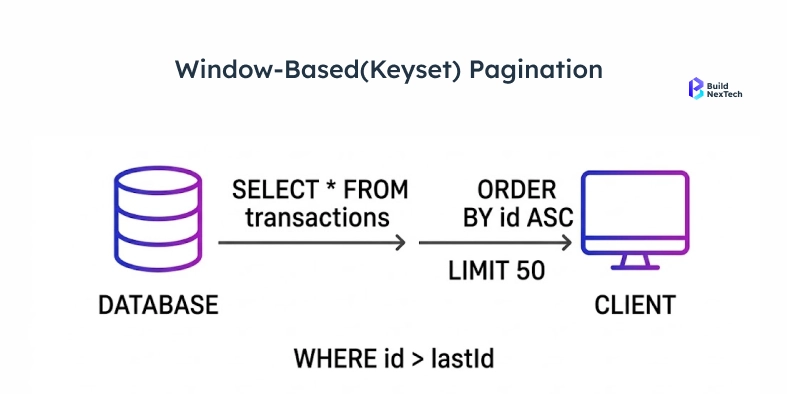
Keyset Pagination
Keyset pagination makes the cursor explicit. Rather than an opaque token, you use the actual values of your sort columns in the URL: ?created_after=2024-03-15&last_id=9912.
This gives the database exactly what it needs to use an index. No performance degradation as data grows. No duplicate records. No drifting results. The requirement is that your sort column must be stable, unique, and indexed. Layering in range filters or full-text search is possible, but the sort column setup needs to be planned for, not bolted on.
Implementing Pagination in REST APIs
Choosing the right strategy is only half the work - building it correctly within your API layer is equally important, especially when working with production-grade systems like those built using Java REST APIs. The other half is building the implementation so any client — a React app, a mobile SDK, a third-party integration — can use it without running into walls.
API Design Principles That Save Everyone Time
Make your metadata explicit. The response should tell the client exactly where they are and how to get to the next chunk. Don't make them infer it.
Pick your parameters and stick with them. Whether you use page, limit, cursor, after, or before — apply them consistently across every endpoint. Inconsistency is how integrations start breaking in confusing ways. If you're operating at scale, an API gateway can enforce these standards so individual services don't drift.
Set hard limits on page size. A client requesting 50,000 records in one call isn't using your API efficiently — it's a reliability risk. Most production APIs cap somewhere between 100 and 500 records. Smaller responses also keep connection pooling healthy under load.
Include navigation links in the response body. Don't make the client construct the next URL from parts. Give them a ready-to-use next link.
Handle the end of the list gracefully. If a request returns zero results because the user has reached the last page, return 200 OK with has_more: false. A 404 suggests something went wrong. It didn't — you just ran out of data.
Example: Cursor Pagination Response
GET /api/v1/orders?limit=20&cursor=eyJpZCI6MTAwfQ==

{
  "data": [
	{ "id": 101, "status": "shipped", "created_at": "2024-03-14T10:00:00Z" },
	{ "id": 102, "status": "pending", "created_at": "2024-03-14T10:05:00Z" }
  ],
  "pagination": {
	"has_more": true,
	"next_cursor": "eyJpZCI6MTIwfQ==",
	"limit": 20
  },
  "links": {
	"next": "https://api.example.com/v1/orders?limit=20&cursor=eyJpZCI6MTIwfQ==",
	"prev": "https://api.example.com/v1/orders?limit=20&cursor=eyJpZCI6MTAwfQ=="
  }
}
Base64-encoded cursor, explicit has_more flag, ready-to-use navigation links. This is the pattern most teams land on after iterating in production.
GraphQL Pagination: The Connections Spec
GraphQL uses the Relay Connections Specification. It's widely understood, supported by the major client libraries, and consistent across the ecosystem.
query {
  orders(first: 20, after: "cursor_here") {
	edges {
  	node { id status createdAt }
  	cursor
	}
	pageInfo {
  	hasNextPage hasPreviousPage startCursor endCursor
	}
  }
}
Each item in edges carries its own cursor. The pageInfo object gives client applications everything needed to navigate in either direction without any guesswork.
Performance Optimization for Paginated APIs
A well-designed pagination strategy can still fall over if the database layer isn't supporting it. Indexes, caching, and monitoring aren't nice-to-haves — they're what the strategy actually runs on.
Indexing Strategies
If your sort column isn't indexed, you're doing a full table scan on every paginated request. That's not pagination — it's slow pagination.
Simple rule: index your sort column. If you're sorting by multiple fields, you need a composite index that mirrors your query exactly. Sorting by (created_at DESC, id DESC) requires a composite index in that same order. If the order doesn't match, the database engine may ignore the index.
For teams stuck with offset pagination on large tables, the deferred join pattern helps. Instead of pulling every column through a heavy offset scan, you first query just the IDs (fast, index-only), then join back to the main table to fetch the full rows for that small subset. More code, but significantly lower scan cost:
-- Naive approach (scans and discards thousands of rows):
SELECT * FROM orders ORDER BY created_at DESC LIMIT 20 OFFSET 10000;

-- Deferred join (index-only scan first):
SELECT o.* FROM orders o
JOIN (
  SELECT id FROM orders ORDER BY created_at DESC LIMIT 20 OFFSET 10000
) ids ON o.id = ids.id;
Materialized views help when you're dealing with expensive aggregation queries. Connection pooling keeps throughput stable under load. EXPLAIN ANALYZE is the starting point for diagnosing any slow query — run it before trying to fix anything.
Caching Paginated Responses
Page 1 of your API gets hit thousands of times a day. Page 800 might get one request a month. Treating them identically wastes resources.
For offset-based APIs, cache by page number with a TTL that reflects how often your data actually changes. For cursor-based APIs, focus caching energy on the first page. For everything else, serve live — or use a short TTL to prevent redundant queries within the same user session.
For public, unauthenticated endpoints, CDN caching keeps the load off your origin servers. For authenticated data, Redis is the standard choice. Tools like Azure API Management let you set gateway-level cache policies without touching application code.
Monitoring Pagination Performance
A few specific metrics tell you when your pagination is starting to buckle:
Response time by page depth. If your p95 latency climbs as users move past page 100 or 200, you have expensive offset scans running. That's when to act, not when things actually break.
Cache hit rate on early pages. Low hit rates on your first few pages mean you're burning compute on your highest-traffic responses. Those should be served from cache.
Cursor validity errors. A sudden spike usually means TTLs are too aggressive or clients are mangling the cursor values.
Database query time, isolated. Don't just look at total response time. A slow query and a slow application layer need different fixes. Go back to EXPLAIN ANALYZE when you're not sure which you're dealing with.
Conclusion
Pagination that works at 10,000 records often breaks at 10 million if it isn’t designed for scale. The choice between offset, cursor, and keyset directly affects how your system performs under load — not just how your API looks.
Offset is easy to implement but degrades as data grows. Cursor and keyset maintain consistent performance, but require proper indexing and query design.
The key point: pagination is not just an API design choice - it’s a scalability decision. It impacts query efficiency, memory usage, and overall system throughput - especially in data-intensive systems where scalable pipelines and real-time processing are critical, as seen in modern data engineering architectures.
Get it right early, because fixing pagination at scale isn’t an optimization — it’s a rebuild.
How BNXT Can Help
At BuildNexTech, we help engineering teams move beyond theoretical fixes by identifying real bottlenecks in production APIs. Using API performance diagnostics, query-level analysis, and load testing, we pinpoint where pagination breaks under scale — whether it’s inefficient offset queries, missing indexes, or poor caching strategies.
From redesigning pagination logic to optimizing database queries and improving API throughput, we focus on solutions that hold up under real traffic, not just test environments.
People Also Ask

1. How do you paginate data that changes in real time?
Use cursor-based pagination anchored to a record ID or timestamp. Unlike offset, it doesn't shift when new records are inserted - it just picks up exactly where it left off. For true real-time needs, pair it with WebSockets or Server-Sent Events.
2. When does offset pagination give inconsistent results?
The moment data changes between requests. A new insert shifts every page by one - users see duplicates. A deletion makes records silently disappear. Frequent data changes mean cursor pagination is the only reliable option.
3. How does pagination affect query performance at scale?
Offset pagination slows down as pages go deeper - the database scans every skipped row every time. Cursor and keyset pagination use database indexes to jump straight to the right spot. Page 1 and page 50,000 take the same time.
4. Should internal and public APIs use the same pagination strategy?
No. Internal APIs can afford complexity - consumers are known and changes are easy. Public APIs need simplicity - developers expect consistency and backward compatibility. Let the audience drive the decision.
5. How do I secure pagination tokens against tampering or enumeration attacks?
Encode cursors in base64 and sign them with HMAC server-side. Validate the signature on every API request - forged cursors get rejected instantly. Bind the signature to the user for sensitive APIs. Keep TTLs short: 15–30 minutes.


.webp)
.webp)
.webp)

.webp)
.webp)



