
.png)

Uber tracks driver locations in real time by combining GPS, Wi-Fi, and cellular data from the driver’s device and streaming updates to its backend through persistent WebSocket connections. A globally distributed architecture processes these updates and delivers them to riders in under 200 milliseconds. Adaptive GPS sampling dynamically adjusts update frequency based on speed, battery level, and trip status to balance accuracy with device efficiency.
Real time location tracking for millions of drivers. A gps tracking system that never sleeps. The live tracking app shows a car gliding down the street. That’s real-time gps tracking in action. The whole tracking system app has to be perfect.
Uber tracks drivers in real time by combining GPS, Wi-Fi, and cellular data from the driver’s device and streaming these updates to its backend using persistent connections like WebSockets. A globally distributed architecture processes and delivers this data to riders with minimal latency.

The Hardest Problems Uber Solved in Real-Time Location Tracking
Real-time tracking at Uber’s scale isn’t just about speed-it's about solving problems that can quietly break the entire system. Two of the biggest challenges were battery drain and encryption overhead. Continuous GPS tracking can quickly exhaust a driver’s phone battery, so Uber uses adaptive location sampling-reducing update frequency when the car is idle and increasing it during movement. This keeps tracking accurate without draining the device.
At the same time, every location update needs to be secure. Encrypting thousands of updates per second can introduce delays, but Uber optimizes this by using lightweight encryption protocols and efficient data transfer methods.
Sub-Second Latency Without Draining Driver Battery: Adaptive GPS Sampling
GPS technology consumes significant battery power. If Uber were to send location updates every second, drivers would experience rapid battery drain, making the approach impractical. To address this, Uber employs adaptive GPS sampling to balance accuracy with energy efficiency.
Indicative GPS Update Frequencies in Ride-Hailing Platforms:
- Waiting for a Ride: Approximately every 30–60 seconds to conserve driver battery.
- Driving to Pickup: Roughly every 4–8 seconds to provide accurate arrival estimates.
- Passenger Onboard: Typically every 2–4 seconds to enable real-time trip monitoring.
- Highway Speeds : As frequently as 1–2 seconds to maintain route accuracy.
- Poor Network Conditions: Update intervals become adaptive and event-driven, often increasing in frequency to compensate for signal instability.
The logic checks speed, battery left, network quality, trip status.
Battery below 15%? Pings slow down. On a highway? Pings speed up.
The following simplified pseudocode illustrates how such adaptive sampling logic can be implemented:
text
if trip_active:
   interval = 4 seconds
if speed > 22 m/s:
   interval = interval / 2
if battery < 15%:
   interval = interval * 3
Encrypting Live Location Without Slowing Update Speed
Location tracking data is highly sensitive and must be protected during transmission. To ensure security, Uber employs transport-layer encryption , such as TLS, along with efficient cryptographic algorithms that minimize additional latency, enabling real-time updates without compromising performance.
Lightweight encryption.
- Transport-layer encryption secures location data between the driver’s device, backend servers, and the rider’s app
- AES‑256‑GCM for the location payload
- Keys rotate automatically every 24 hours

How Uber's GPS Engine Powers Real-Time Location Updates
So here’s how Uber’s real-time tracking actually works, it all starts with the driver’s phone. They don’t just count on GPS satellites alone, because honestly, in a busy city with huge buildings blocking the signal, that would be a mess. Instead, the app mixes together data from satellites, nearby Wi‑Fi networks, and cell towers to figure out exactly where the driver is. This blended trick helps keep things accurate even when you’re deep in a concrete jungle.
Once the app knows the driver’s spot, it shoots that info over to Uber’s servers using a constant connection (kind of like a steady open line, not one that keeps hanging up and redialing). So instead of asking “where are you now?” every few seconds, the system just keeps streaming the driver’s location live. That’s why on your rider app, the little car moves almost instantly no weird jumps or delays. It feels smooth and reliable because, well, it is. By mixing clever location finding with a non‑stop data feed, Uber makes sure the whole ride on your map feels seamless from the moment you book until you pull up to your stop.
How Uber Triangulates Driver Position Using Multi-Source GPS Signals
Gps tracking technology here mixes multiple sources:
- GPS satellites: 4–20 meters, needs open sky
- Cell towers: 50–500 meters, works almost anywhere
- Wi‑Fi access points: 10–50 meters, good in cities
- Bluetooth beacons: 1–5 meters, rare but super accurate
A smart algorithm weighs each source. Bad GPS? Trust Wi‑Fi more. This is mobile location tracking at its most clever.
Uber enhances positioning accuracy in dense urban environments by leveraging advanced mapping and sensor-fusion techniques. These methods may including the use of detailed map data and environmental modeling to estimate satellite visibility and mitigate signal blockage caused by tall buildings
Why Uber Uses WebSockets Over HTTP Polling for Live Data Streaming
HTTP polling requires the client to repeatedly send requests to the server to check for new data, introducing additional latency and overhead. In contrast, WebSockets establish a persistent, bidirectional connection that enables the server to push location updates to the client in real time.
So Uber uses WebSockets. Flow:
- Rider app opens WebSocket to the nearest edge server.
- Server subscribes to that connection to driver location streams.
- Driver sends a ping : server pushes to rider instantly.
- A heartbeat every 30 seconds keeps the connection alive.
- Network drops? App reconnects automatically.
The Scalable Architecture That Lets Uber Track Millions of Drivers
Uber’s ability to track millions of drivers in real time comes down to a highly scalable, distributed architecture. Instead of relying on a single system, it uses multiple independent services that handle location updates, data processing, and user requests simultaneously. This allows the platform to manage massive volumes of data without slowing down.
The system is designed to scale horizontally, meaning it can add more servers during peak demand to handle increased traffic. Combined with load balancing and efficient data pipelines, this ensures that location updates remain responsive and consistent even during high-demand periods across different cities.
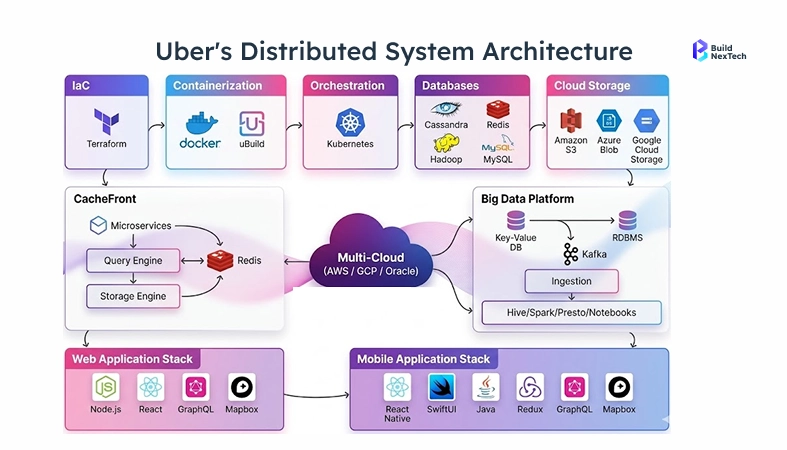
Auto-Scaling Strategies for Location Request Spikes During Peak Hours
Uber's infrastructure scales dynamically in response to real-time demand adding compute capacity automatically when traffic spikes, without manual intervention. This is handled through Kubernetes-based horizontal pod autoscaling, where predefined thresholds trigger new instances within seconds.
Kubernetes + Apache Kafka handles the firehose of location streams. This is real-time data processing at massive scale.

How Uber's Distributed System Keeps Location Accuracy Across Every City
One data center cannot serve the whole world. Latency would kill the experience. Uber runs multiple regions each city cluster is semi‑independent. That’s distributed system design.
What’s inside one region :
- 15 Kafka brokers
- 50 Flink task managers
- 30 Redis nodes
- 20 Pinot servers
- 10 PostgreSQL nodes
Regions talk using uRepllicator Uber’s own Kafka replication tool. Active‑Active Kafka means no single point of failure. One region dies? Failover in under 30 seconds.
Inside Uber's Live Tracking App: Features That Refresh in Milliseconds
Uber’s live tracking experience feels instant because it is built on a system designed for continuous, real-time updates. As drivers move, their location is captured and streamed to the backend, then instantly pushed to the rider’s app. This creates a smooth, near real-time view of the car moving on the map.
Behind the scenes, optimized data syncing and efficient map rendering ensure that updates appear without lag or screen jitter. Instead of reloading the entire interface, only small pieces of data are updated, allowing the app to refresh in milliseconds while maintaining a seamless user experience.

Uber vs Ola - A Comparison of Real-Time Tracking Architectures

How Uber Syncs Driver GPS Pings With the Rider App in Real Time
Driver phone grabs a location. That coordinate needs to show up on a rider’s screen – fast. Under 200ms fast.
Pipeline steps:
- Driver app captures GPS: 5–10 ms
- Encrypt + compress on device: 5–10 ms
- Send to edge server via WebSockets: 20–50ms
- Edge server publishes to Kafka topic driver_locations : 2–5 ms
- Flink processes stream (validation, enrichment): 10–20 ms
- Redis caches latest location: 1–2 ms
- Pub/Sub pushes to subscribed rider apps: 15–30 ms
- Rider app renders car on map: 5–10 ms
Real time data flows through every stage. Real time analytics tools monitor for anomalies. Machine learning models predict the next position to smooth movement. No one likes a jumping car icon.
Sync goes both ways. Rider app asks for location. System replies with driver’s last known geolocation information. WebSockets keep the pipe open. This is location sharing app functionality done right.
How Uber's Map Layer Renders Driver Movement Without Screen Lag
Screen lag happens when the map can’t keep up with incoming updates. Uber uses a bunch of tricks.
What Uber does:
- Vector tiles instead of raster images : 70% smaller payload
- Client‑side prediction : app guesses where car will be between pings
- Progressive loading : map loads in layers, not all at once
- GPU acceleration : offloads CPU
The map layer runs on Google’s map SDK but heavily customized. Uber’s own rendering engine smooths the path. Even if a GPS ping arrives late, the car doesn’t jump. It glides.
Prediction logic:
text
function predict_position(last_pos, last_time, current_time):
    elapsed = current_time - last_time
    if elapsed < 100ms:
        return last_pos
    speed = calculate_speed(last_pos.history)
    predicted_lat = last_pos.lat + (speed.lat * elapsed)
    predicted_lng = last_pos.lng + (speed.lng * elapsed)
    return predicted_position
Rider never sees the prediction. Car just moves smoothly. That’s the magic of a well‑built gps tracking app.
Conclusion
Uber’s real-time location tracking shows how advanced GPS technology, continuous data streaming, and scalable distributed architecture come together to create a seamless user experience. Build Next Tech brings specialized expertise in developing and validating geospatial and mobility solutions, helping businesses implement scalable, high-performance location-based platforms.
People Also Ask

Q1. How does Uber handle tracking inside tunnels or underground areas?
Uber maintains tracking inside tunnels or underground areas by using predictive location technology that estimates a vehicle’s position based on its last known GPS coordinates, speed, direction, and route patterns until the GPS signal is restored.
Q2. What triggers Uber to increase or decrease location update frequency?
Uber dynamically adjusts location update frequency using adaptive GPS sampling, which considers factors such as driver speed, trip status, battery level, and app activity to balance tracking accuracy with device efficiency.
Q3. Does Uber use machine learning to improve location accuracy over time?
Yes, Uber uses machine learning algorithms to enhance location accuracy by correcting GPS errors, predicting routes, and smoothing vehicle movement based on historical and real-time data.
Q4. How does Uber maintain tracking consistency during high-speed travel?
Uber ensures consistent tracking during high-speed travel by increasing GPS update frequency and incorporating motion sensor data to maintain accurate and smooth location updates.
Q5. How Long Does Uber Store Your Location Data After a Trip?
In many regions, this data may be stored for several years, depending on local regulations and dispute resolution needs. Users can review detailed retention practices in Uber’s Privacy Notice.


.webp)
.webp)
.webp)

.webp)
.webp)



