
.png)

Introduction to Google Maps API and Modern App Development
Growing Role of Location Services and Geolocation in Modern Applications
Location has become an essential element of contemporary digital experiences. Ride-sharing platforms, food delivery apps, logistics dashboards, and more of the above-mentioned businesses are all dependent on geolocation, GPS coordinates, and location services to provide contextual information in real-time. Current developers have brought mapping features into applications, allowing use of navigation, tracking and spatial analytics.
There are a number of technologies that lead to this trend to location-aware applications:
- GPS and latitude and longitude tracking allow proper location of gadgets and vehicles.
- With the inability of GPS, IP geolocation and IP lookup services permit approximate detection of location.
- The use of cloud services and API platforms allows developers to integrate data on mapping in web and mobile applications within a short period of time.
- Mobile SDKs like the Maps SDK for Android and Android SDK enable native map experiences in Android apps.
With the increased use of clouds, scalable cloud services and cloud hosting platforms are widely used by organizations to drive location-based applications. Mapping infrastructure has become the primary component of developing modern systems to engineering teams such as QA engineers, CTOs, and DevOps leads.
What Google Maps API Offers: Available APIs, Architecture, and Core Services
The Google Maps Platform offers a powerful infrastructure of API and SDKs to enable programmers to envelop maps, location cleverness, and navigation elements into programs. These APIs can be run on the scalable infrastructure of Google Cloud Platform, and hence they are reliable to support an enterprise grade system.
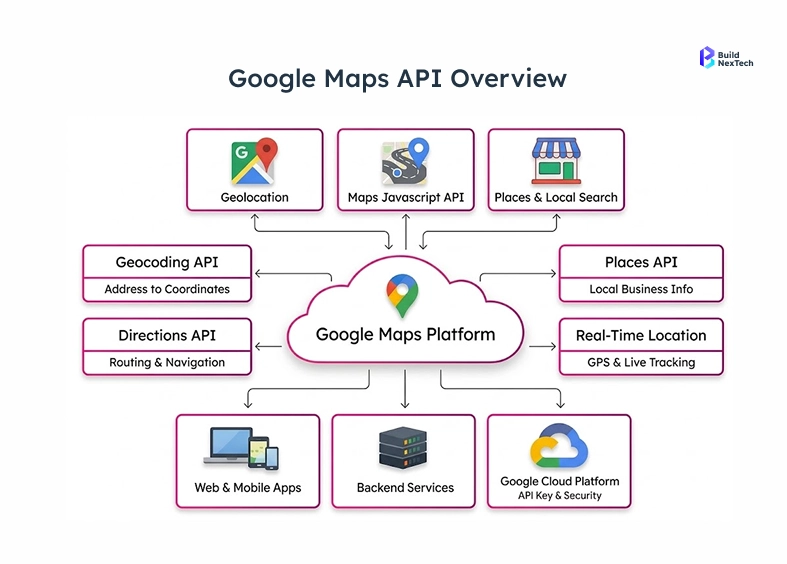
The platform has some of the fundamental services that are utilized in the current API development:
- Maps JavaScript API to integrate Web applications with interactive maps.
- Maps SDK for Android and Android SDK integration in the development of native Android apps.
- Maps Embed API to simply embed maps on websites or dashboards.
- Navigation SDK and Google Maps Platform Navigation SDK for turn-by-turn navigation features.
- Geocoding API which is used to translate addresses to latitude and longitude locations.
The APIs collaborate with each other in a Google Cloud project where developers are able to control credentials, billing and access controls in a single location. This centralized architecture makes the management of API easier to handle but preserves the performance and reliability of the applications over the world to the team at companies such as BuildNexTech.
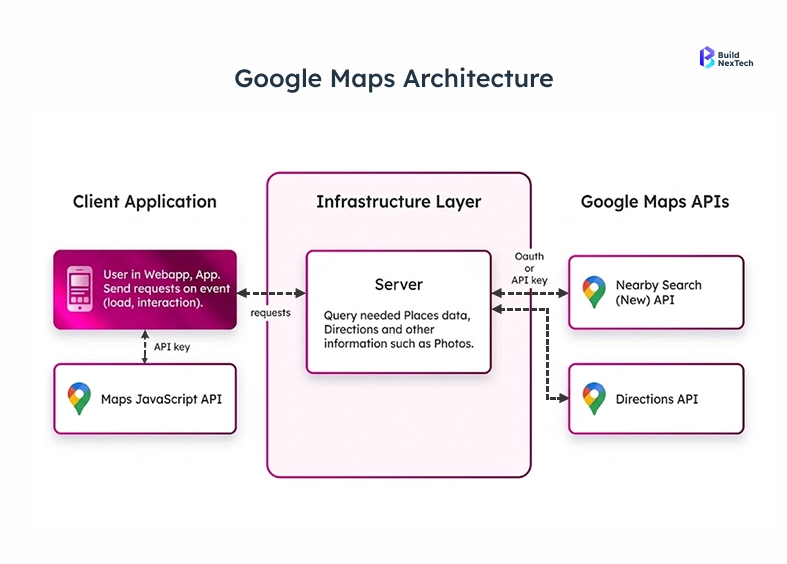
Key Features Including Geocoding API, Directions, and Real-Time GPS Coordinates
The powerful nature of Google Map API is that the options of features are broadly high to developers. These tools facilitate more sophisticated spatial functionality scaled down to travelling distances, since no complicated facilities are needed, unlike mailing the kinds of addresses into map co-ordinates.
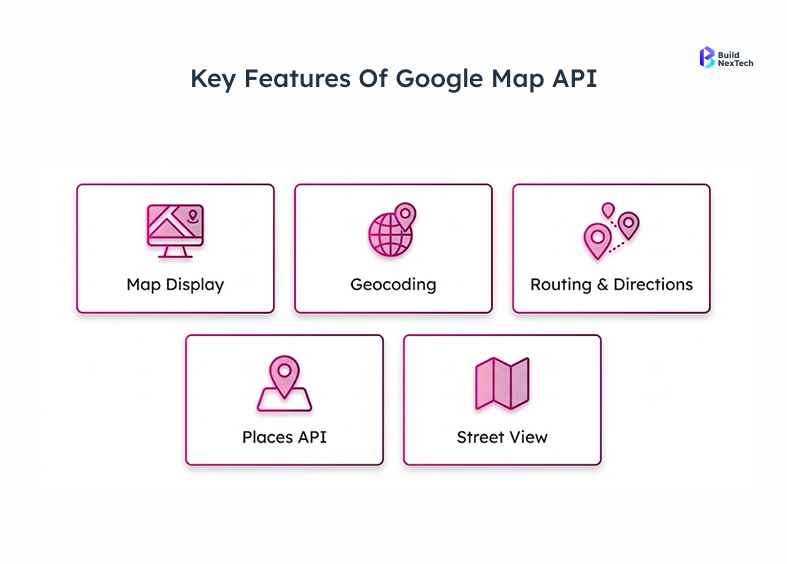
Among the most popular capabilities, there are:
- Geocoding API to change addresses into latitude and longitude coordinates.
- Directions API direction calculating routes and estimating travel times between places.
- Places API to find out about nearby businesses and to retrieve Place ID.
- Immersion in the location visualization via integration Street View panorama.
- Real time GPS coordinate monitoring to display the user location on a map.
The set of features enables developers to create interactive experiences, including delivery tracking, store locators, and travel apps. With composition of API calls, cloud computing and location data-geolocation, developers can convert ordinary maps to smart location services.
Popular Use Cases Such as Ride-Sharing Apps and Travel Planning
Millions of people across the world use A Location-based APIs in many of their daily services. Applications that are developed based on Google Maps Platform services offer real-time information that enables users to navigate the real world in a more effective manner.
The typical industry applications are:
- Cars sharing systems where cars are tracked and give better routes.
- Travel planning applications with attractions, routes and hotels.
- They include delivery and logistics systems that track vehicles with GPS coordinates.
- Local discovery apps are applications that assist users in the process of locating businesses near them with the aid of the Places API.
- Fleet management dashboards a visualization of assets that are recently set on an interactive Google Map.
As an example, a travel application with attractions in Sydney Australia or restaurants in Mountain View can request the coordinates using the Geocoding API and will show it in real-time. The ability to map APIs is a stalwart of current digital platforms.
Getting Started with Google Maps API
Importance of API Keys, Geocoding, and Google Cloud Platform Setup
The developers will have to implement authentication and infrastructure with Google Cloud Platform (GCP) before they can start using the Google Maps Platform. Each API request must be authenticated with a separate API key as an identifying credential of the application.
In this arrangement, a few elements form part of this arrangement:
- Creation of Google cloud project to arrange the resources and APIs.
- Implementation of API call authentication by keys.
- Billing account setup needed to do production workloads.
- Have access to the Google cloud to control APIs and track usage.
These are components that guarantee secure and traceable access to Google APIs. With the help of a specific Google Cloud project, an organization will be able to retain the appropriate API management, permissions, and track the use trends.
Setting Up Your Google Cloud Platform Account and Navigating the Console
The developers have to create and set up their environment within the Google Cloud console to begin working with Google Maps Platform services. The console is a dashboard that is used to primarily operate APIs, billing, and resources.
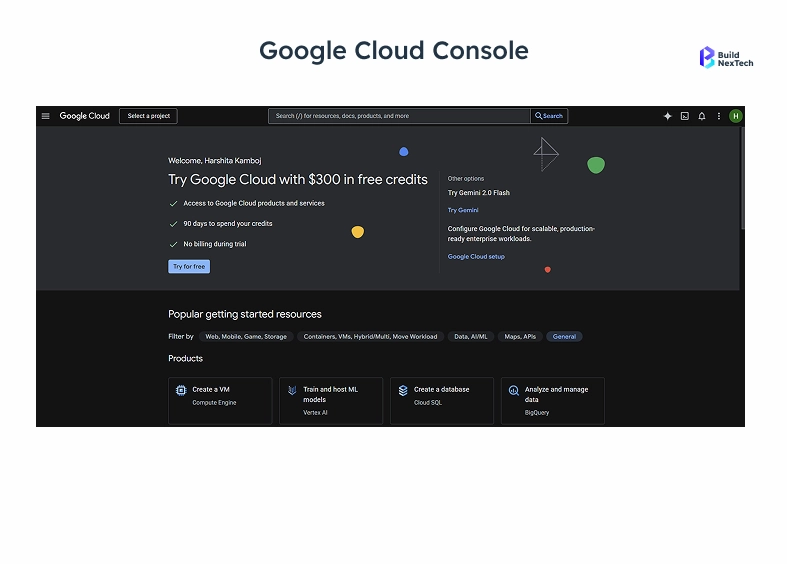
The steps that are usually followed in the setup process include:
- Register the Google Cloud Free Trial, and it provides credits to test APIs.
- Create a new Google Cloud project from the project selector page.
- Connect the project with a billing account in order to access the API.
- Go to the Manage resources page where you can arrange cloud resources and services.
- Check in the organization list if you are using enterprise accounts.
After activating the cloud environment, developers are able to incorporate selected API which may include JavaScript API, Maps Embed API or Navigation SDK. This architecture assists groups in containing systematic cloud solutions and expandable API architecture.
Generating Your Google API Key and Applying Security Best Practices
The second thing that is done after establishing the cloud project is to generate a secure Google API key. This key permits requests issued by applications and only trusted systems can access the APIs.
There are a number of best practices that developers should observe when creating and managing Google Cloud credentials:
- Access the Google Cloud console API Key creation interface.
- Limit API keys based on domain or IP address and application type.
- Activate the API security policies to do unauthorized access.
- Periodically change or renew keys to minimize security limitations.
Companies, which value API security as a first-level, decrease the chances of being abused or surcharged without prior notice. BuildNexTech teams, such as an example, will have very strict key restrictions and monitoring policies ensuring a stable API access among the projects.
Understanding API Cost and Pricing Structure for Google Maps API Usage
The Google Cloud Free Trial is only the beginning as many developers also find themselves with the API cost based on usage when moving to production applications. The knowledge of the pricing model assists the organizations to make estimates and maximize the utilization.
Key cost factors include:
- Total number of API calls to services such as Directions or Places.
- Use of Maps JavaScript API or Maps Embed API within applications.
- Number of geolocation requests or geocoding API requests.
- Traffic generated by mobile SDKs such as Google Maps SDK for Android.
Google offers elaborate pricing dashboards within the Google Cloud billing section. Analytics monitoring use will enable teams to manage costs and effectively scale the applications.
Implementing Google Maps API in Your Application
Basic Setup Using JavaScript Maps API as the Primary Method
JavaScript API is a widely used system of embedding the maps in web applications. It enables the developers to show interactive maps in an HTML file, and thus, geographic information can be dynamically visualized.
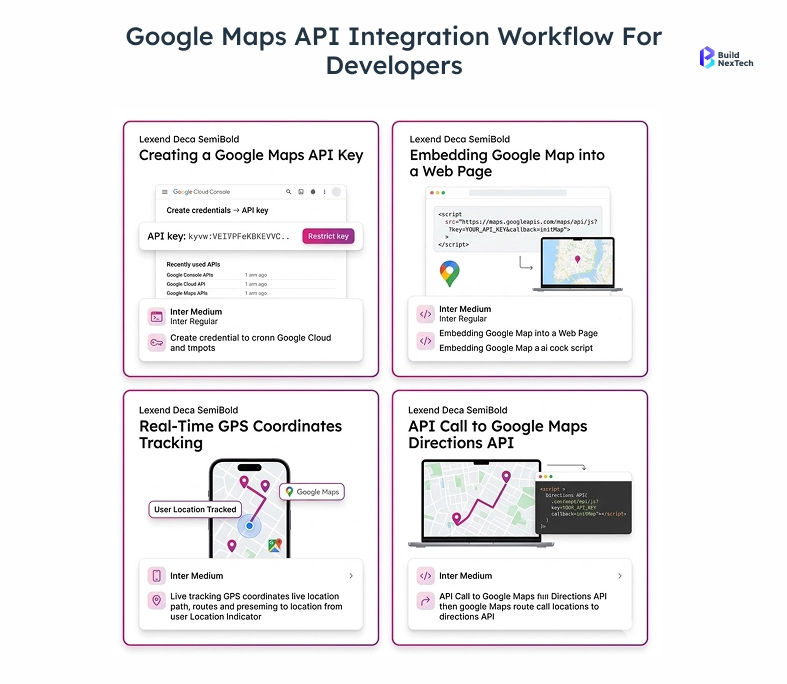
An average set up procedure consists of:
- Adding API key in script tag to load Maps API Library.
- Building a container element on the HTML page on which the map will be generated.
- Starting the map using coordinates like the longitude and latitude.
- Drawing icons or sketches at the Google Map.
The strategy enables programmers to develop map-based functionalities of dashboard, travel apps, and analytics applications easily. Since the JavaScript API can execute on the browser, it has got flexibility in providing frontend frameworks and interactive experiences nowadays.
Making API Calls for Geolocation, Directions, and Places
After initializing the map, developers are able to get location information on API calls and develop the application further. Such requests make a request against the Google Maps Platform API and provide structured responses.
Types of API calls are typically:
- Geolocation API makes an invitation to know the user location.
- Direction API calls which compute the routes between two places.
- Places is an API call that will access business listing or Place ID information.
- Approximate positioning, IP location or IP geolocation.
As an example, a delivery platform can ask to be informed of the route between a warehouse and a destination and display the route on a map. Such API design allows real time integration of data in applications.
Handling API Responses, Parsing JSON Data, and Managing Errors
The majority of Google APIs will provide responses in JSON format that have to be parsed by the developers to retrieve useful information. Applications that can be used to integrate mapping data will need that you understand the structure of the response.
The general workflow of API responding involved by developers is as follows:
- Deserialize API response (JSON) objects.
- Get fields of latitude and longitude, distance and the steps of the route.
- Manage the errors of API requests.
- Install on-demand retries in case of control network failures.
Correctness in response management enhances reliability and the application is predictive. With resilient API tools and workflows, teams are able to build scalable systems which handle errors and edge cases gracefully.
Leveraging Advanced Features of Google Maps API
Customizing Maps with Markers, Overlays, and Branding Styles
Beyond displaying basic maps, developers can customize visual elements to match branding and user experience requirements. Customization options allow organizations to create unique map interfaces tailored to their applications.
Common customization techniques include:
- Adding markers to highlight important locations.
- Using map overlays to visualize routes or geographic zones.
- Applying custom styling to align maps with brand identity.
- Displaying interactive Street View panorama experiences.
For example, a tourism app could highlight landmarks in Sydney Australia with customized markers and themed map colors. Such enhancements improve usability while reinforcing brand recognition within location-based platforms.
Integrating Real-Time Geolocation and Latitude-Longitude Tracking
Real-time location tracking is critical for applications such as fleet management and ride-sharing services. The Google Maps API supports continuous updates of GPS coordinates and device positioning.
Key implementation strategies include:
- Requesting location permissions from the user’s device.
- Tracking latitude and longitude updates through mobile sensors.
- Updating markers dynamically to reflect user location changes.
- Visualizing routes and movement on an interactive map.
Developers often test these features using an Android Virtual Device when building Android apps. Real-time tracking enables applications to display moving assets, improving operational visibility for logistics and transportation platforms.
Utilizing the Places API for Local Business Discovery
The Places API is designed to help developers build applications that connect users with local businesses and attractions. By querying location data, apps can provide personalized recommendations and search results.
Typical capabilities include:
- Searching for restaurants, hotels, or services near a location.
- Retrieving Place ID information and business details.
- Displaying ratings, reviews, and opening hours.
- Integrating results with maps and navigation tools.
A travel application could recommend restaurants in Mountain View or tourist attractions across a city. These insights allow businesses to deliver richer user experiences powered by accurate location intelligence.
Best Practices for API Development, Security, and Performance
Securing Your Google API Key and Preventing Misuse
Security is one of the most important considerations in API development. Without proper safeguards, exposed API keys can lead to unauthorized requests and unexpected costs.
Best practices for protecting API credentials include:
- Restricting keys to specific domains or applications.
- Using OAuth authentication where applicable.
- Monitoring requests through the Google Cloud console.
- Implementing rate limits and request validation.
By following these practices, organizations reduce security risks and maintain reliable access to Google Maps Platform APIs.
Optimizing API Calls to Improve Performance and Reduce Costs
Efficient API usage improves both performance and cost management. Applications that minimize unnecessary API calls reduce latency and operate more efficiently.
Developers often implement strategies such as:
- Caching frequently requested location data.
- Reducing duplicate geolocation requests.
- Using batch queries where supported.
- Implementing client-side logic to limit unnecessary requests.
These optimizations improve response times while keeping API cost under control. Teams building high-traffic systems should prioritize efficient API design to ensure scalability.
Monitoring API Usage and Performance Through Cloud Analytics
Monitoring tools in Google Cloud Platform provide valuable insights into API activity and performance metrics. These analytics help teams detect anomalies and optimize system behavior.
Important monitoring capabilities include:
- Viewing request counts and response times.
- Tracking errors and latency trends.
- Analyzing usage patterns across applications.
- Reviewing Google Cloud billing and cost reports.
For engineering teams, these insights enable proactive troubleshooting and informed capacity planning. At BuildNexTech, continuous monitoring is a standard practice to maintain stable API integrations across production environments.
Conclusion: Start Building with Google Maps API Today
Recap of the Importance of Google Maps API in Modern Development
Location technology has been a key part of digital platforms. Google Maps Platform offers the services to support the development of effective location-based solutions with a variety of applications ranging from logistics dashboards and travel planning.
The platform allows developers to:
- Incorporate a map, direction, and geolocation features in applications.
- Provide control of API keys and cloud-based providers via Google Cloud platform.
- Develop scalable systems on modern cloud technology.
- Provide real time information based on GPS and location data.
With the rise of the business that uses location intelligence, the art of mapping APIs can be an asset to any contemporary development team.
Encouragement to Explore Geolocation and Cloud-Powered APIs
The mapping API ecosystem is still in development with the introduction of more sophisticated cloud services, mobile SDKs, and real-time data platforms. The people who develop using these technologies get the capability to enable themselves to come up with innovative applications to connect digital and physical space.
Emerging trends include:
- Combining AI and geolocation analytics.
- Smart infrastructure real-time map.
- Robotic navigation based on GPS and mapping API.
- Sophisticated spatial computing on the cloud.
In the case of the innovation-oriented teams, the discovery of the potential of Google Maps Platform services is the gateway to the emergence of the location-driven applications.
Call to Action: Begin Your Google Maps API Quickstart Today
As a QA engineer, DevOps lead or CTO who is planning to create location-enabled systems, now is the ideal moment to begin experimenting with the Google Maps API. Using its rich list of tools, scalable infrastructure and worldwide coverage, the platform delivers the solution in every aspect to build contemporary map-based applications.
Start your journey by:
- Creation of a Google Cloud project and creation of a Google API key.
- Getting to know APIs such as Geocoding, Directions and Places.
- Creating your first map with the JavaScript API, or Maps SDK for Android.
- Tracking the usage via the Google cloud console.
With this simple approach to quickstart and an opportunity to benefit with the experience that is shared by BuildNexTech, developers can safely establish powerful location-aware applications that genuinely add value to their users.
People Also Ask

What is the Google Maps API and how does it work?
Google maps API is part of the Google Maps Platform - a series of web APIs that are powered by Google Cloud Platform. The developers implement the use of Google API key as a distinguishing factor, so that they can authenticate API calls on which they directly incorporate the maps, geolocation, GPS coordinates, directions, and location service in web and mobile apps.
How do I get a Google API key to get started?
Go to Google Cloud console, make selections by following project creation and selecting required services of Google Maps Platform in the library of maps API, bind a billing account and undertake the process of generating an API key under Google Cloud credentials it will not take but a few minutes.
Is the Google Maps API free or does it have an API cost?
Google Maps Platform Billing will have a 200 USD free credit in Google cloud monthly. Better still, API cost is consumption-based - API calls to Geocoding, Directions API, Places API and JavaScript API map loads, and the utilization of location services, all the fees on the use of these products in the Google Cloud billing dashboards.
Can I use the Google Maps API for GPS coordinates and geolocation?
Yes. The API is not shy on geolocation, real-time GPS coordinates, latitude and longitude, IP geolocation by IP look, and IP location of the user, such that applications can locate, display as well as track the user in every Google Map application operating on the web and Android platform.
How do I secure my Google API key and manage API security?
By restricting your Google Cloud API key in the Google Cloud control panel by placing restrictions on the HTTP referer or ip address, to restricting it only to authorised Google APIs, to monitoring API calls and patterns of use with Cloud Monitors, to oAuth server-side requests, and to using and changing Google Cloud credentials frequently, you can have high API levels of security.


.webp)
.webp)
.webp)

.webp)
.webp)



