
.png)
Today we see software teams release at an unprecedented pace; that said, traditional Git workflows are breaking down. We see long term branches, delayed merges, and very painful release cycles which in turn slow down the speed of software delivery and also create a great deal of merge issues. Trunk Based Development (TBD) is a better, faster, and more secure option to Git Flow. It puts version control in sync with CI/CD practices, DevOps, and today’s cloud native architectures. Also it does very well in large.
This guide will go over what trunk based development is, how it is different from Git Flow, which is key in continuous integration, also we will touch on how feature flags, automated tests, and progressive delivery play a role in confident releases
Trunk-Based Development in Modern Version Control Systems
The trunk-based approach to version control emphasizes quick feedback, organized code, and consistency in code management. Unlike long-lived branch strategies, developers compete against one another to modify a single common trunk, which represents the best version of the source code at that moment. This approach simplifies the flow of version control in software and creates a clearer picture of how features progress from the development environment to production. Each commit represents a single, well-defined task, which improves traceability and auditability.
Why Traditional Git Workflows Struggle at Scale
However, as development teams scale and applications become more and more distributed, traditional branching models such as Git Flow increasingly create friction in the way systems are run. In a fast-paced system environment involving web applications, microservices, cloud-based systems, and/or CI/CD-based software development teams, application delivery is more about velocity and integration.
Large organizations typically find that the cost of managing multiple types of branches, releases, and integration windows increases significantly as their teams get larger. The workflow that appears linear initially actually introduces performance problems as it grows out of control.
Limitations of GitFlow and Long-Lived Branches
GitFlow relies on:
- Feature branches
- Develop branches
- Release branches
- Hotfix branches
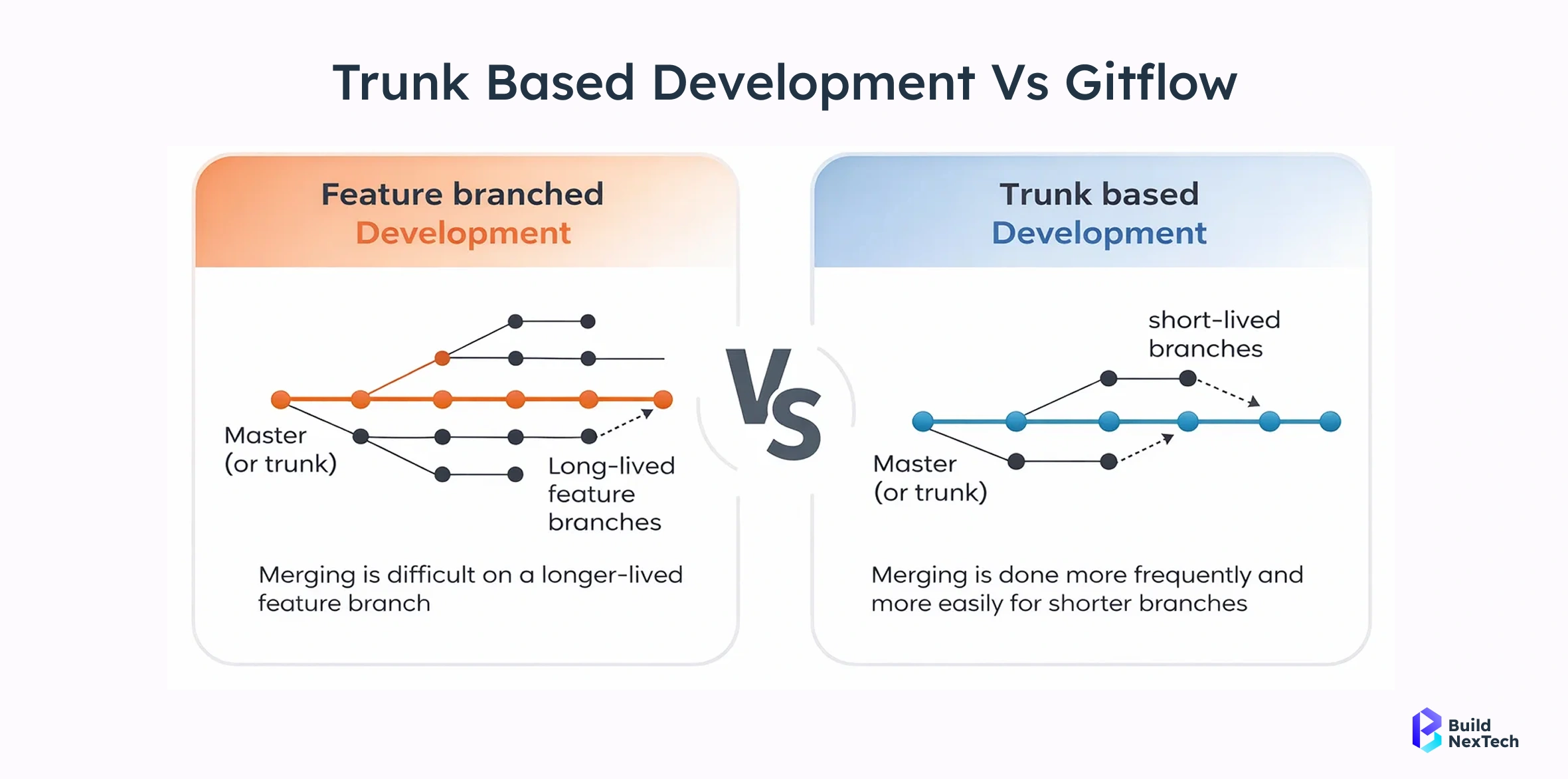
While structured, this model creates long-lived branches that drift away from the main branch, increasing integration risk.
Problems:
- Delayed integration
- Large merge requests
- Complex release branch maintenance
- Reduced deployment frequency
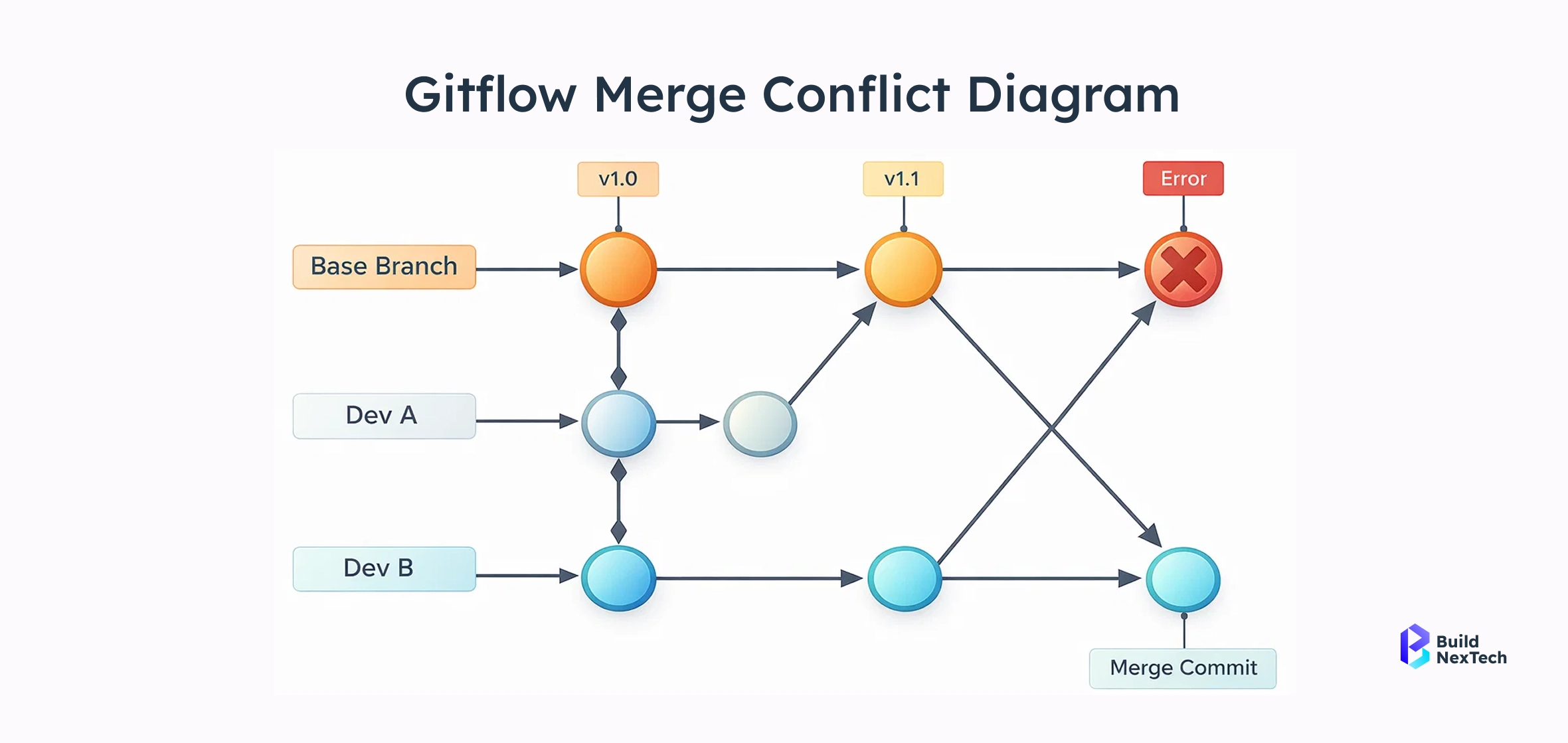
Merge Conflicts and Delayed Integration
The longer a feature branch remains open, the greater the likelihood of integration problems. When developers modify overlapping parts of the source code, conflicts emerge during merging, often requiring manual reconciliation and additional testing.
Typical risks include:
- Merge failures during integration
- Conflicting code changes across teams
- Broken builds affecting the development environment
- Last-minute fixes just before release deadlines
- Increased review comments due to large pull requests
These issues directly impact code review efficiency, CI pipelines, automated test reliability, and overall software quality. Instead of focusing on building new features, teams spend valuable time resolving integration problems that could have been avoided through frequent merges and smaller code changes.
What Is Trunk-Based Development
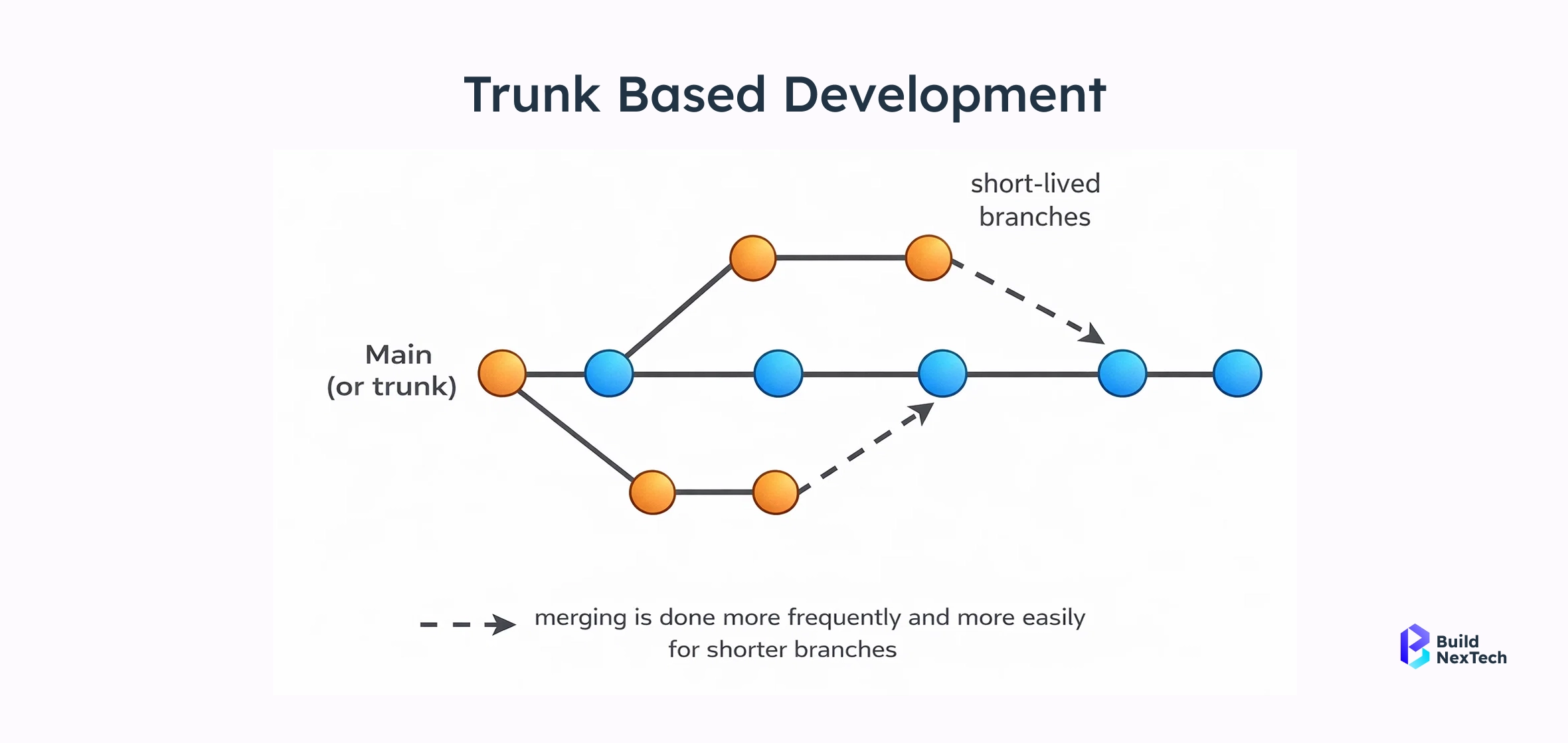
In the practice of Trunk Based Development (TBD) all developers work together on a single main branch which is also referred to as the trunk or master branch. Instead of using long term feature branches teams put in small and frequent code changes which they immediately integrate into the trunk thus keeping the source code always integrated, tested and ready for production. This approach which we see improves software delivery speed, CI/CD practices and release pipeline stability does so because integration is a continuous process throughout development cycles. Also by reducing branch complexity and minimizing divergence we see that trunk based workflows maintain a clean commit history, improve code management and reduce integration risks.
Core Principles of Trunk-Based Development
Successful trunk-based development depends on a few fundamental principles:
- Single main branch
All production-ready code lives in one trunk (main / master branch), simplifying versioning flow and versioned software management. - Short-lived feature branches
If feature branches exist, they live only for a few hours or a day—not weeks—preventing branch-based workflow complexity. - Frequent integration
Developers merge changes multiple times a day, reducing merge conflicts and improving CI pipelines. - Automated testing and build validation
Every commit triggers automated build, test, and validation processes to ensure code quality and conflict detection. - Trunk always deployable
The trunk remains production-ready at all times, enabling safe releases, canary deployments, and progressive delivery. - Feature flags for incomplete work
Feature toggles allow teams to merge unfinished features safely without affecting users.
How Trunk-Based Development Works in Practice
A typical trunk-based workflow inside a modern development environment looks like this:
- The developer pulls the latest source code from the main branch.
- Work is divided into small task-level changes or feature slices instead of large features.
- The developer implements the change and runs the automated test suite locally.
- A short-lived branch or direct commit is created and submitted via a merge request / pull request.
- Code review happens quickly to maintain fast feedback cycles.
- CI pipelines automatically run build, test, and security validation checks.
- Once approved, the change is merged into the trunk, keeping the trunk continuously updated and stable.
- The release pipeline can deploy the change immediately or enable it later using feature flags.
This process ensures continuous integration, faster software releases, and better code organization across teams.
Typical Developer Workflow
# pull latest trunk
git checkout main
git pull origin main

# create short-lived branch
git checkout -b feature-login-ui

# make small changes
git add .
git commit -m "Add login button UI"

# push and create PR
git push origin feature-login-ui


# After review:
# merge quickly to trunk
git checkout main
git merge feature-login-ui
git push origin main
Trunk-Based Development vs GitFlow
Branching Strategy Comparison
Release Speed, Stability, and Developer Productivity
Trunk-based workflows significantly improve development velocity by encouraging frequent commits and early integration. Because developers merge small changes continuously, the system avoids the large, risky integrations that typically occur in GitFlow-based release cycles.
Trunk-based development helps reduce:
- Merge conflicts caused by long-running branches
- Large pull requests that slow down code reviews
- Release branch maintenance overhead
- Integration failures discovered late in the cycle
- CI pipeline bottlenecks caused by batch integrations
Result:
- Faster and more predictable software releases
- Improved build stability and test reliability
- Higher developer productivity and faster feedback loops
- Better overall software quality
- Happier and more collaborative development teams
Why Trunk-Based Development Is Essential for CI/CD
Modern CI/CD pipelines are built around one assumption: code is integrated continuously. Trunk-Based Development directly supports this by encouraging small, frequent merges into a shared main branch. Without frequent integration, CI pipelines lose their effectiveness and become delayed feedback systems instead of real-time quality gates.
When teams rely on long-lived branches, integration happens late, defects pile up, and CI becomes a formality rather than a safety net.
Continuous Integration Requires Frequent Merges
Continuous Integration (CI) is not just about running builds—it’s about validating every code change as early as possible.
In a healthy CI setup:
- Every commit triggers an automated build
- Unit, integration, and security tests run automatically
- Issues are detected within minutes, not days
- Conflict and error detection happens immediately
- Developers fix problems while the context is still fresh
Long-lived feature branches break these assumptions by delaying integration. When changes are merged after days or weeks, CI pipelines detect problems too lateoften right before release - causing merge failures, broken builds, and last-minute fixes.
Keeping the Main Branch Always Deployable
One of the defining goals of trunk-based development is to keep the main branch continuously deployable.
In trunk-based dev:
- Builds and tests run on every merge
- Automated test coverage protects the trunk from regressions
- Feature flags allow incomplete features to remain disabled
- CI pipelines enforce quality gates before merge
- The main branch stays “green” and production-ready at all times
This approach enables continuous delivery, where teams can deploy on demand without risky stabilization phases or release branches.
The Role of Feature Flags in Trunk-Based Development
Feature flags (feature toggles) are the secret weapon of trunk-based workflows.
Feature Flags vs Feature Branches
Decoupling Deployment from Feature Release
With feature flags:
- Code is deployed but disabled
- Feature is released later
- Instant rollback without code revert
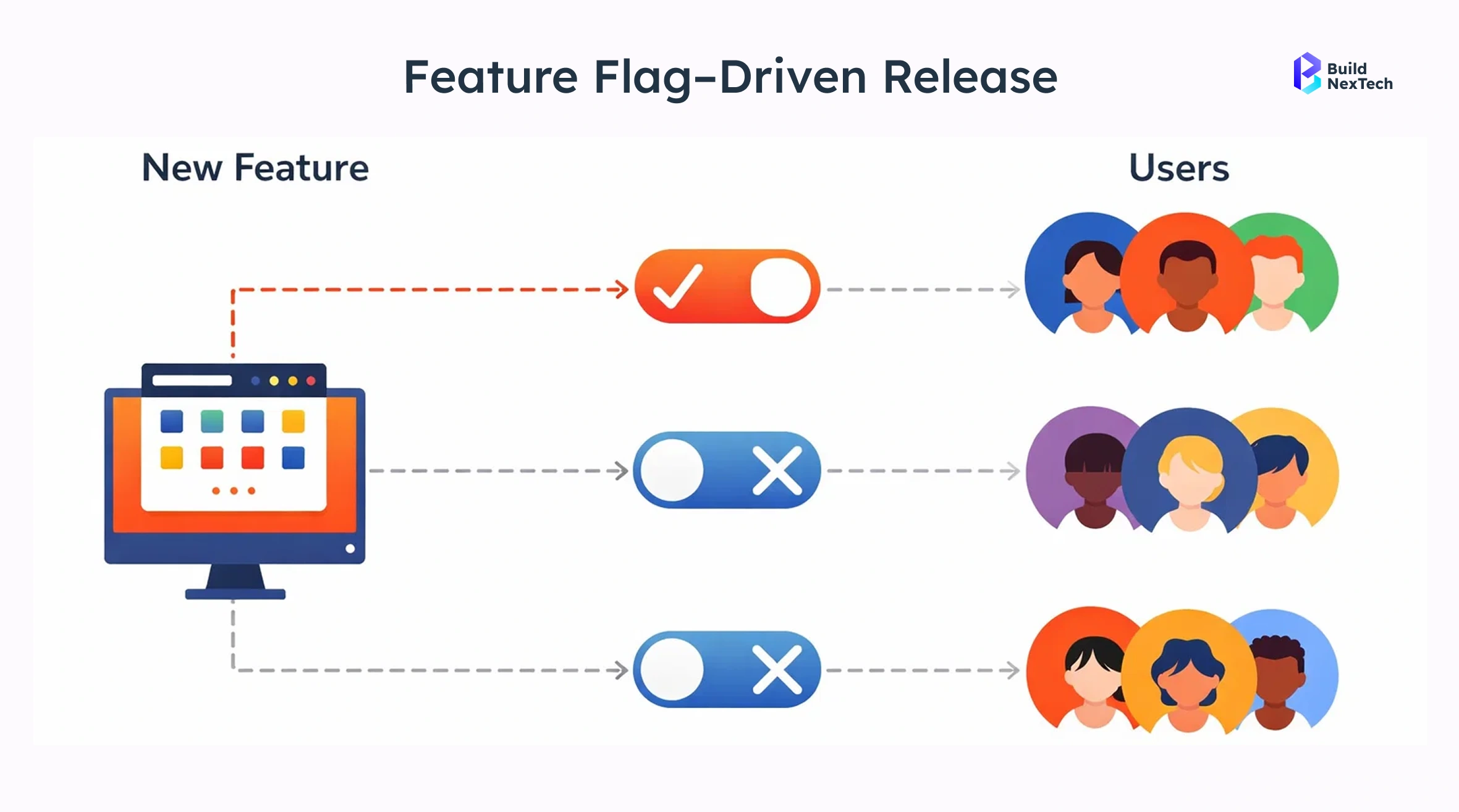
Trunk-Based Development and Modern Deployment Strategies
Imagine releasing a new feature to 1% of users, watching real-time metrics, and rolling it out globally within minutes—without downtime, hotfix branches, or panic rollbacks.
This is what Trunk-Based Development enables when combined with modern deployment strategies.
Canary Deployments with Trunk-Based Development
Canary deployments become significantly safer when combined with trunk-based development because every merge into the trunk is small, validated, and production-ready. Instead of releasing large batches of changes, teams expose the new trunk commit to a limited user segment first and expand gradually based on real-time system metrics.
Step-by-Step Canary Flow
Key Metrics Monitored During Canary Releases
Real-World Micro Case
A cloud-native SaaS platform using trunk-based workflows deploys a redesigned checkout flow. After merging the feature into the trunk, the CI/CD pipeline releases it to 2% of users using a canary deployment. Monitoring detects a small spike in checkout failures, so the rollout is paused and a quick fix is merged into the trunk. Once the metrics stabilize, the rollout resumes and reaches 100% of users without any major incident, demonstrating how trunk-based development and canary releases together reduce deployment risk.
Progressive Delivery and Gradual Rollouts
Trunk-based development + feature flags enables:
- Percentage-based releases
- User targeting
- Traffic segmentation
Feature: New Search Algorithm
Rollout Plan:
Stage 1: OFF (Internal testing only)
Stage 2: 5% users – Monitor error rate, latency, search success rate
Stage 3: 25% users – Validate user engagement and click-through metrics
Stage 4: 50% users – Confirm system stability under higher traffic
Stage 5: 100% users – Full production release
How teams use this in practice:
After merging the code into the trunk, the feature remains disabled by default. Product and engineering teams gradually increase exposure while monitoring real-time metrics (performance, failures, user behavior). If any issue appears at 25% or 50%, the rollout is paused or the feature is instantly turned OFF, avoiding a full rollback or emergency redeployment.
Rollbacks and Failure Recovery in Trunk-Based Development
Fast recovery is one of the biggest advantages of trunk-based development. Because code is merged continuously and protected by feature flags, teams can respond to failures instantly without complex release branch rollbacks or emergency patches.
Instant Rollbacks Without Code Reverts
Instead of reverting commits or rebuilding previous versions, teams can immediately disable the affected feature using a feature flag or deployment control.
Typical rollback flow:
Instead of waiting for a new release pipeline to complete, rollback actions happen in seconds, significantly reducing customer impact and improving incident response time.
Kill Switches for Production Incidents
Kill switches are runtime controls that instantly disable problematic functionality without changing the underlying source code. They are critical in high-availability systems where downtime directly impacts revenue and user trust.
Kill switches are commonly used during:
- Security incidents detected by a security service or security solution
- API endpoint failures causing cascading service outages
- Database schema migrations producing unexpected errors
- Online attacks involving malformed data or malicious SQL command attempts
- Sudden performance regressions after deployment
Organizations operating large-scale web apps, SaaS platforms, and cloud-native systems rely heavily on kill switches to maintain uptime while engineering teams diagnose and resolve the root cause safely.
Best Practices for Adopting Trunk-Based Development
Adopting trunk-based development requires more than changing a branching model—it involves improving engineering discipline, CI/CD practices, and collaboration workflows. Teams that successfully implement trunk-based workflows focus on small changes, fast feedback loops, and strong automated quality gates.
Small Batch Changes and Daily Merges
High-performing development teams commit and merge small batches of code frequently instead of accumulating large feature branches. This approach reduces integration complexity and makes debugging significantly easier.
Best practices include:
- Merge to the main branch at least once a day
- Keep changes task-level rather than feature-level
- Avoid long-lived branches and delayed integrations
- Maintain a clean and readable commit history
- Ensure each merge keeps the trunk in a deployable state
Small batch development reduces merge conflicts, improves release pipeline reliability, and allows faster software delivery with lower operational risk.
Automated Testing and Code Reviews
Automated testing is the safety net that allows teams to merge frequently without sacrificing software quality. Every code change should trigger automated build, test, and validation steps in CI pipelines before merging into the trunk.
Recommended practices:
- Automated build verification on every commit
- Strong unit and integration test coverage
- Automated test coverage reporting dashboards
- Lightweight, fast code review processes
- PR-centric trunk-based development workflows
- Continuous monitoring of automated test suite health
By combining automated testing with fast code reviews, development teams ensure that the trunk remains stable while maintaining high deployment frequency.
Trunk-Based Development for Microservices and Cloud-Native Systems
Scaling Trunk-Based Development for Large Teams
Google Massive Monorepo + Trunk Workflow
Google is widely cited for using a single shared trunk (mainline) to manage an enormous codebase across thousands of developers.
- Engineers commit to a single company-wide trunk with heavy automation and frequent integration, avoiding long-lived feature branches and merge hell.
- This practice supports extremely high throughput while maintaining build stability and CI/CD integration.
Facebook (Meta) High Commit Velocity + Feature Flags
Major engineering teams at Facebook (Meta) use a trunk-based approach with feature flags and frequent merges to accelerate delivery without destabilizing the main branch.
Netflix Trunk + Canary Releases + Continuous Delivery
Netflix embraces a flexible release style that aligns with trunk-based development by deploying incremental trunk commits through canary and progressive rollout models.
Linux Kernel — Frequent Integration into Mainline
While a distributed open-source project, the Linux Kernel development process resembles trunk-based integration: contributions are merged back into a central mainline branch through frequent integration and validation. Linux Kernel maintains a continuous integration flow into a main development branch despite having thousands of contributors globally.
Kubernetes and Distributed Architectures
Trunk-based dev fits perfectly with:
- Kubernetes deployment strategies
- Canary release
- Progressive delivery
- High deployment frequency
When GitFlow Still Makes Sense
Despite its limitations at scale, GitFlow is not obsolete. In certain environments, its structured, branch-heavy model can still be a practical choice.
Teams with Infrequent or Regulated Releases
GitFlow may still be appropriate when:
- Regulatory standards require strict approvals
Industries such as finance, healthcare, and government often mandate formal release branches, audit trails, and controlled promotion of code between environments. - Releases are monthly or quarterly
Teams shipping infrequently benefit less from rapid integration and may prefer clearly separated release branches for stabilization and compliance sign-offs. - Legacy systems dominate
Older systems with fragile test coverage, tightly coupled components, or manual deployment processes often struggle with continuous integration and frequent merges.
In these cases, GitFlow’s explicit release branches, hotfix branches, and environment-based workflows provide predictability and governance, even if delivery speed is lower.
Choosing the Right Git Strategy
There is no universal version control strategy that fits every team, product, or organization.
- GitFlow favors structure, separation, and formal release control
- Trunk-Based Development favors speed, automation, and continuous integration
For modern DevOps teams building web apps, cloud-native platforms, and microservices—with strong automated testing and CI/CD pipelines—trunk-based workflows consistently outperform branch-heavy models.
The right choice depends on:
- Deployment frequency
- Compliance requirements
- Team size and maturity
- Test automation coverage
In fast-moving environments, trunk-based development isn’t just an alternative—it’s the natural evolution of version control in continuous delivery.
Conclusion
Why Trunk-Based Development Is the Future of Git Workflows
Modern software delivery demands speed, reliability, and confidence—and trunk-based development delivers all three. By minimizing long-lived branches, encouraging small and frequent code changes, and keeping the main branch continuously deployable, trunk-based development aligns perfectly with continuous integration, continuous delivery, and DevOps practices.
Compared to traditional GitFlow, trunk-based workflows:
- Reduce merge conflicts and integration pain
- Improve code quality through early feedback and automated testing
- Increase deployment frequency without sacrificing stability
- Enable safer releases using feature flags, canary deployments, and progressive delivery
For teams building cloud-native applications, microservices, and high-traffic web platforms, trunk-based development is no longer optional—it’s a competitive advantage.
Moving from GitFlow to Trunk-Based Development
Adopting trunk-based development doesn’t require an overnight rewrite of your process. Successful teams start by:
- Shortening branch lifetimes
- Investing in automated testing and CI pipelines
- Introducing feature flags to decouple deployment from release
- Building confidence in frequent, incremental releases
With the right foundations in place, teams can ship faster while reducing operational risk.
How bnxt.ai Helps Teams Ship Better Software
At bnxt.ai, we help engineering teams design, build, and operate modern web applications using scalable DevOps practices, CI/CD automation, and cloud-native architectures.
Whether you’re:
- Migrating from GitFlow to trunk-based development
- Implementing feature flags and progressive delivery
- Optimizing CI/CD pipelines and automated testing
- Building secure, high-performance web services
Our team partners with you to modernize your software delivery lifecycle from version control strategy to production rollout.
If your organization is ready to move faster without compromising quality, bnxt.ai provides the web services and engineering expertise to make it happen.
People Also Ask

Is trunk-based development suitable for monorepos?
Yes, many large monorepos successfully use trunk-based development with strong automated tests. It works especially well when CI pipelines validate every commit before integration
How does trunk-based development affect commit history?
It creates a clean, linear commit history with fewer merge commits. This makes debugging, tracking changes, and auditing code evolution much easier.
Can trunk-based development work without feature flags?
Yes but feature flags make it significantly safer and faster. They allow incomplete features to be merged without exposing them to users.
Does trunk-based development reduce code reviews?
No, it improves them by making reviews smaller and faster. Smaller pull requests also increase review quality and reduce approval delays.
Is trunk-based development compatible with GitHub Flow and GitLab Flow?
Yes, it aligns closely with both models when branches are short-lived. Many teams treat GitHub Flow as a lightweight implementation of trunk-based practices.


.webp)
.webp)
.webp)

.webp)
.webp)



