
.png)
.webp)
Introduction
Speed and reliability rarely go hand-in-hand. Going too quickly may lead to breaking something for your users, while going too slowly means you'll be left behind your competitors waiting for an approval.
The challenge faced by modern deployment strategies is to solve this exact dilemma. If you're in a DevOps egg, you probably know CI/CD pipelines: the automated processes for moving your code from your developer's workstation into production. The two most debated ways of achieving that are progressive delivery and continuous deployment.
While both approaches aim to get software to end-users as fast as possible, they do so via very different means. This post is going to help clarify the differences between the two approaches.
Understanding CI/CD in DevOps
In DevOps, CI/CD refers to the practices and frameworks that enable organizations to automate the development and testing of software applications. By implementing a CI/CD framework, companies can streamline these processes and reduce manual effort. This automation improves efficiency and ensures that applications are properly tested before being deployed to the production environment.
What is CI/CD?
CI/CD refers to Continuous Integration and Continuous Delivery or Deployment.
Continuous Integration: "the practice of regularly merging changes into a code repository". Or, stated another way by using automated testing of the code after each of those changes by an automated build process & the merge will allow the project to be tracked for consistency so that no conflicts occur when more than one developer is working on that same piece of source code.
Continuous Delivery: "same as Continuous Integration, with the addition of having the builds be available for human decisions about whether or not to create a release".
Continuous Deployment: "an evolution of Continuous Delivery where validated builds are automatically published to production". This allows multiple versions of the same source code to be released daily.
.webp)
CI/CD Pipeline Meaning
A set of consecutive automated processes referred to as the Continuous Delivery Pipeline exists. This set of processes helps in the transformation of the code into an application that is production-ready through steps.
The five parts of the Continuous Delivery Pipeline include:
1. Source Control Integration
2. Automated Builds
3. Automated Testing
4. Security Validation
5. Automation of the Deployment Process
All the parts of the pipeline will be automated to avoid any errors.
Progressive Delivery Explained
The industry is changing to incorporate CI/CD pipeline solutions with new functionality being deployed in a lower-risk manner through a variety of techniques to appropriately deploy new features in such manner as to create minimal risk problems for the organization and its customers. Progressive delivery involves deploying new functionality for a portion of your user base over a period of time, as opposed to doing it all at once, through the incremental deployment of new functionality which will be managed using such techniques as: feature flags; rolling out feature toggle; segmenting user base; monitoring user experience; and monitoring system performance; and rolling back systems if needed.
Using the technique of progressive delivery will improve the reliability of the system and reduce the risks of integrating new functionality into the system. It will also improve your overall user satisfaction level.
.webp)
Key Features of Progressive Delivery
Benefits / Characteristics Are Achieved via Progressive Delivery:
1.Safe Software Deployments
Feature flags/feature toggles distinguish between deploying code and making a feature available to end-users. You can deploy the code to production but withhold the feature from users until it is completely ready for them. If necessary, the feature can be disabled immediately if there are issues without needing to re-deploy the code.
2.Gradual Feature Rollout
Progressive delivery allows for gradual rollout of features to users as opposed to all users at once, such as allowing 5% of users access to a feature but increasing that number if metrics indicate that this is warranted.
3.User Segmentation
User segmentation allows an organization to rollout features based on user groups within the organization. Features may be trialed by users in particular geographic regions, device categories and subscription levels thus providing a means for teams to collect data focused on collecting feedback from users and/or analyzing user behaviour.
4.Monitoring/Observability
Monitoring tools will provide visibility into system performance during the rollout period of a feature, which teams can use to determine whether to expand/modify/roll back the feature based on metrics such as error rates, response times, and user engagement.
Tools for Progressive Delivery
Progressive delivery is supported by numerous platforms; the following platforms are widely used: Argo Rollouts, LaunchDarkly, Split.io, Harness, and Flagger.
These platforms can also be integrated into the Kubernetes ecosystem through the use of service meshes, ingress controllers, and metric providers.
They can use these integrations to perform canary, blue-green, and automated rollback strategies.
Continuous Deployment Unveiled
Continuous Deployment is one of the most advanced forms of Continual Integration and Continual Delivery. In Continuous Deployment, any code change passed by all automated tests will be automatically deployed to production without human intervention.
In a Continuous Deployment implementation, developers will commit their code into a version control tool such as GIT. Once a developer commits their code, the CI/CD toolchain will automatically take care of the automated build, unit testing, integration testing, security testing etc. Then, after a successful finish in each step of the CI/CD process, a code change will be automatically deployed to production.
Implementing Continuous Deployment will help organizations achieve their goals with ease.
.webp)
How Continuous Deployment Works
A continuous deployment process typically follows this pattern:
- Programmers commit code to a shared repository
- Automated build tools compile the code
- Automated tests verify functionality and security
- Automated deployment tools release the update to production
No human intervention is required in this completely automated process.
Tools for Continuous Deployment
Using CD (Continuous Delivery), development teams can automate the deployment of new versions of their software. Through the CDD process, your application is automatically deployed into production as long as it passes all the requisite tests and is approved by the release team; this means that no manual intervention from a software approval/release team member will be needed to deploy the new version into production.
Once the CI/CD pipeline has successfully gone through all of the testing and validation phases, the new version of your program can be automatically installed into production.
There are several types of automation tools required for CD, including:
• Jenkins
• GitHub Actions
• GitLab CI/CD
• CircleCI
• Spinnaker
• Argo CD
These are orchestration tools to organize the deployment of containerized applications.
An organization can continue adding new features and enhancing its entire application development, testing, and production deployment processes by utilizing the CDD process.
The CD process also relies on the availability of automated services, including but not limited to: testing the application; monitoring the application; and rolling back the application, if necessary.
Progressive Delivery vs Continuous Deployment: A Strategic Comparison
While progressive delivery and continuous deployment are related, they are used for different purposes in modern software delivery.
Both methods are used to speed up delivery, but they are used in different ways.
Understanding the differences between the two methods helps organizations choose the best delivery method.
Differences Between Continuous Delivery and Continuous Deployment in DevOps
Progressive delivery and continuous deployment relate to modern software delivery processes but approach them from different perspectives.
Continuous deployment has a focus on speeding up the delivery of software through automation in order to give teams the ability to iterate much more frequently. Progressive delivery focuses on managing feature releases within an application.
Many organizations are taking advantage of the benefits of both delivery methodologies. They use automated continuous integration and continuous deployment (CI/CD) to produce software and then apply progressive delivery principles to control how quickly users will have access to new functionality.
.webp)
Deployment Techniques: Blue-Green and Canary Deployments
Modern methods reduce the risks as well as the downtime.
With the help of two similar environments, a blue-green deployment enables the deployment of two applications at the same time. Currently, the application is running in the Blue environment, whereas the new version of the application will be deployed in the Green environment. Once the new version of the application is successfully tested, the traffic or requests will be directed to the green environment. If problems arise, it is easy to go back to the previous application version by directing the traffic back to the Blue environment.
.webp)
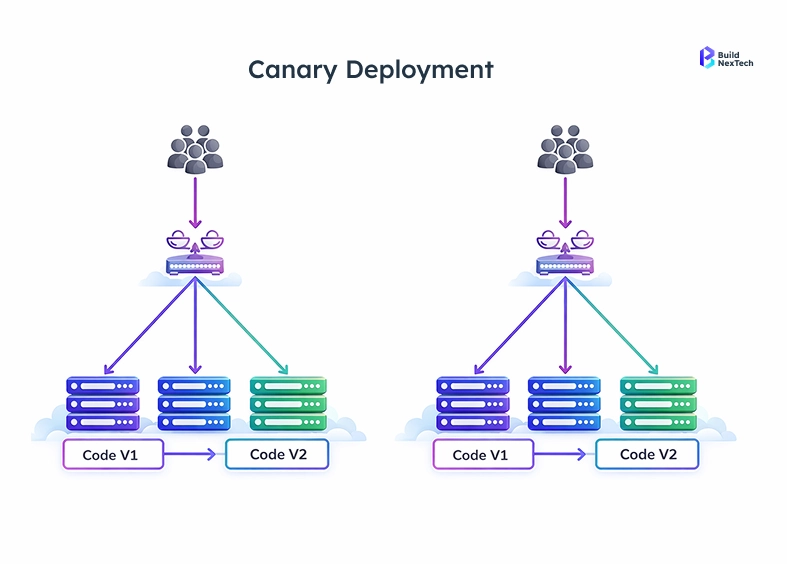
The canary deployment process involves deploying the new version of the app to a small group of users, referred to as canaries, and closely monitoring error rates and overall performance. If error rates are low, full deployment can occur.
The canary method provides an opportunity to observe user feedback and performance metrics during the early access phase before full deployment.
The following are alternative deployment methods:
1. Recreate Deployment
2. Ring Deployment
3. Canary Deployment
4. Traffic Shaping
Use Cases of Progressive Delivery vs Continuous Deployment
Large-scale distribution via Progressive Delivery is the perfect distribution method for SaaS applications where the business consequences of adding new functionality might be significant (e.g. A/B testing on checkout, implementing features that affect how users access/use their data, or in a highly regulated environment where there is an urgent need to roll back to a previous state quickly).
Continuous deployment is the best option for organizations that have development teams that operate in a fast paced schema and place a very high value on automation/testing at the same time they have a capacity to tolerate a certain level of downtime in production for relatively short periods of time, have very little cost associated with the production failure, and where the ability to develop and deploy at a rapid pace is viewed as a competitive advantage (e.g. collaborative tool development or micro services).
Cloud Deployment Models and Their Impact on CI/CD
For businesses, one essential aspect to think about before using continuous integration and continuous delivery (CI/CD) pipelines is choosing a reliable cloud platform for deploying such pipelines. Cloud platforms used by different organizations vary widely because they allow flexibility for their customers. In most cases, an organization can use multiple services from different cloud providers to create their CI/CD pipeline. The flexibility that cloud computing offers is mainly around the infrastructure available and its ability to scale as needed. Flexibility helps facilitate the use of continuous deployment and progressive delivery when developing applications within a distributed computing environment.
Additionally, cloud infrastructure offers many automated deployment mechanisms that can help make it easier to deploy applications. Organizations may choose to implement one of these cloud computing deployment models to get the most out of their CI/CD pipelines.
Types of Cloud Deployment Models
Organizations have different models available to develop Continuous Integration/Continuous Deployment solutions (CI/CD), depending on how they implement CI/CD. Each of the models has its own limitations and advantages, and the organization will have to consider these limitations and advantages when considering how the organization will operate following implementation of the model.
1. The public cloud has the most capability and the lowest total cost of ownership associated with developing CI/CD solutions. There are many tools available to use in implementing CI/CD solutions in the public cloud. Therefore, there is a lot of CI/CD solution development by new/emerging businesses in the public cloud.
2. The private cloud is going to provide an organization with more control over its data than would normally be available in the public cloud. Because private clouds provide more separation of an organization's data from other organizations' data than a public cloud, the overall cost of developing a CI/CD solution will be much greater for a private cloud than for a public cloud. Private clouds typically develop CI/CD solutions in the healthcare and financial services industries.
3. Hybrid Cloud: Hybrid cloud refers to the union of public and private cloud computing. The private cloud is used to retain confidential information, while the public cloud provides scalable infrastructure. Large corporations with legacy systems typically implement hybrid cloud technologies.
4. Multi-Cloud: Companies that employ a multi-cloud solution deploy multiple vendors' products simultaneously. Therefore, multi-cloud environments are generally more reliable than companies using a single vendor's product.
Each of the four models supports CI/CD and progress delivery; however, successfully implementing progress and continuous delivery will require appropriate implementation tools.
Implementing CI/CD: Best Practice
CI/CD implementation is not just about selecting the right tools for the software. The teams should establish strong development workflows, automation testing, infrastructure automation and continuous monitoring to ensure that the software releases and reliable and consistent.
CI/CD Implementation Strategies
These techniques must be put into practice in organizations for the purpose of making a reliable continuous integration/continuous deployment pipeline process.
- Automated Testing, which is a quick way to check the validity of the code that was altered before putting it into the CI/CD pipeline.
- Infrastructure as Code, in which the environments that are to be deployed will be the same when they are deployed.
- Monitoring/Observation Tools, to provide the developer with information on how well the system that is being deployed is working.
- Validation checkpoints/control before deploying to ensure that the code has no issues with the production environment after it has been deployed.
- Performance metrics monitoring after they have been deployed to ensure that everything is working correctly.
These practices help ensure that new releases of software are reliable and that there are low risks of failure in the CI/CD process.
Conclusion
To solve the same problem, two different approaches exist: Continuous Deployment (for high-speed deployments with an established test framework) and Progressive Delivery (if you're not focused on how fast you can deploy a feature, but rather want to control the exposure of your dashboard based on which teams deployed the feature). Continuous Deployment works well for teams that frequently deploy code and have confidence in their automated testing processes and can quickly rectify issues found in production.
Progressive Delivery is also a complicated way of allowing teams to deploy features to multiple user groups, with less risk by having been thoroughly tested through an actual release cycle, giving developers valuable feedback on how users are using their features, before they are made available to all users.
The best teams use continuous deployment techniques for the mechanics of releasing code quickly to production while using progressive delivery techniques for controlling how the code is delivered. Combining Buildnextech's infrastructure support and Frugal Testing's testing capabilities make a powerful combination.
People Also Ask

1. What distinguishes continuous deployment from continuous delivery?
The main distinction between continuous delivery and continuous deployment is that continuous delivery involves the deployment of the code's readiness. However, before being deployed, the code modifications must be approved. The process of implementing code changes is known as continuous deployment.
2. What are the most widely used tools for implementing continuous deployment and integration?
Jenkins, GitHub Actions, GitLab CI/CD, CircleCI, Spinnaker, and Argo CD are popular tools that can be used.
3. How is the user experience affected by progressive delivery?
The user experience is affected by progressive delivery since only a small number of users receive the code changes.
4. What advantages are offered by the blue-green deployment model?
Blue-green deployment models have various advantages including: - Shorter downtime periods - Easy to roll back to previous versions of applications - Easier to test applications prior to rollout
5. What types of Kubernetes Deployment Tools are available for Continuous Integration / Continuous Delivery (CI/CD)?
CI/CD Pipeline Deployment Tools in Kubernetes: - Argo CD, Flagger and Helm are all types of deployment tools available in Kubernetes that can be used for automated software application deployments and for performing canary or progressive deployment strategies.


.webp)
.webp)
.webp)

.webp)
.webp)



