


As the pace of digital transformation continues to gain momentum, increasing numbers of organisations are recognising the need to migrate applications to the cloud in situations they weren't ready to consider just a few short months ago. If you are still depending on legacy, on-premise application stacks, monolithic applications, or legacy technology stacks (to name a few), or if you are an organisations with hundreds of legacy applications that were recently developed or adopted into your environment, you're probably seeing innovation slow, increased risk across your security landscapes, and reduced operational efficiencies.
Cloud application migration can modernise your systems and create the security, scalability, and flexibility of the future IT landscape that puts your business ahead of competition. Regardless of whether application migration to AWS Cloud, hybrid, or multi-cloud is the direction for your organisation, the right cloud migration strategy will put your applications together in a streamlined manner so that integration is simple and performance is optimised.
This Cloud Migration Playbook will equip organisations looking to turn the page on legacy IT systems with recommended actionable steps, strategies, and best practices.
organisations can partner with cloud migration providers and consulting companies, as well as free tools from companies like AWS Cloud, Microsoft Azure, Google Cloud Platform, IBM Cloud, or Pega Cloud, to elevate your cloud journey through migration, free trials for cloud data storage, and insight into managing costs for cloud data storage.
Key Takeaways:
1️⃣ Discover the challenges related to legacy applications and the importance of modernization.
2️⃣ Formulate a comprehensive cloud migration strategy aligned with your organisation's business objectives.
3️⃣ Select the appropriate model, cloud provider, and architecture for your workloads.
4️⃣ Move through the migration process towards modernizing your applications to the cloud in a secure and effective way.
5️⃣ Improve performance, reduce costs, and take advantage of cloud-native innovation after the migration is complete.
🏛️ Understanding Legacy Applications
What is a Legacy Application?
A legacy application is an older software system or platform that is still in use but using out-of-date technology, architecture, or design. Common examples include:
- Applications running on unsupported operating systems 🖥️
- On-premise client/server applications or legacy monolith applications
While these applications support core business processes 🏢, they often face challenges such as:
- High maintenance costs 💸
- Limited scalability in hybrid or public cloud environments 📈
- Compatibility issues with new cloud services, PaaS, SaaS, or IaaS platforms ⚙️
- Security vulnerabilities due to outdated protocols and servers 🔐
Many organisations hesitate to migrate because of concerns over downtime ⏳, complexity, and cost 💰.
Why Move Legacy Applications to the Cloud? 🌥️
Cloud migration services offer numerous advantages:
- Scalability: Dynamically handle peak traffic with load balancing and auto-scaling 📊
- Cost-Effectiveness: Pay-for-usage models optimise IT budgets and cloud resource allocation 💵
- Security Improvements: Enhanced monitoring, multi-factor authentication, and IAM roles reduce risks 🔒
- Business Agility: Faster deployment, easy update, faster resolution for remote working and support
- Innovation Enablement: Apply Artificial Intelligence, micro service architecture, advanced analytics, serverless computing (AWS lambda) and cloud application development services
When the organisations are migrating to the legacy applications they get the modern, secure and scalable systems. These systems can be run in a public cloud, private cloud or hybrid cloud environment. Migration also helps in better synchronisation of data and data flows.
🛠️ Building a Cloud Migration Strategy
Choosing the right model depends on business goals and compliance needs. Many organisations work with cloud migration service providers to adopt public or hybrid cloud models for flexibility, while those with strict data control prefer private cloud. Integrating microservices architecture enhances scalability, agility, and faster deployment across all models.
Choosing the Right Cloud Model ☁️
Choosing the proper cloud configuration is important:
- Public Cloud: Examples of cost-effective, flexible cloud services are the AWS Cloud, Microsoft Azure, and Google Cloud.
- Private Cloud: This is a single-tenant infrastructure that the organisation agrees on due to security and regulatory purposes.
- Hybrid Cloud: A mixture of public and private cloud, which allowed organisations to choose a performance-based, flexibility-based, or multicloud option.
Considerations of business objectives, regulatory considerations, long-term objectives, and budget considerations should guide you in this decision.
Estimating Cloud Migration Costs 💰
A successful migration begins with cost estimation. Key considerations include:
- Number of critical systems, virtual machines, and servers 🖥️
- Data storage, transfer, and cloud storage type (object, block, file) 💾
- Licensing, subscriptions, and CI/CD tool integrations ⚙️
- Third-party tools and data integration software like Talend Data Integrator, Fivetran, and Astera Centerprise Data Integrator 🔄
- Post-migration optimization, monitoring, and Cloud Contingency Plans 🛡️
Most providers, including Microsoft Azure and AWS, offer migration cost calculators 🧮 and free trials for small workloads. Updating configuration files and auditing the tech stack ensures accurate planning ✅.
Leveraging Cloud Consulting Services 🧑💼
Partnering with cloud computing consulting services, cloud migration consulting services, or cloud consulting companies helps organisations:
- Select the optimal cloud model and provider ☁️
- Develop a clear migration roadmap 🗺️
- Ensure security 🔐, compliance ⚖️, and business continuity 🏢
- Access cloud application development services 🛠️ for modernization
🚀 Steps to Migrate a Legacy Application
Before migration, assess your IT environment with a SWOT analysis. A cloud application development company can guide this to ensure a smooth cloud transition. For example, the SWOT analysis may suggest that your organisation has robust data integrity or protection, but has a weakness associated with aging infrastructure. When an organisation identifies this information, they can begin to proactive and strategic planning to mitigate risk associated with a legacy to cloud migration.
1️⃣ Assess Current IT Landscape and Perform SWOT Analysis
Conduct a SWOT analysis to map dependencies and identify risks:
This evaluation keeps disruption minimal. It also matches business processes and involves stakeholder engagement.
2️⃣ Define Migration Objectives and Success Metrics
Define migration goals like cost savings, performance, and security 🔒, and track success with metrics like uptime, ROI, and responsiveness 📊 using cloud DevOps services.
- Define measurable targets:
- Reduce IT Operational Expenditure
- Scale, performance and response times can be improved.
- increase security and compliance;
- Enable Innovation (cloud-native development, microservices and serverless functions).
- Key success measures include uptime, ROI and performance improvements 📊.
3️⃣ Choose the Right Cloud Provider
- Find a cloud provider that meets your business objectives and compliance requirements, as well as has the migration and monitoring capabilities. Cloud providers could include AWS Cloud, Microsoft Azure, Google Cloud Platform, IBM Cloud, Pega Cloud.
- Review cloud providers based on the following criteria:
- - Global scope & compliance (AWS Cloud, Microsoft Azure, Google Cloud Platform, IBM Cloud, Pega Cloud)
- - Application discovery and mapping & dependency analysis
- - SLAs, uptime guarantees, and monitoring
- - Migration tools (cloud-to-cloud i.e. on-prem -> mid-tier)
- - Modern architecture and distributed systems (microservices architecture, etc.)
4️⃣ Migration Approach (6 Rs Conversion Framework )
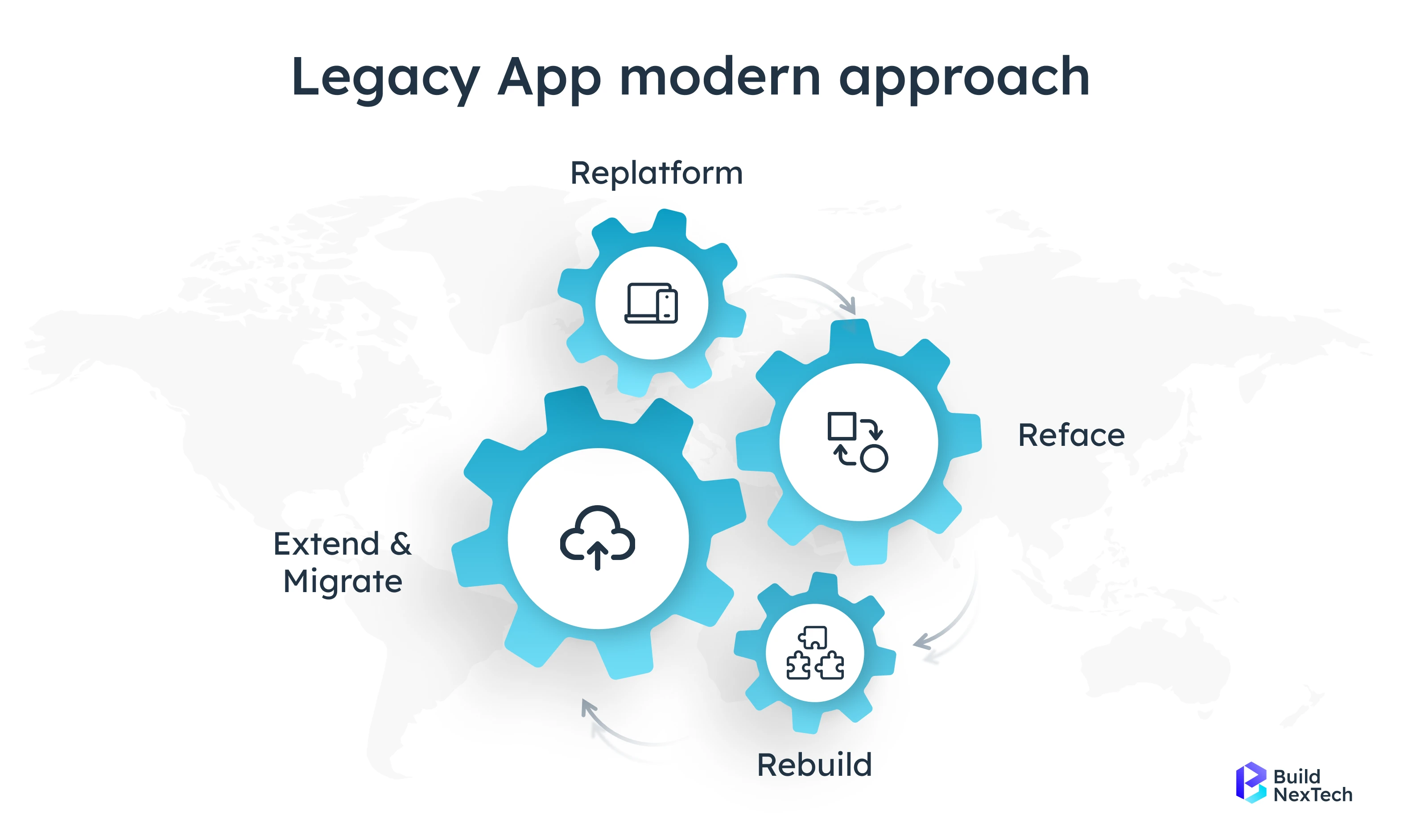
Select the optimal migration approach ---- Rehost, Replatform, Refactor, Repurchase, Retire, or Retain ---- based on application complexity & business goals ⚙️. An optimal migration will mitigate "lift and shift" disruptions, as well as mitigate use or ownership change for optimal performance during a migration to cloud ☁️.
- Rehost / Lift-and-Shift – Move the application to the cloud with minimal changes, preserving existing architecture and functionality ⚙️☁️
- Replatform / Lift, Tinker, Shift - some minor optimization ⚙️
- Refactor / Re-architect - change cookbooks to change for native capabilities 🏗️
- Repurchase - #SaaS ☁️
- Retire – Remove redundant applications ❌
- Retain – Keep select applications on-premise temporarily 🖥️
5️⃣ Design the Target Cloud Architecture
Plan a cloud architecture with high availability, load balancing, secure storage 🔒, and integration with legacy systems. Ensure it supports scalability, disaster recovery, and cloud-native features for optimal performance ⚡.
Essential Factors in Design:
- Reliability and Disaster Recovery 🔄
- Load Balancing and Auto-Scaling 📈
- Secure Cloud Storage Encrypt and Multi-Factor Authentication 🔒 and ✅
- Integration with file storage servers, databases 📊, and other cloud-native features 🛠️
6️⃣ Migration and Testing
Start with non-critical systems to minimize disruption ⚡ and thoroughly test performance, compatibility, and data integrity. Train teams to manage cloud resources efficiently for a smooth transition ☁️.
- Start with the least critical systems to mitigate risk ⚡
- Validate Performance, Compatibility, Data Integrity 📊
- Train personnel to manage AWS Lambda, Amazon API Gateway endpoints, and monitoring tools with error detection ⚠️ and error thresholds 📏
7️⃣ optimise, Monitor, and Continuously Improve 🔧
Continuously monitor performance, resource usage, and security 🔒, applying automated scaling and optimizations. Gather feedback and refine the cloud architecture to ensure efficiency, flexibility, and ongoing innovation ⚡.
These are things done after migration:
- Performance, resource utilization, and response times are tracked. 🎯
- Automated scaling and optimizations are implemented. 🚀
- Updates are maintained for compliance and security. ⚙️🔒
- Data is guaranteed to remain accessible 🔄 and ready for digital capacity. 🌎
- Migration is an iterative process that requires ongoing tuning.
- Migration is a progressive process that requires continual tuning.
✨ Benefits of Migration to Cloud
- Lower IT Costs: Less hardware and maintenance. 💸
- Elasticity Needed: Remote accessibility to applications.
- Better Security: Continuous updates, monitoring, and IAM role management. 🔏
- Scalability: Scale resources easily. 📈
- Innovation: Utilizing AI, analytics, microservices, serverless computing and development services for cloud-native applications.
💾 Cloud Data and Cost Considerations
Consider storage type, data transfer, and redundancy 💾 to optimise costs and performance. Plan for migration complexity, volume, and resource usage to ensure efficiency ⚡.
Factors affecting migration costs include:
- Volume of data and assessment requirements 📦
- Complexity of dependencies and application architecture ⚙️
- Need for refactoring or redesign 🏗️
- Migration duration and potential downtime ⏳
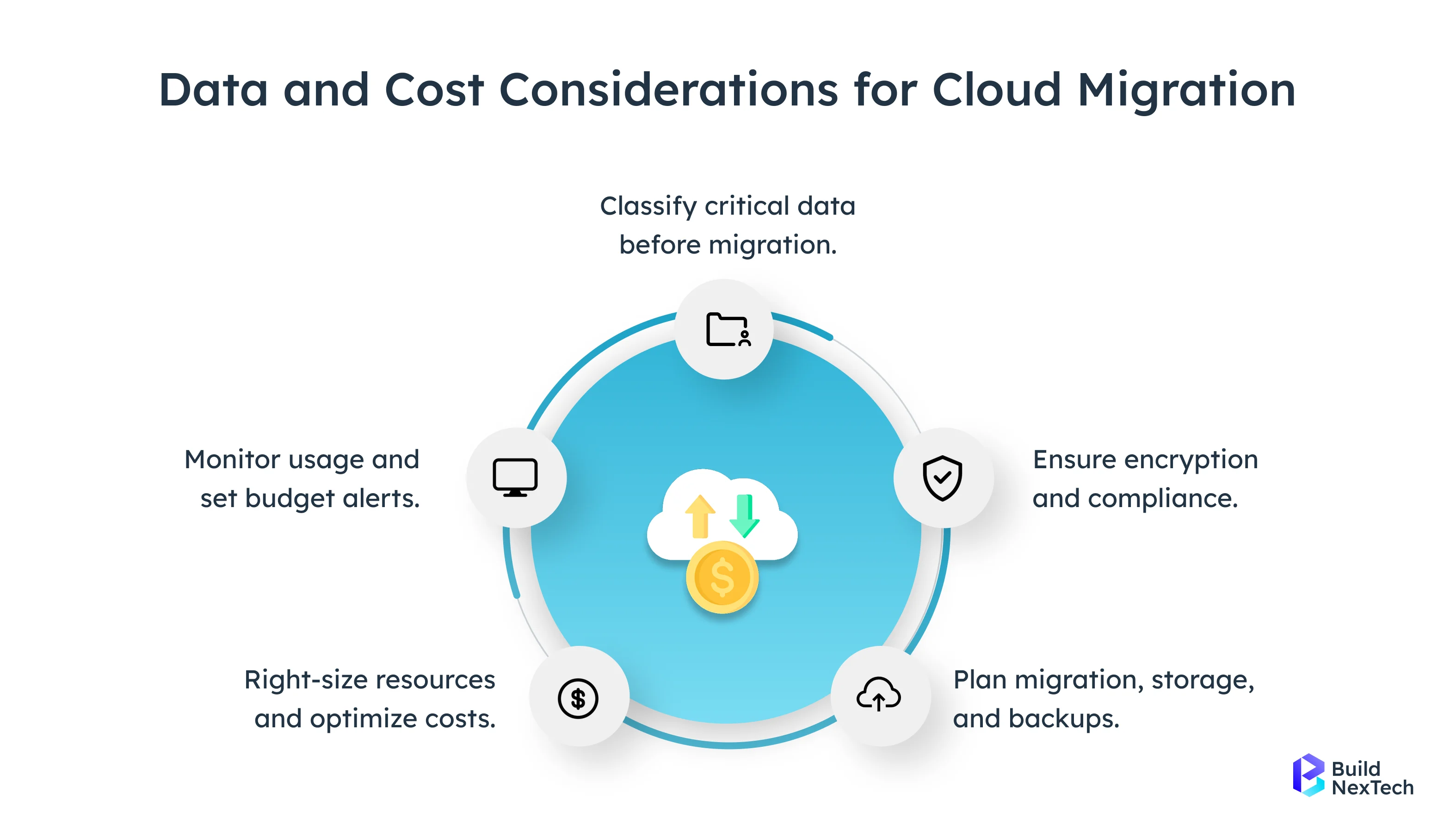
Optimizing cloud resources and storage types ensures cost efficiency and performance ✅.
🛠️ Cloud Migration Tools
Use tools like CloudEndure, Google Cloud Migrate, and Azure Migrate to migrate applications to the cloud with minimal downtime ⚡. Azure cloud migration tools, Microsoft Cloud Migration Tool, and other cloud to cloud migration tools make it easy to migrate your databases, applications, and disaster recovery configurations 🔒. These tools ease the migration process but also demonstrate the benefits that come with embracing the cloud such as better cost effectiveness, better resiliency, scalability and increased security while making it faster to deploy more contemporary cloud native applications.
Leading Cloud-to-Cloud Solutions
- CloudEndure (AWS): Automated migration with minimal downtime ⚡
- Google Cloud Migrate: Supports rehosting and refactoring 🔄
- Azure Migrate: End-to-end support for VMs, databases, and applications 🖥️
Azure-Specific Tools
Use Azure Site Recovery, Azure Database Migration Service, and Azure App Service Migration Assistant to move legacy applications securely and efficiently ⚡. These tools support disaster recovery, database migration, and cloud application modernization 🛠️.
- Azure Site Recovery: Disaster recovery and legacy migration 🛡️
- Azure Database Migration Service: Moves legacy databases to Azure SQL 📊
- Azure App Service Migration Assistant: Migrates .NET and PHP applications 🖥️
Microsoft Cloud Migration Toolkit
Provides application discovery, cost calculators, and step-by-step guidance 🗺️. Helps ensure security, compliance, and smooth migration of legacy systems to the cloud ⚡.
- Application discovery and assessment tools 🗺️
- Cost calculators and free trial options 🧮
- Guidance on security, compliance, and monitoring of DNS servers, network access layers, and application layers 📡
- Step-by-step migration roadmap 🛤️
For legacy to cloud migration, choose tools based on complexity and goals. CloudEndure or Google Cloud Migrate suit rapid migrate application to cloud needs, while Azure Migrate and Microsoft Cloud Migration Toolkit are best for structured application migration to cloud strategy. Partnering with cloud computing consulting services ensures smoother migration, lower risks, and faster modernization.
🎯 Strategic Cloud Migration Using Azure Migrate
A robust migration strategy ensures applications move to AWS Cloud, Azure Cloud, Google Cloud, IBM Cloud, or Pega Cloud efficiently. Tools like Azure Migrate help modernise legacy systems. They turn these systems into secure, scalable, and high-performance cloud-native applications.
Benefits include:
- Cost reduction 💰 and resource optimization ⚙️
- Enhanced security using IAM roles 🔒
- Improved response times ⏩ and operational agility ⚡
- Innovation through serverless computing, microservices, and cloud application development services 🛠️
Every organisation should keep a cloud migration plan. This plan helps modernise legacy software and optimise IT operations. It also helps meet regulatory standards and prepare for digital demand.
✅ Conclusion
Migrating legacy applications to the cloud is essential for organizations to stay competitive, agile, and secure. Using a structured approach, cloud infrastructure management services, and tools like CloudEndure, Azure Migrate, or Google Cloud Migrate ensures a smooth and efficient transition. The new cloud environments provide enhanced scale, lower costs, improved security, and the opportunity to innovate with microservices architecture, serverless compute and cloud application development services.
People Also Ask

What is a legacy application?
A legacy application is an older application that is still being used, but it is a built in outdated technologies or architecture. Typically they run on-premise or in a monolithic structure, which limits their scalability, leads to increased associated costs for maintenance, and adds security risks to the business. 🖥️
What are the benefits of moving a legacy application to cloud?
Moving to the cloud introduces benefits associated with scalability, effective cost structure, security, agility in the business, and the availability of technological benefits stemming from options like microservices architecture and serverless computing. 🌥️💸
What does the 6 Rs framework for cloud migration mean?
The 6 Rs framework is designed to help customers select a the best way to migrate that is consistent with migration difficulty and business goals. The framework defines the options to; Rehost, Replatform, Refactor, Repurchase, Retire or Retain. ⚙️🚀
What cloud migration tools do you recommend?
Recommended tools that can be used to help your migration go smoothly are; CloudEndure, Google Cloud Migrate, Microsoft Cloud Migration Tool Kit, Azure Migrate. These tools help accelerate the migration, reduce downtime, and help with cloud migration activities such as modernise databases, dependency mapping, or hybrid cloud architecture. 🛠️
How do I measure the success of a cloud migration?
Success can be measured on several levels including uptime, performance gain, cost reduction, operational efficiency, security, or innovative capabilities in using cloud native services/solutions. 📊


.webp)
.webp)
.webp)

.webp)
.webp)



