
.png)
.webp)
When there are code releases and feature launches, there is a chance of deployment failures, and it can make rollbacks complicated and dangerous. When systems are scaled, and the rate of the deployment is heightened, the approach then, will cause downtime, performance degradation, and an overall negative impact on the user experience. Feature flags solve these issues, because they allow teams to control features at runtime without having to redeploy new code. Feature flags allow safer rollouts, fast rollbacks, user control, and performance monitoring of features. Coupled with improved deployment strategies like canary, blue-green, and rolling deployments, feature flags improve speed and reliability, all the while reducing the risk of releases.
What You Will Learn
- Why deployment failures happen and how feature flags help reduce release risk
- How to decouple deployment from release using feature toggles
- Ways to use feature flags with canary, blue-green, and rolling deployments
- Best practices for safe rollouts, fast rollbacks, and production monitoring
Common Causes of Production Failures
Deployment failures are rarely caused by a single bug. They emerge from a combination of code, infrastructure, and process issues.
Key causes include:
- Unreleased code paths activated unintentionally
- Database schema mismatches (PostgreSQL, Hibernate ORM)
- Configuration drift across environments (YAML, env vars)
- API contract changes in microservices
- Missing runtime validation and monitoring
- Incomplete end-to-end tests
- Traffic spikes amplified by load balancers
This diagram, inspired by AWS’s production deployment patterns, illustrates how tightly coupled releases increase failure impact and recovery time.
Diagram: Typical Deployment Failure Flow
.webp)
Inspired by: AWS Architecture Blog (Route 53 deployment strategies)
Description: A tightly coupled deployment where code release, feature exposure, and user traffic happen at the same time—resulting in a large blast radius and slow recovery.
Risks of Tightly Coupled Deployments
In tightly coupled deployments, deployment equals release. The moment code reaches production, it is instantly exposed to all users. While this model may look simple, it significantly increases operational risk—especially at scale. Any defect, configuration issue, or performance regression immediately impacts every user, leaving teams with little room to react.
Key problems with tightly coupled deployments:
- Big-bang releases expose all users at once, increasing blast radius
- Rollbacks require redeployment, which slows recovery and raises MTTR
- No user segmentation or gradual rollout, making safe testing impossible
- High on-call stress during incidents and peak traffic hours
- Poor DORA metrics, especially change failure rate and recovery time
Case Study: Amazon & AWS (Controlled Releases)
Amazon popularized the idea of decoupling deployment from release after early incidents where small changes caused large-scale outages. Today, AWS services rely heavily on progressive rollouts, internal testing rings, and runtime controls to limit blast radius.
Key takeaway: Production safety improves when features can be disabled instantly without redeployment.
Source:LINK
What Are Feature Flags
Feature flags what some also refer to as release gates, feature switches, or turntables which teams use to control application behavior at runtime without going through a full code redeployment. They serve as on/off for features which in turn allows teams to determine when a feature goes out, which users see it and how it performs in production. They enable teams to:.
They enable teams to:
- Control features at runtime, allowing instant enable/disable without code changes
- Decouple deployments from releases, reducing risk during production deploys
- Run safer experiments, such as A/B tests, beta releases, and canary rollouts
- Recover from failures faster, using kill switches instead of emergency rollbacks
.webp)
Feature Flags vs Traditional Configuration
Comparison Table
Decoupling Deployment from Release
Feature flags break the traditional deploy = release lock by introducing a runtime control layer between code deployment and feature exposure.
What changes with feature flags:
- Code can be deployed continuously without immediately impacting users
- Features are released independently of deployments
- Risk shifts from deploy time to runtime control, where it’s easier to manage
Engineering benefits:
- Smaller, safer release cycles with reduced blast radius
- Higher confidence during production deployments
- Faster collaboration between development and operations teams
How Feature Flags Improve Deployment Safety
Feature toggles greatly reduce deployment risk what they do is give teams the ability to fine grain control which users see a feature and at what time. Instead of going to all users at once we see teams which are able to roll out features gradually also continuously monitoring performance, errors and user feedback. This approach also reduces the impact of failures and makes production releases very predictable.
Reducing Deployment Blast Radius
With feature flags, new features are no longer an “all-or-nothing” release. Teams can control exposure at runtime and gradually increase visibility as confidence grows.
You can safely roll out features to:
- Internal teams for early validation
- Beta testers for real-world feedback
- Specific regions to reduce geographic impact
- Selected user groups or customer tiers
- Small traffic percentages to limit blast radius
Interactive Example: Progressive Rollout
Typical rollout plan:
1% → 5% → 20% → 100%
At each stage, teams observe:
- Error rates and latency
- Business metrics and user behavior
- System stability under real traffic
If issues appear, the feature can be paused or disabled instantly—without redeploying.
Enabling Runtime Control and Fast Recovery
One of the biggest advantages of feature flags is runtime control. Instead of reacting to failures with emergency redeployments, teams can respond instantly by toggling features on or off in production. This dramatically reduces recovery time and lowers the stress of incident response.
Runtime control enables teams to:
- Perform quick rollbacks without redeploying code
- Activate kill switches during production incidents
- Safely handle unknown edge cases that only appear under real traffic
.webp)
Kill Switch Use Cases
A kill switch is a special type of feature flag that lets you instantly turn off a part of your system in production—without redeploying code.
Think of it as an emergency stop button for software.
When something goes wrong in production (latency spikes, errors, outages), instead of rushing a rollback or redeploy, engineers flip a kill switch and immediately stop the problematic behavior
Companies like Amazon and Netflix use kill switches extensively to protect customer experience. When metrics cross safe thresholds, features are disabled automatically—often before users notice any impact.
Feature Flags and Modern Deployment Strategies
Canary Deployments with Feature Flags
Canary Deployment represents a software release strategy when a new version of an application is deployed to a small subset of users rather than a big bang release (i.e., releasing to all users all at once).
The concept is similar to the old mining practice where miners used canaries in coal mines as an early warning system. If the canary showed signs of danger (dying), miners would know that something was wrong before they were affected.
In software:
- The “canary users” act as a test group.
- Any issues, bugs, or performance problems are detected early.
- If everything works fine, the feature is gradually rolled out to the rest of the users.
- If something goes wrong, the rollout can be stopped or rolled back quickly, minimizing the impact on your users.
Key benefits of Canary Deployments:
- Reduced risk: Only a small portion of users see potential problems.
- Faster feedback: Real user behavior helps identify issues that tests might miss.
- Safe experimentation: Teams can test new features, performance improvements, or UI changes without affecting everyone.
- Smooth rollbacks: If the canary fails, it’s easy to revert without impacting the majority of users.
.webp)
Blue-Green Deployments and Kill Switches
A Blue-Green Deployment is a release strategy that reduces downtime and minimizes risk when deploying new software versions. The idea is simple: you maintain two identical production environments:
- Blue environment – The current live production that all users are using.
- Green environment – The new version of your application, fully deployed and ready, but not yet live.
When you’re ready to release:
- You switch traffic from Blue to Green.
- Users start interacting with the new version immediately.
- If something goes wrong, you can switch back to Blue almost instantly, ensuring minimal disruption.
Key Benefits of Blue-Green Deployment:
- Zero downtime: Users never experience service interruption during the switch.
- Quick rollback: If the new version has a problem, switching back to the previous environment is fast and safe.
- Safe testing: You can test the new environment in real-world conditions without affecting users
- Reduced risk: Only one environment is live at a time, so you avoid partially broken deployments.
.webp)
Rolling Deployments in Kubernetes
A Rolling Deployment is a deployment strategy where new versions of an application are gradually rolled out to replace the old version without downtime. Unlike Blue-Green, you don’t have two full environments; instead, Kubernetes updates pods incrementally.
How it works:
- Update configuration
You update the Deployment YAML or container image in Kubernetes. - Incremental rollout
Kubernetes replaces pods one at a time (or in small batches) with the new version.- Old pods are terminated gradually.
- New pods take over traffic seamlessly.
- Monitoring
Metrics such as latency, errors, and pod health are monitored during the rollout.- If issues arise, the rollout can be paused or rolled back automatically.
Key Advantages:
- Zero downtime: Users continue to access the application throughout the rollout.
- Smooth rollback: Kubernetes can revert to the previous version if pods fail health checks.
- Fine-grained control: You can adjust the update strategy (e.g., max unavailable pods, max surge pods) to control rollout speed.
- Works natively with microservices: Each service can be updated independently without impacting others.
Progressive Delivery Using Feature Flags
Progressive delivery is a modern release strategy that lets teams gradually roll out new features, continuously monitor performance, and make data-driven decisions before exposing changes to all users. By combining feature flags with incremental rollouts, teams can reduce risk, improve user experience, and react quickly to issues.
Gradual Rollouts and Percentage-Based Releases
Progressive delivery focuses on three main principles:
- Incremental releases:
Features are enabled for a small subset of users first. This allows teams to test new functionality in production without impacting everyone. - Continuous evaluation:
Metrics and performance are monitored in real-time to detect issues early. Rollout decisions are based on actual user data rather than assumptions. - Feedback-driven rollout decisions:
Depending on the metrics and user feedback, the feature rollout can be paused, expanded, or rolled back. This ensures a controlled and safe release process.
User Targeting and Traffic Segmentation
User targeting and traffic segmentation are key techniques in progressive delivery and feature-flag-based rollouts. They allow teams to control who sees new features and reduce risk by exposing changes to specific user groups instead of everyone at once.
Common Segmentation Strategies
- Geography
- Roll out features to users in a specific region first.
- Example: Release a new payment method only to users in Europe before global rollout.
- Subscription Tier
- Target users based on their plan (free, premium, enterprise).
- Example: New analytics feature enabled for premium users first.
- Device / OS
- Segment users by platform, device type, or operating system.
- Example: Deploy an iOS-specific UI change to iPhone users first.
- Feature Usage History
- Target users based on how they interact with existing features.
- Example: Advanced UI redesign shown only to power users who frequently use the feature
.webp)
Monitoring and Observability for Safe Releases
Monitoring and observability play a critical role in ensuring safe feature-flag-based releases. While feature flags control exposure, monitoring helps teams understand the real impact of a feature in production and catch issues early.
Feature-Level Metrics and Toggle Impression Data
To effectively evaluate flagged features, teams should track metrics at the feature level, not just at the application or service level.
Track per feature:
- API latency
- Error rate
- Database load
- User behavior
These metrics help identify whether a specific feature is degrading performance or negatively affecting user experience.
Common tools used:
- Graphite
- Amplitude
- Prometheus + Grafana
Detecting Performance Regressions Early
Feature flags combined with monitoring act as an early warning system for production issues. Instead of reacting to outages, teams can detect regressions as soon as metrics start deviating from normal behavior.
Common pattern:
- Enable the feature for a small user segment
- Continuously watch feature-level metrics
- Automatically disable the feature if thresholds are breached
This approach allows teams to respond instantly without redeploying or impacting all users.
Feature Flags in CI/CD Pipelines
Integrating Feature Flags with CI/CD
- Developer writes code with a feature flag
- The new feature is wrapped inside a flag (ON/OFF)By default, the flag is OFF
- Code is merged early
- Developers merge incomplete or in-progress features safely
- Users cannot see the feature yet
- CI pipeline runs
- Build the application
- Run unit tests and integration tests
- Ensure the flagged code doesn’t break existing functionality
- Code is deployed to staging
- The feature flag is turned ON in staging
- Validate behavior in a real environment
- Automated tests are executed
- End-to-end tests verify:
- Feature works correctly
- No performance or functional issues
- Deploy to production with flag OFF
- Code reaches production
- Feature remains hidden from users
- Gradual rollout using the flag
- Enable for internal users or small traffic
- Monitor metrics
- Instant rollback if needed
- If issues appear, turn the flag OFF
- No redeploy required
.webp)
Release Automation and Deployment Validation
Feature flags enable automated and reliable release validation as part of the CI/CD pipeline. Instead of releasing features immediately, teams can validate them step by step using controlled toggles.
Automated checks include:
- Toggle the feature ON in staging to validate real-world behavior
- Run automated end-to-end tests to ensure the feature works correctly
- Gradually promote the feature to production using controlled rollouts
This approach ensures that features are tested, validated, and released safely without impacting all users at once.
Best Practices for Using Feature Flags
Feature Flag Lifecycle Management
Every feature flag should be treated like a temporary production tool with a defined purpose and lifespan.
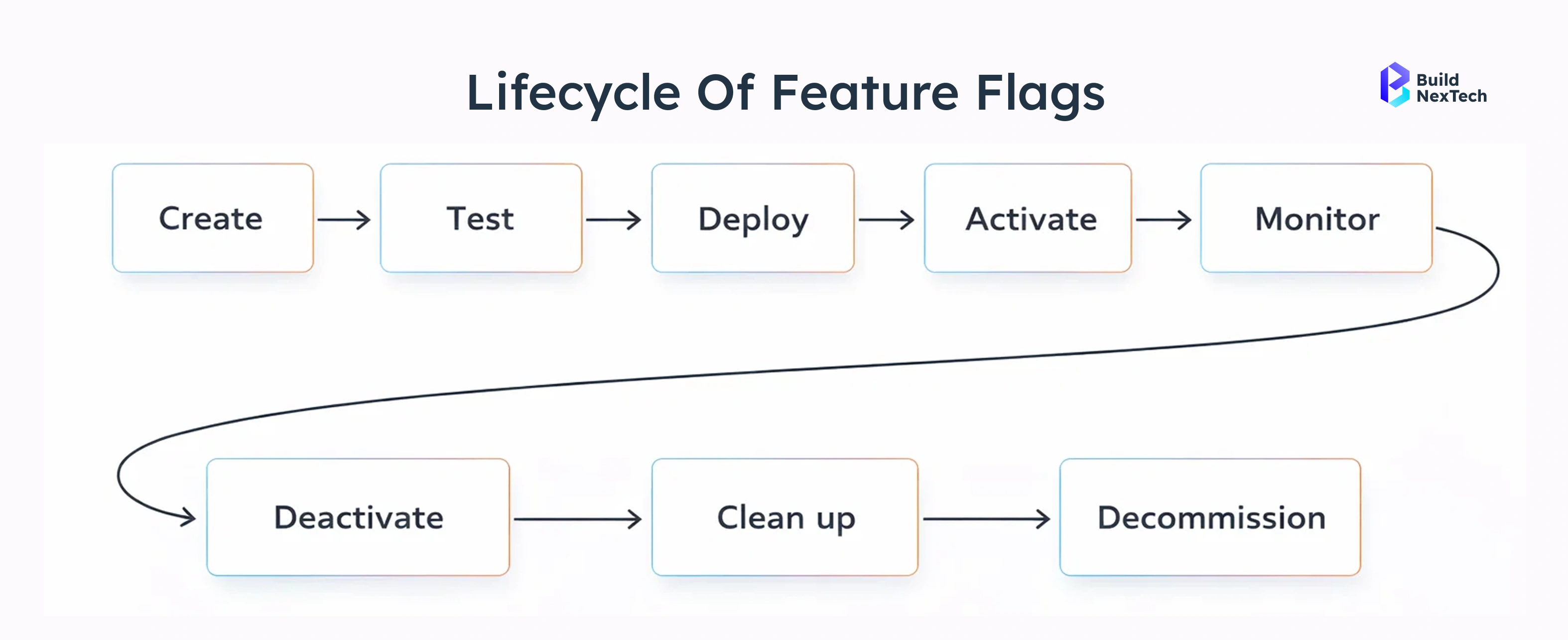
Recommended lifecycle:
- Create flag
Define the goal of the flag and what success looks like before enabling it. - Roll out
Enable the feature gradually for selected users or environments. - Evaluate
Monitor performance, stability, and user behavior to decide the next step. - Retire
Remove the flag and clean up the code once the feature is fully released or discarded.
Golden rule:
Every feature flag must have a clear owner and a planned expiry date.
Avoiding Technical Debt and Flag Sprawl
As teams scale, unmanaged feature flags can quickly grow into technical debt.
Common anti-patterns
- Permanent flags
Flags that stay in code long after the experiment is complete. - Nested flags
Multiple flags inside each other, making logic hard to understand and test. - No documentation
Teams don’t know why a flag exists or whether it’s still needed.
Real-World Use Cases and Case Studies
Case Study 1: Netflix-Style Progressive Delivery
- Problem
Netflix frequently rolls out UI and experience updates across a massive global user base. Releasing changes to all users at once often increases the risk of regressions and negative user impact.
- Solution
Netflix uses feature flags combined with user segmentation to control feature exposure. New UI changes are enabled gradually for specific user groups, regions, or devices instead of being released globally.
- Outcome
- Significant reduction in deployment-related failures
- Faster and safer experimentation with new UI features
- Ability to instantly disable problematic features without redeploying
Source:LINK
When Feature Flags Are Not Enough
Limitations of Feature Flags
Feature flags do not replace core engineering fundamentals. They help control releases, but they cannot fix underlying problems.
They don’t replace:
- Testing – Bugs will still reach production if code is not properly tested
- Good architecture – Poorly designed systems remain fragile, even with flags
- Observability – Without monitoring, issues may go unnoticed
- Security reviews – Feature flags cannot prevent security vulnerabilities
Feature flags reduce risk, but they cannot eliminate it on their own.
Combining Feature Flags with Deployment Strategies
Feature flags are most effective when paired with established deployment strategies rather than used on their own.
Safe releases =
- Feature flags + controlled feature exposure
- Canary deployments + early feedback from small user groups
- Blue-green deployments + zero-downtime infrastructure switches
- Strong CI/CD pipelines + automated testing and validation
Together, these practices form a layered release strategy that reduces deployment risk and improves reliability.
Conclusion
Deployment failures are rarely caused by a single bad commit—they usually happen when changes are released too quickly and too broadly. Feature flags address this by separating deployment from release, giving teams greater control over how and when features reach users.
When combined with CI/CD pipelines, monitoring, and proven deployment strategies, feature flags enable safer rollouts, faster experimentation, and instant recovery from failures. To stay effective, they must be managed with clear ownership, defined lifecycles, and regular cleanup.
Modern web service platforms like bnxt.ai further support this approach by helping teams build, deploy, and scale web applications with reliability and flexibility. Together, feature flags and robust web services create a strong foundation for delivering high-quality software with confidence.
People Also Ask

Do feature flags work with database schema changes?
Feature flags can hide application logic, but database changes must remain backward compatible. Use expand-and-contract patterns when evolving schemas alongside flags.
Should feature flags be stored in code or managed externally?
While simple flags can live in code, production systems benefit from external flag services that support real-time updates, auditing, and access control
Can feature flags be tested before reaching production?
Yes. Flags should be validated using unit tests, integration tests, and staging environments with different flag states to prevent unexpected behavior.
What happens if the feature flag system goes down?
Most systems fall back to safe defaults or cached values. Designing flags with sensible defaults ensures the application remains stable during outages.
Who should own feature flags—developers or operations?
Ownership should be shared. Developers define flag behavior, while operations teams manage rollout, monitoring, and emergency controls


.webp)
.webp)
.webp)

.webp)
.webp)



