
.png)
%20(1).webp)
Choosing the right headless CMS is not just a technical decision it shapes how fast your team ships content, how well your site performs, and whether your infrastructure holds up as you scale.
With platforms like Contentful, Sanity, Strapi, and Hygraph all competing for attention, most teams get stuck on the same question: which one actually fits our use case?
This guide gives you a structured framework, real comparisons, and clear decision criteria so you can choose with confidence and avoid a costly re-platform six months from now.
What is a Headless CMS and Why It Matters Today
Modern businesses don't just manage one website they manage content across mobile apps, web platforms, digital signage, and third-party integrations. A headless CMS handles this by separating where content is stored from how it is displayed, then pushing that content everywhere through REST or GraphQL APIs.
Understanding this API-first model is the foundation for every decision that follows. Without it, you are comparing features instead of evaluating fit.
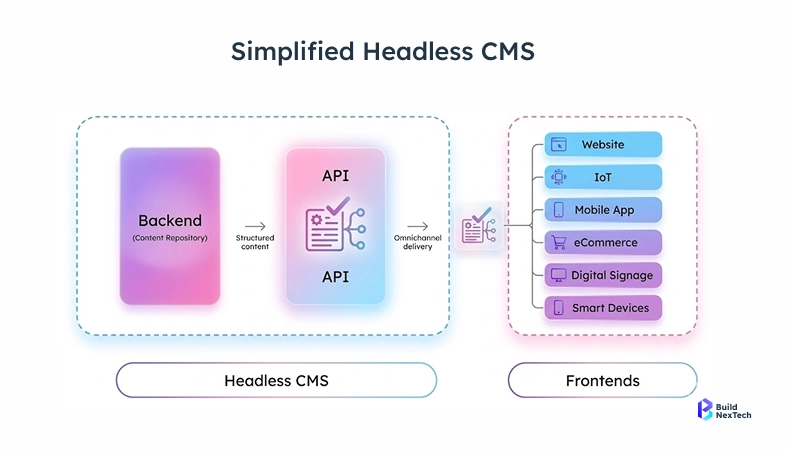
Understanding Headless CMS Architecture
A headless CMS stores content and exposes it through a Content API via REST endpoints, GraphQL, or GroQ queries without prescribing how it should look on screen. Developers use any frontend they prefer: React, Vue, Next.js, or static site generators for Jamstack builds.
This decoupled approach lets teams reuse content across multiple frontends, maintain a consistent content structure, and publish faster across all channels without rebuilding content from scratch.
Why Headless CMS is Growing in Popularity
There are several converging forces changing the way digital leaders are looking to transition to Headless Content Management Systems:
- Omnichannel publishing requirements – The need for reusable content to be able to be served to web, mobile, digital signage and voice without needing to re-build that content.
- Growing adoption of Jamstack sites, Static Site Generators and new front end frameworks such as Next.js and SvelteKit.
- Pressure from Core Web Vitals – There are now Content Delivery Network supported methods of delivering content through a Content Delivery Network and that has a direct impact on how your site ranks in organic search.
- Adoption of a Microservices Architecture - content operations are increasingly co-locating with commerce, personalization and semantic search type services.
- The need for Content Agent and agent context – The growing use of machine-readable structures to drive the use of AI-driven content personalization pipelines.
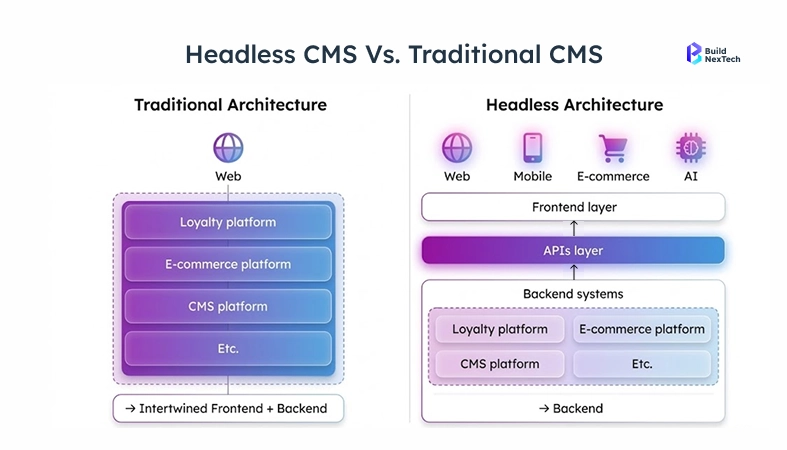
Core Capabilities of a Headless CMS
Before comparing CMS platforms, know what the category's core capabilities actually look like:
How to Choose the Right Headless CMS (Step-by-Step Framework)
With options ranging from Contentful and Sanity to Strapi, Hygraph, Wix Headless, and Sitecore XM Cloud, the challenge isn't finding choices — it's filtering for fit across content structure, API maturity, and workflow needs.
This three-step framework cuts through the noise, starting with requirements, moving through deployment models, and landing on an informed platform decision.
Define Your Project Requirements
Start here before product demos or feature comparisons. Clarify the following:
- Content types: Are you managing blog posts, landing pages, or machine-readable structures for AI-driven personalization pipelines?
- Delivery channels: Web only, or multichannel delivery across mobile, digital signage, and Progressive Web Apps?
- Team composition: Editors need a strong visual editor and clean admin UI. Developers need solid GraphQL, REST, and API design support.
- Compliance and security: Do you need SOC 2, GDPR, or ISO 27001? Does your industry restrict hosting options?
- Timeline: Is this a fast proof of concept or a full microservices deployment with custom schemas and CRUD operations?
Choose the Right Deployment Model (Cloud vs Self-Hosted)
Your choice of hosting models has a lasting impact on content operations, content governance, and long-term API development costs:
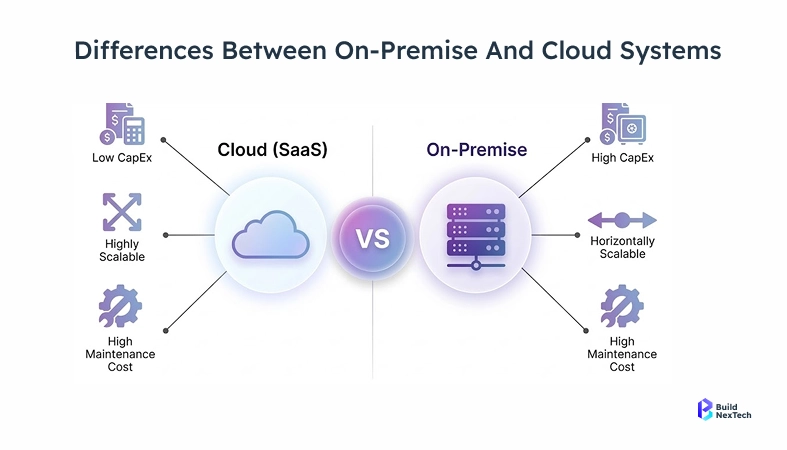
Open Source vs Proprietary: Making the Right Choice
The three open-source Content Management Systems (CMS) - Strapi, Directus, and Payload CMS - are good because they offer you complete control over your admins, schema/designs of your site, CRUD (create|read|update|delete) potential on any object, and much more; however, you're 100% responsible for hosting the CMS, versioning the APIs & providing security certifications. On the other hand, CMS platforms such as Contentful, Sanity (with its Content Lake, Content Operating System), Hygraph (the only native GraphQL federation), ButterCMS, Wix Headless very good SaaS (software as a service) platforms provide you with a polished workflow for content creation and publishing (including the ability to use an Image CDN); enterprise-level support; and, if you're working with multiple teams & deliverables, then the SAAS solution will affect how quickly you are able to publish & whether or not you can publish across multiple channels.
Top Headless CMS Platforms Compared
This is where most guides stop at a feature list. Below is a practical breakdown across the criteria that actually matter: API depth, editor experience, pricing model, and ideal use case.
Best Headless CMS for Enterprise
For enterprise deployments, Contentful and Sitecore XM Cloud lead the field. Contentful's mature API, granular roles, and robust content governance make it the default choice for large content teams managing high volumes across multiple brands.
Sanity is a strong enterprise contender when developer velocity and real-time collaboration are priorities. Its Content Lake and flexible GROQ-powered querying gives engineering teams more control than most SaaS platforms allow.
Best Headless CMS for Ecommerce
Ecommerce builds demand fast Content API response times, tight integration with commerce platforms, and strong support for product content modeling. Contentful and Hygraph both perform well here Hygraph's native GraphQL federation is particularly useful for federating product, inventory, and CMS data through a single endpoint.
Storyblok is worth evaluating for ecommerce teams that rely heavily on landing page flexibility and need non-technical editors managing product promotions without developer support.
Headless CMS Pricing Comparison
Pricing structures vary significantly and the free tier alone rarely tells the full story:
Headless CMS Evaluation Checklist (Decision Framework)
Shortlisting headless CMSs is easy. Scoring them objectively against your content delivery, API-first approach, editor usability, and content governance requirements is harder - and that is where most teams go wrong.
Use the decision tree and platform comparison table below as a working reference with your team to remove guesswork and focus on workflow maturity, GroQ queries support, visual editing quality, and real-world content operations fit.
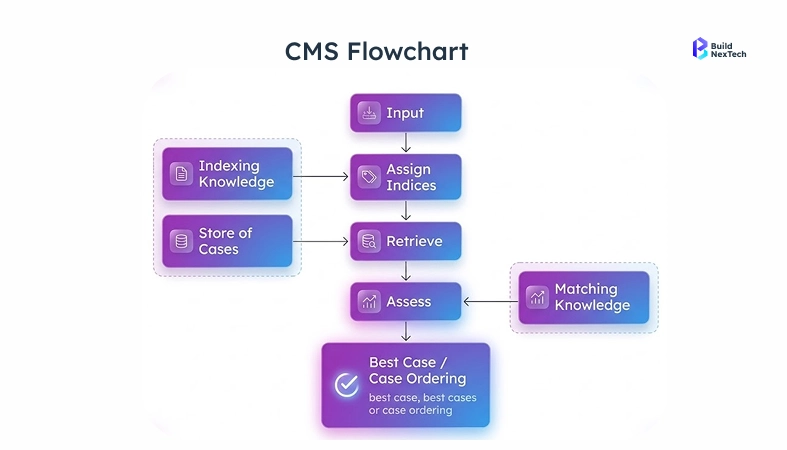
Decision Tree: How to Select the Right CMS Based on Your Use Case
Work through these questions before finalizing any CMS platforms shortlist:
- Need full data control and on-premise hosting? Prioritize self-hosted CMS platforms with custom admin panel and CRUD operations.
- Team is primarily non-technical content editors and content creators? Prioritize visual editor, editor usability, and content management interface quality.
- Building Jamstack sites or Static Site Generators properties? Prioritize Content Delivery Network, Next.js ISR support, and Content API response speed.
- Complex content model with relational content and rich text fields? Evaluate GraphQL API depth, GroQ queries, and content modeling flexibility.
Performance, Security, and Scalability Evaluation
Beyond features, evaluate these technical criteria to protect your digital experiences long-term:
- Content API Speed: Test REST API and GraphQL API response times under load - a slow Content API directly damages Core Web Vitals.
- Content Delivery Network and Image CDN: Global CDN with Image CDN support is non-negotiable for media assets at scale and international multichannel delivery.
- Security Certifications: SOC 2 Type II, ISO 27001, GDPR - required for regulated industries, and tied directly to your hosting models choice.
- API Versioning and Rate Limits: Understand REST endpoints throttling and how the platform manages API versioning as your content model evolves.
Common Mistakes to Avoid When Choosing a Headless CMS
Even experienced teams get this wrong. Most headless CMS selection mistakes are not technical - they are organizational and strategic, rooted in moving too fast without properly evaluating content structure, editor experience, workflow maturity, or content governance requirements.
These three mistakes come up repeatedly across teams of every size. Recognizing them early will sharpen every subsequent step of your evaluation across CMS platforms.
Mistake 1: Choosing Based on Trends Instead of Needs
The most popular headless CMS is not always the right fit. A startup on a simple Jamstack site does not need the same GraphQL federation, content governance framework, or omnichannel publishing infrastructure as an enterprise running Sitecore XM Cloud or a custom Content Operating System. Always anchor your evaluation to documented requirements - your content types, content model, API connectivity needs, and workflow maturity - not GitHub stars.
Mistake 2: Ignoring Content Team and Workflow Requirements
Developers evaluate CMS platforms on GraphQL API quality, REST API design, and API-first solutions. But content editors and content creators live in the admin UI and visual page editor every day. A clunky content management interface kills adoption fast. Before committing, validate these with your editorial team:
- Is content editing intuitive in the admin panel or visual editor without developer support?
- Does the platform support preview mode and draft mode for structured content review?
- Can content editors manage rich text fields, relational content, and media assets independently?
- Are content workflows, content lifecycle stages, and real-time collaboration built in natively?
Mistake 3: Overlooking Scalability and Integration Limits
CMS migrations are expensive and disruptive. Evaluate for where your content operations will be in two to three years, not just today. Teams routinely miss:
- REST endpoints and GraphQL API rate limits that throttle publishing velocity at scale.
- Missing API connectivity for content personalization, semantic search, or Content Agent integrations.
- No support for Next.js ISR, bundle size optimization, or Static Site Generators compatibility.
- Weak relational content, custom schemas, and content relationships as the content model grows.
Best Practices for Successful Headless CMS Implementation
Selecting the right CMS is half the job. How you implement it - from content modeling and API development to content workflows and content governance - determines whether your content operations thrive or stall under technical debt.
These three practices consistently separate successful headless CMS deployments from the ones that require painful re-architecture six months in, regardless of team size or workflow maturity.
Plan and Structure Your Content Model Early
Your content model determines everything downstream: how content types relate via relational content, how reusable content flows across channels, and how machine-readable structures support content personalization and Content Agent use cases. Run content modeling workshops with developers, content strategists, and content creators before writing code. A solid content-first approach means:
- No embedded HTML in rich text fields - keep content structure clean and portable.
- Typed fields wherever possible: dates, references, booleans, and machine-readable structures.
- Clear content relationships - a Blog Post references an Author, Category, and media assets.
- Localization and omnichannel publishing built into the content model from day one.
- Content governance documentation version-controlled alongside your codebase.
Align CMS with Frontend and Architecture
Your headless CMS is one node in a broader microservices architecture. Align it tightly with your front-end frameworks, API development pipeline, and deployment stack. If you are using Next.js on Vercel, look for webhook-triggered Next.js ISR, GraphQL API with GroQ queries, and a maintained SDK. For Multi-tenant Application setups, API versioning and API flexibility are non-negotiable. Cache Content API responses at the Content Delivery Network layer to protect Core Web Vitals, and use environment-specific REST endpoints for clean content governance across dev, staging, and production.
Optimize for SEO, Performance, and Workflows
Give content editors control over SEO fields - meta titles, descriptions, canonical URLs - directly in the admin panel without developer tickets. Support rich text and markdown in content editing fields for long-form content at scale. For performance, pre-render via Static Site Generators or cache at the Content Delivery Network layer to keep bundle size lean and Core Web Vitals strong. Leverage Image CDN for all media assets. Define clear content lifecycle stages - draft mode, preview mode, approved, published - and enforce role-based content governance permissions to keep content workflows accountable and your support system responsive.
Conclusion
Picking the right headless CMS is a strategic infrastructure decision that shapes how your team manages structured content, delivers digital experiences, and scales content operations - across Jamstack sites, Progressive Web Applications, omnichannel publishing pipelines, and future Content Agent integrations.
Use the takeaways and checklist below to move forward with clarity, and reach out to BNXT when you are ready for an expert hand in making the final call.
Key Takeaways for Choosing the Right CMS
Get this decision right and you will have a Content Operating System that scales with your business, empowers content editors, and gives developers the API flexibility they need. Here is what to keep front of mind:
- Start content-first: define content types, content model, custom schemas, and content structure before evaluating CMS platforms.
- Evaluate from both sides: developer (REST API, GraphQL API, API versioning) and editor (visual editor, admin UI, editor usability, workflow features).
- Plan for omnichannel publishing, content personalization, and multichannel delivery - even if they are not immediate needs.
- Match hosting models to your security certifications requirements and content governance framework, not just budget.
Final Decision Checklist
How BNXT Can Help You Choose the Right Headless CMS
At BNXT, we have guided dozens of product teams through the headless CMS landscape - from startups building their first Jamstack site to enterprise digital leaders migrating off monolithic platforms onto API-first solutions like Contentful, Sanity's Content Operating System, Hygraph, or Sitecore XM Cloud. We bring hands-on experience across the full spectrum of headless CMSs and CMS platforms.
Our process starts with your content model, content types, workflow maturity, API development needs, and omnichannel publishing goals - including content personalization, semantic search requirements, and support system fit - before we ever recommend a platform. From content structure planning to content modeling, API-first approach design, and full implementation, we are with you at every step. Reach out to the BNXT team and let us help you build content infrastructure with the right visual editor, admin UI, Content API, and content workflows - that you will not need to rebuild in two years.
People Also Ask

1. Which headless CMS is best for a Next.js project?
Sanity and Contentful are the most popular choices for Next.js projects. Both offer well-maintained Next.js SDKs, webhook-triggered Incremental Static Regeneration (ISR), and strong GraphQL support. Sanity edges ahead for developer-heavy teams thanks to its GroQ query language and generous free tier. Contentful is the safer choice for teams that need enterprise-grade SLAs and dedicated support.
2. What is the difference between a headless CMS and a traditional CMS?
A traditional CMS like WordPress manages both content storage and the frontend presentation layer as a single system. A headless CMS separates the two: content is stored in the CMS and delivered to any frontend via APIs. This gives developers freedom to use any framework, and lets teams publish the same content to web, mobile, and other channels without rebuilding it.
3. Is Strapi a good choice for enterprise projects?
Strapi is a strong choice for enterprises that need full control over their infrastructure, data, and custom schemas. It is open-source and self-hosted, which means your team owns hosting, API versioning, and security certifications. For enterprises that need a polished SaaS workflow with managed infrastructure, Contentful or Hygraph are typically better fits.
4. How do I test APIs in my headless CMS?
Use tools like Postman to send requests directly to your CMS REST endpoints or GraphQL API and validate response payloads. For load testing at scale, tools like k6 or Artillery are worth evaluating to simulate high-traffic conditions and identify API rate limit thresholds before they become a production issue.
5. What should I look for in a scalable headless CMS?
Evaluate API rate limits, CDN and Image CDN support, multi-tenant capabilities, and the platform's track record handling high content volumes. Also check whether the platform supports API versioning this is critical as your content model evolves and whether it integrates with personalization, commerce, or search services you'll need down the line.


.webp)
.webp)
.webp)

.webp)
.webp)



