

Building cross-platform mobile applications traditionally requires skilled developers, long development cycles, and significant investment. For startups and businesses that want to launch products quickly, this can become a major barrier. FlutterFlow is changing this landscape by making app development faster, more accessible, and far more efficient. Built on Google’s Flutter framework, FlutterFlow offers powerful low-code features for cross-platform app development, combining drag-and-drop design, Firebase integration, AI-powered tools, and responsive UI to accelerate prototyping, streamline workflows, and deliver production-ready applications efficiently. Choosing the right backend frameworks for scalable applications is equally important when building production-ready systems. As the demand for rapid digital product development grows, platforms like FlutterFlow are becoming essential tools for startups, enterprises, and product teams looking to accelerate cross-platform app development while reducing time-to-market and overall development costs.
By 2027, the global low-code and no-code development platforms market is forecast to reach 65 billion U.S. dollars, showing why no code application development and app development services like FlutterFlow are transforming mobile application and web app development worldwide.
What is FlutterFlow and Why Does It Matter?
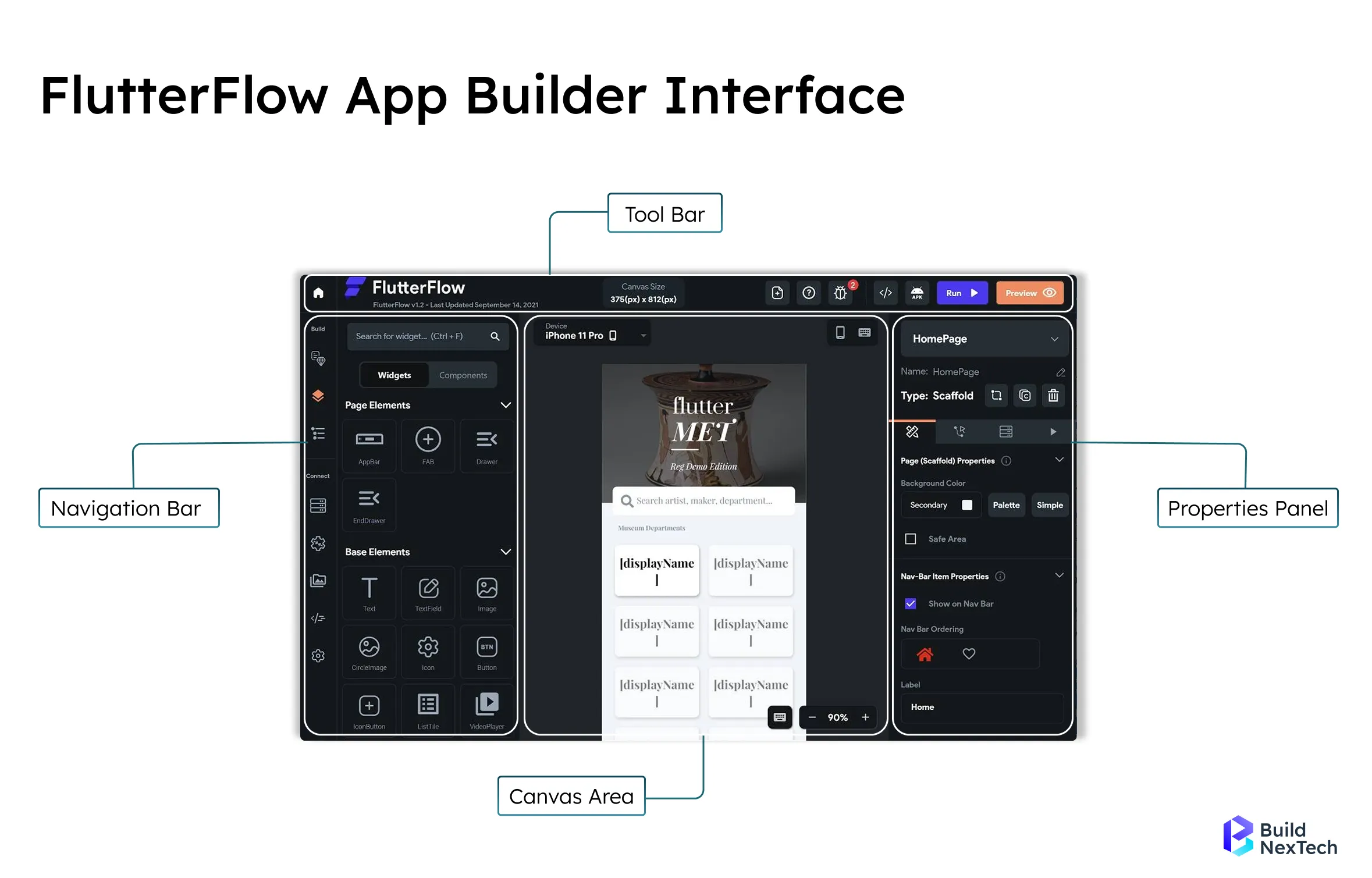
FlutterFlow is a no-code development platform and app builder software built on Flutter, helping developers and business owners quickly develop an app. It enables cross platform app development and mobile app development tools for Flutter apps, FlutterFlow web app, and mobile application projects, with seamless Firebase integration. Developers can manage logic workflows using FlutterFlow’s Action Flow Editor, allowing them to control navigation, backend calls, and state management inside a visual interface.
Using its drag-and-drop app builder platform and code export to Android Studio, FlutterFlow reduces app development costs while making custom app development and web app development more efficient.
Why FlutterFlow Matters in Modern App Development:
- Lets developers skip repetitive UI setup — live previews show changes instantly without recompiling.
- Ships with 100+ prebuilt widgets covering authentication, dashboards, and e-commerce flows out of the box.
- Cuts average MVP development time significantly compared to writing Flutter from scratch.
- Keeps costs predictable with a subscription model instead of per-feature developer billing.
- Used in production by companies ranging from YC-backed fintech startups to healthcare SaaS platforms.
Key Features of Flutter Flow for Modern App Development
FlutterFlow offers powerful low-code features for cross-platform app development, combining drag-and-drop design, Firebase integration, AI-powered tools, and responsive UI to accelerate prototyping, streamline workflows, and deliver production-ready applications efficiently.
FlutterFlow supports team collaboration with shared workspaces, version history, and role-specific permissions, allowing development teams to coordinate efficiently across projects.
- Drag-and-Drop Builder - Simplifies UI/UX creation with reusable widgets, making cross-platform app development faster without complex coding.
- Firebase & Firestore Integration - Enables real-time database, authentication, cloud storage, and API connectivity for scalable apps.
- AI-Powered Tools - Boost productivity with AI-generated code, smart suggestions, and automated workflows.
- Custom Code & API Integration - Extend low-code flexibility with REST APIs, microservices, and custom Dart code for advanced functionality.
- Responsive Design System - Build adaptive layouts that adjust seamlessly across devices, ensuring a consistent user experience.
- Pre-Built Templates & Widgets - Speed up development using ready-made templates for dashboards, authentication, and e-commerce apps.
- Collaboration & Version Control - Teams can collaborate in real-time with GitHub integration, making project management smoother.
Flutter vs FlutterFlow - What Sets Them Apart?
For businesses evaluating app development services, it’s important to understand how Flutter and FlutterFlow differ beyond definitions. Both are powerful in cross-platform app development, but they serve different organizational needs depending on budget, scalability, development resources, and long-term maintenance.
The right choice depends on where you are in the build. FlutterFlow gets you to a working product faster. Flutter gives you more room to grow into complexity. Most teams we work with start with FlutterFlow and bring in custom Flutter code only when they hit a specific wall.
How to Get Started: Templates, Tools, and First App Steps
FlutterFlow simplifies custom app development with templates, pre-built widgets, and Firebase integration, enabling faster cross-platform mobile development or a FlutterFlow web app at a lower app development cost. Its no-code app builder platform helps both developers and entrepreneurs quickly develop an app with reduced complexity while maintaining high performance and scalability.
FlutterFlow also supports third-party integration through RESTful API connections and external third-party APIs, enabling integration with payment gateways, analytics platforms, and external services.
FlutterFlow also includes built-in app security features, including support for Firebase security rules, secure authentication workflows, and protected backend access.
1. Explore FlutterFlow Templates:
Templates accelerate Flutter app development and no-code application development:
- Choose ready-made templates for dashboards, e-commerce, social apps, or authentication flows.
- Customize layouts, widgets, and design elements using the drag-and-drop builder.
- Ensure smooth performance on both Android and iOS devices.
2. Set Up Essential Tools and Integrations:
Prepare your development environment with essential tools and integrations:
- Figma / Sketch: Design UI/UX mockups.
- Postman: Test APIs and backend integrations.
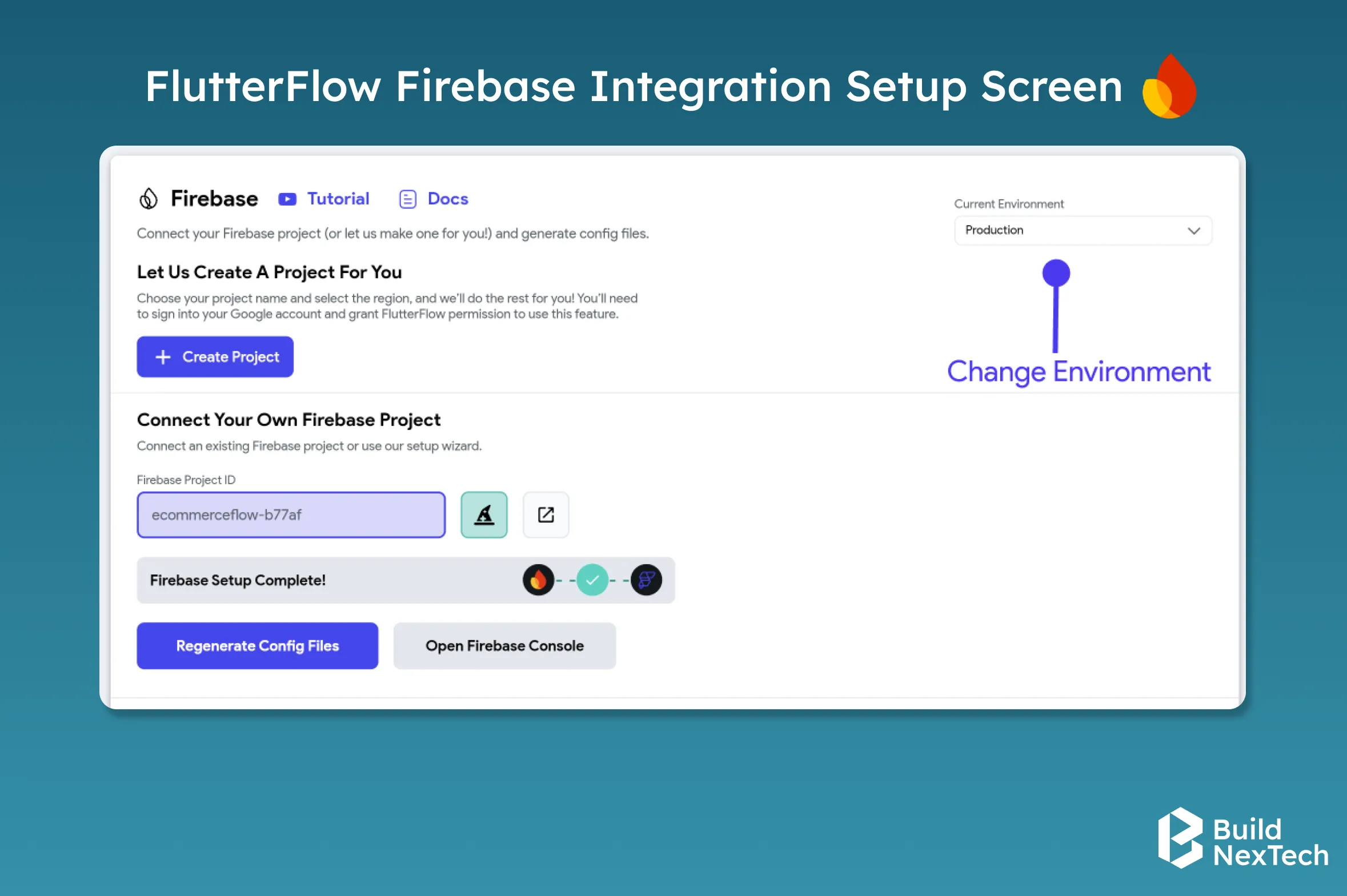
- Firebase: Manage authentication, cloud storage, and real-time databases efficiently.
- Supabase: An alternative backend for authentication, database, and storage solutions.
- GitHub / GitLab: Track changes and collaborate with team members.
- Slack / Trello: Organize workflows and manage project tasks effectively.
- Stripe: Integrate secure payment processing for apps with e-commerce or subscription features.
- Google Analytics: Monitor user interactions and app performance for better decision-making.
3. Design with the No-Code App Builder:
Developers should regularly test applications in FlutterFlow’s testing environment, use testing tools such as the debug panel, and perform local run tests to ensure application stability before deployment.
Easily build and customize app layouts with intuitive drag-and-drop features, making design faster and simpler.
- Create screens using reusable widgets, buttons, and navigation elements.
- Test UI in real-time with live previews.
- Integrate APIs, custom Dart code, or third-party SDKs for advanced functionality.
- Ensure a consistent user experience across mobile applications and FlutterFlow web apps.
4. Connect Backend and Firebase:
- Link your app to Firebase or Supabase for authentication, storage, and database functionality.
- Streamline data handling and implement workflows to improve performance.
- Support scalable cross-platform mobile development and web apps.
5. Preview, Test, and Launch:
- Test your app across multiple devices to ensure responsiveness.
- Optimize performance, speed, and user experience while minimizing development cost.
- Launch on Android, iOS, or as a FlutterFlow web app, making your project live efficiently.
Best Practices for Efficient Flutter Flow Development
Streamlining your FlutterFlow process drives better organizational performance, reduces app development cost, and aligns with external best practices for scalable, efficient solutions. Below are five essential steps supported by industry experience:
- Optimize Assets & Enable Lazy Loading for Performance
Compress images and enable lazy loading, code splitting, and tree shaking to boost performance levels in your cross platform mobile development projects. These strategies reduce load times across mobile applications and FlutterFlow web app deployments. - Structure Projects with Reusable Components & Organized Architecture
Create libraries of reusable UI components like buttons and form fields. Maintain a clear file structure for pages, logic, and data models. This improves custom app development, supports standard practices, and enhances organizational effectiveness. - Use Secure, Optimized Backend Integration
Firebase or other database platforms, blockchain web development frameworks, and design efficient queries with indexing and caching. Minimize network calls by bundling data, which supports knowledge management programs, Inventory Management, and customer service features without slowing the app. - Test for Scalability with Cross-Device and Load Testing
Simulate real-world usage by testing on multiple devices and under load. This ensures UI responsiveness, captures performance bottlenecks, and supports systems and structures needed for growing teams or tools like AI-powered coach interfaces. - Facilitate Collaboration with Versioning and Project Branches
Organize development using separate environments or feature branches. This supports iterative, just in time updates and reinforces organizational performance by enabling coordinated work across internal teams, community centers, or decentralized workflows.
When Should You Use FlutterFlow for App Development?
FlutterFlow is best suited for organizations that want to build applications quickly without investing in long traditional development cycles. By combining a visual interface with the power of the Flutter framework, it allows teams to design, prototype, and launch cross-platform applications efficiently. Businesses can reduce development complexity while still building scalable mobile and web applications.
Many startups, product teams, and enterprises adopt FlutterFlow when they want to move from idea to working product faster. The platform allows teams to experiment with user interfaces, workflows, and features while maintaining flexibility for future development.
Building MVPs and Startup Applications
FlutterFlow is particularly useful for startups building Minimum Viable Products (MVPs). Instead of spending months developing a full application, teams can design the UI visually and integrate backend services quickly.
Startups can validate their ideas faster by launching a functional product and gathering user feedback early. This rapid development cycle allows companies to iterate quickly and improve their product before investing in large-scale development.
Rapid Prototyping and Product Validation
Product teams often use FlutterFlow to create prototypes and test application ideas. The drag-and-drop interface makes it easy to build screens, define workflows, and preview the application in real time.
Designers and product managers can collaborate closely with developers, ensuring that user interface concepts translate quickly into working applications. This reduces communication gaps between teams and accelerates product validation.
Internal Business Applications
Another common use case for FlutterFlow is building internal tools and business applications. Organizations frequently use the platform to develop dashboards, workflow management tools, and administrative panels.
Since FlutterFlow integrates with backend services like Firebase and APIs, companies can quickly connect their applications to databases, authentication systems, and external services. This makes it easier to build tools that improve operational efficiency.
Cross-Platform Mobile and Web Applications
FlutterFlow enables teams to create applications that work across multiple platforms from a single project. Instead of building separate applications for Android, iOS, and web environments, developers can design and manage everything in one place.
This cross-platform capability reduces development effort and ensures consistency in the user experience across devices. It is especially valuable for businesses that want to reach a wider audience without maintaining multiple codebases.
When Traditional Development May Be Better
Although FlutterFlow is powerful, it may not be ideal for highly complex applications requiring advanced system integrations or extensive custom logic. Large enterprise systems, complex animations, or applications requiring deep customization may still benefit from traditional Flutter development.
In many cases, teams combine FlutterFlow with custom coding to extend functionality and achieve the best balance between speed and flexibility.
Real-World Examples & Use Cases Built with Flutter Flow
Levi9 - Banking App Transformation
Levi9, a software development company, needed to build a secure banking app that was both scalable and quick to deliver. Traditional methods would have taken longer due to complex UI design and integrations. To speed things up without losing quality, Levi9 used FlutterFlow.
- Enabled quick UI prototyping with the drag-and-drop app builder.
- Offering real-time Firebase and API integration for secure transactions.
- Supported cross-platform app development with a single codebase for Android and iOS.
- Simplified adding security, authentication, and custom app development features.
- Helped deliver the mobile application faster to market with reduced app development cost.
Atlas - Ex-YC Founders Build a New Credit Card Platform
Atlas, founded by former Y Combinator entrepreneurs, aimed to launch a modern credit card platform quickly and efficiently. Traditional approaches required extensive backend setup and manual workflows. To accelerate development without compromising security, Atlas leveraged FlutterFlow.
- Enabled rapid UI prototyping with an easy no-code app builder design.
- Integrated real-time API connections for payment processing and user management.
- Supported cross-platform mobile development using a single codebase.
- Simplified implementation of security, compliance, and custom app development features.
- Helped bring the Flutter app and web app to market faster.
Healthcare Unity - TrustEHR
Healthcare Unity set out to develop a secure, user-friendly EHR (Electronic Health Record) system for healthcare providers. Traditional methods would have taken months due to complex data structures and compliance requirements. By using FlutterFlow, Healthcare Unity could accelerate development while maintaining high standards.
- Facilitated quick UI prototyping for patient and doctor dashboards using the app builder platform.
- Offering real-time Firebase and API integration for health records and appointment management.
- Enabled cross-platform app development from a single codebase for Android, iOS, and FlutterFlow web app.
- Simplified HIPAA-compliant security, authentication, and no code application development features.
- Helped deliver the mobile application faster to healthcare providers with reduced app development cost.
Limitations of Flutter Flow to Know
While FlutterFlow is a top no-code app builder for cross platform app development,web app development ,businesses and developers should consider project complexity, performance, integrations, and long-term Flutter app development requirements.
- Limited Deep Customization - Advanced Flutter app development features, system-level APIs, or unique animations may require manual coding in Android Studio.
- Platform Dependency - Updates and new features are controlled by FlutterFlow, which may impact blockchain app development or ongoing custom app development.
- Learning Curve for Advanced Features - Integrating Firebase, APIs, or complex workflows still needs technical understanding, even on a no code development platform.
- Performance on Large Apps - Large mobile applications may face performance bottlenecks; optimization is needed for smooth cross-platform mobile development.
- Limited Third-Party Integrations - Some enterprise-level APIs or custom features may not be fully supported by this app builder software.
- Subscription Costs - FlutterFlow pricing is subscription-based; ongoing costs may add up for teams doing multiple Flutter app development services.
FlutterFlow in the AI-Driven Development Era
FlutterFlow now includes a built-in AI widget generator that lets you describe a UI component in plain text and get a working widget instantly. It also supports AI-assisted action flows, where you can describe the logic you want "send a push notification when a user hasn't opened the app in 7 days" and FlutterFlow generates the backend action automatically.
For development teams, this changes the math on MVPs. What used to require a developer to wire up manually can now be prototyped by a product manager in an afternoon. The risk is over-reliance AI-generated flows still need review, especially for apps handling payments or health data. But for early-stage teams moving fast, it's a meaningful edge.
Conclusion: Is Flutter Flow Right for Your Next Project?
FlutterFlow has emerged as a practical and future-ready no-code app builder, offering speed, flexibility, and efficiency for businesses seeking cross-platform mobile and web app development. With its intuitive drag-and-drop interface, pre-built templates, and growing ecosystem, it empowers teams to deliver applications faster while keeping costs predictable, an advantage crucial for today’s competitive digital landscape.
Still, the decision to adopt FlutterFlow depends on your business goals and project scale. For startups and MVPs, it delivers agility and rapid testing. For enterprises and beyond, pairing FlutterFlow with backend systems, professional development support, and advanced integrations ensures long-term scalability, reliability, and business impact. This makes it not just a tool, but a foundation for innovation in modern app development.
If you're deciding whether FlutterFlow is the right fit for your next build — an MVP, a client project, or an internal tool — we've shipped all three at BuildNexTech. We'll give you an honest answer, not a sales pitch. Book a free 30-minute call → and we'll walk through your use case, your timeline, and whether FlutterFlow or traditional Flutter development makes more sense for what you're building.
People Also Ask

Does FlutterFlow support CI/CD pipelines?
Yes, FlutterFlow supports CI/CD pipelines with GitHub Actions integration, enabling deployment automation, continuous delivery, smoother testing, and reliable workflows across environments.
Is FlutterFlow suitable for production applications?
Yes, FlutterFlow can be used to build production-ready applications. The platform supports features such as authentication, database integration, API connectivity, and responsive design. Developers can also export the generated Flutter code and continue development in traditional Flutter environments if advanced customization is required.
Can FlutterFlow integrate with external APIs and backend services?
Yes, FlutterFlow supports integration with external APIs and backend platforms such as Firebase, Supabase, and REST APIs. This allows developers to connect applications to databases, authentication services, payment gateways, and third-party systems while maintaining scalability and performance.
Does FlutterFlow support custom Dart code?
Yes, FlutterFlow allows adding custom Dart code blocks for advanced customization, flexible functionality, deeper logic, unique integration, and improved user experience across modules.
How does FlutterFlow handle app performance?
FlutterFlow handles app performance through an optimized framework, efficient widget rendering, caching strategies, scalable backend integration, database syncing, smooth animations, and responsive user experiences.


.webp)
.webp)
.webp)

.webp)
.webp)



