
.png)
.webp)
Cloud computing provides organizations with the opportunity to achieve scalability, flexibility, and cost-saving opportunities through the use of cloud technology; however, the journey that an organiszation undertakes in migrating from an established on-premise system to a new cloud solution presents challenges in determining on-premise cloud, data security, and workload requirements. In addition to outlining the most common migration mistakes made by organizations moving to the cloud, this blog post discusses the advantages of on-prem systems and how hybrid cloud technology provides businesses with a methodology to achieve performance, security, and cost-effectiveness throughout their operations today.
Understanding Cloud Computing and On-Premises Solutions
- Many companies utilize a hybrid approach to implement both on-premises and cloud solutions.
- Cloud platforms are able to provide businesses with a scalable and lower-cost infrastructure and cloud setup, whereas on-premises solutions allow for complete control over their data, security, and performance.
- The final decision will ultimately be based on the workload sensitivity of the company as well as any regulatory compliance requirements they need to adhere to, in addition to financial considerations related to the implementation of either or both types of solutions.
.webp)
What is Cloud Computing?
Cloud computing is delivering access to resources used to provide computing services (and related products/services) from the internet, including servers, storage, database management, networking, software services (cloud-based apps), analytics, etc.
Organizations may take advantage of cloud computing by scaling their computing resources on demand, lowering their initial investment for infrastructure, providing global computing power while avoiding maintenance and management of physical hardware.
Public cloud environments provide multiple zones of availability globally to improve uptime and redundancy.
What is On-Premises Computing?
On-premises computing consists of hosting and managing ALL of a company’s IT resources within the company’s own facilities.
Organizations have complete control of their IT hardware, software, and data; thus, they can manage their workload regarding security, compliance, and performance to ensure that they can perform efficiently for their mission-critical workloads, which require such controls as strict governance and a minimised external attack surface.
Types of Cloud Services
Cloud services are generally categorized as:
Flexible cloud services allow access to IT resources based on an organization's requirements for flexibility and based on the demands of the cloud. IaaS (infrastructure as a service) provides a virtualised infrastructure with complete control of the underlying hardware, and PaaS (platform as a service) provides a ready-to-use development environment. while SaaS (software as a service) provides managed software via the Internet. Making the best choice between the three types will assist organisations in establishing the right combination of control, efficiency, and scalability.
.webp)
Risks Associated with Cloud Migration
Moving to the cloud offers increased growth and change, but it could also add some risk factors, such as data loss or theft, difficulty moving applications, operational risks, remote cyber attacks, having an outage during the migration period, and being unable to quickly set up a new cloud-based environment.
Before starting a data migration project, fully understand the risks involved with migrating workloads to the cloud. Make sure to assess the post-migration risks associated with the workloads moved to the cloud before developing your organization’s migration strategy.
Data Security in the Cloud
Many organiszations face challenges in their transition from data security as it relates to cloud computing, primarily around securing sensitive data. Many organisations are reliant on the CSPs’ security mechanisms to protect sensitive data from unauthorised access, data breaches, or failure to comply with regulatory requirements. Systems may be compromised by improper configuration of storage, lack of controlling access rights, and/or weak utilisation of multi-factor authentication.
Examples of mitigating controls include encryption, implementing and enforcing strict access controls; perform regular audit checks, and establishing and maintaining backup plans to ensure that cloud data is adequately protected while continuing to meet both access speed and compliance requirements.
To reduce risks, organizations should adopt a security-first approach that includes:
- Encryption and data loss prevention
- Strong access controls and MFA
- Continuous monitoring by a dedicated security team
- Regular audits and compliance checks
These practices strengthen cloud security services and protect data in shared cloud environments.
Challenges of Cloud Application Migration
Cloud application migration can be both complex and costly to perform cloud application migration if it hasn't been planned appropriately. Some examples of these challenges are:
Application compatibility problems:- For example, legacy applications may need to be redesigned to function efficiently once they are moved to the cloud.
Downtime:- During the process of migrating data, services may experience downtime, leading to potential loss of customer satisfaction and revenue.
Inaccurately configured cloud environments:- Improperly configured cloud environments can also lead to security vulnerabilities or system failures.
Difference in performance levels:- Applications that are optimized to operate within on-premises systems often do not work as well when running in a cloud-based environment due to latency.
Cloud Security Infrastructure Vulnerabilities
Mismanagement of environments, even with the presence of proper security infrastructure in the cloud, can still expose organisations to vulnerabilities.
To minimize the above risks, organizations should implement proactive controls and continuously monitor their cloud computing data security with a focus on:
- Regular audits of access permissions and identity management
- Updating of cloud configurations in a timely fashion with respect to security patches
- Automated threat detection and monitoring tools
- Stronger cloud data protection policies and compliance checks.
Advantages of On-Premises Infrastructure
Control Over Data Privacy
On-premises infrastructure allows an organization to have complete control over its data, including how it stores that data and how it safeguards that data.
This is important for supporting the organization’s obligations to comply with regulatory and privacy obligations.
- For example, healthcare and financial services organizations use on-premises solutions to store and process sensitive information within their secure internal networks.
On-premises infrastructure is therefore essential for minimizing the reliance on outside parties to store or process an organisation’s data.
- Thereby enabling the organization to respond quickly to any security-related incidents or concerns and also continue to maintain the trust of its customers.
Reduced Latency and Improved Performance
By having placed resources in Local on-premise infrastructure, you are reducing network latency by having the data and application near the user, which ultimately increases the speed at which they can interact with these resources.
The above is especially crucial when dealing with resource-intensive or real-time workloads (e.g., trading systems, control software, etc.). even the slightest amount of latency could potentially impact the efficiency of your operations.
Cost Considerations
- On-premise computing generally costs more to implement than cloud solutions, but it can still produce lower total costs over time when used for predictable workloads.
- Organizations benefit from predictable costs with no additional charges for subscriptions and use of cloud services.
- Therefore, organisations can have better control over costs and realize savings through planned utilisation of their infrastructure over time.
The Case for Hybrid Cloud Solutions
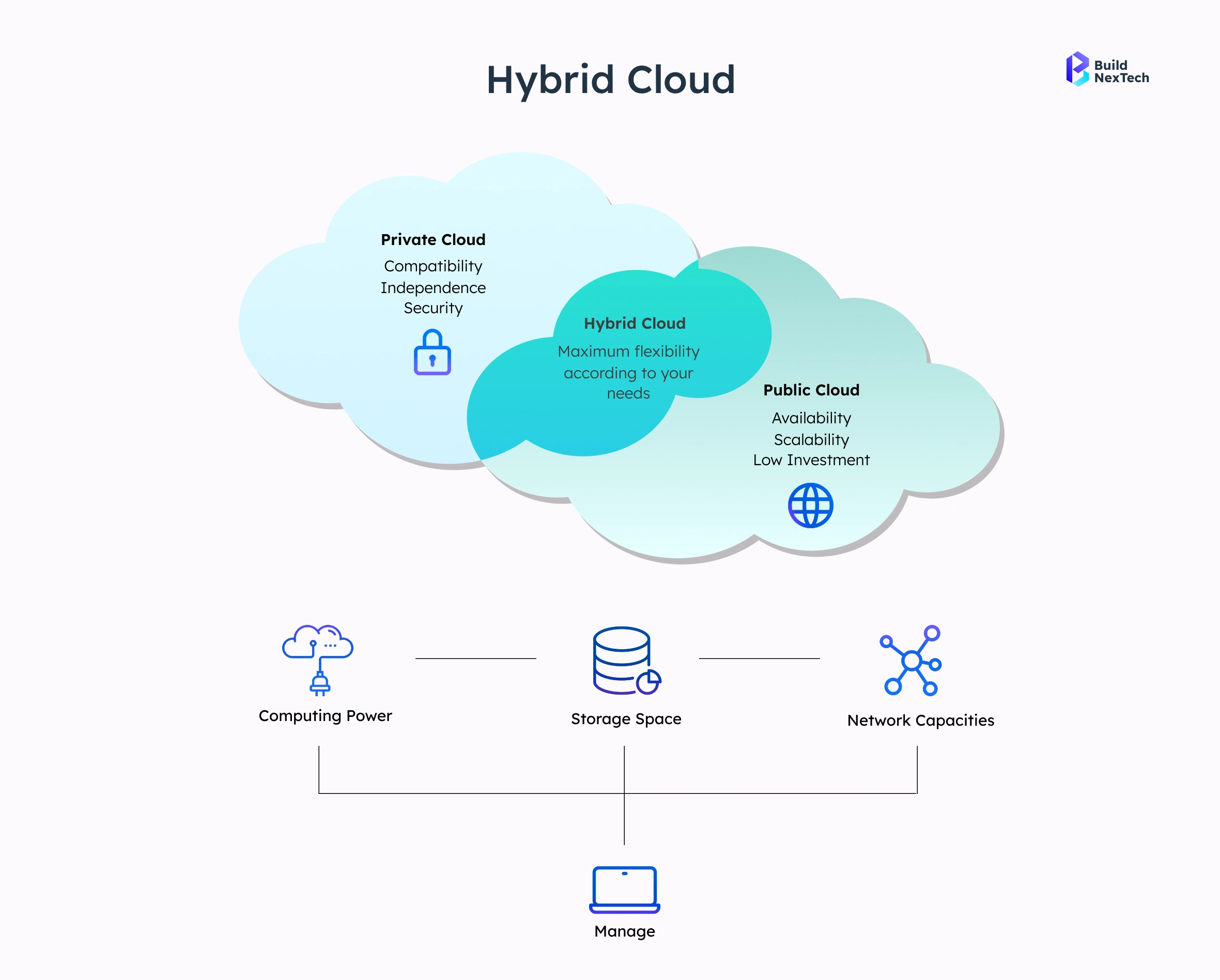
- With hybrid cloud solutions, organizations can blend their on-premise IT infrastructure and cloud-based resources to achieve balanced control, scalability, and cost.
- The organizations will be able to maintain their most sensitive workloads on-premises and leverage the cloud for additional flexibility and scalability.
- Organizations can also enhance performance, provide better disaster recovery, and adapt more readily to changes in their business requirements through the integration of these two environments.
Benefits of Hybrid Cloud
The combination of on-premises infrastructure and cloud services – hybrid cloud solutions- offers multiple real-world benefits.
- Workload Placement Flexibility: Organizations can run sensitive or critical workloads on-premises, while performing less sensitive workloads in the cloud.
- Scalability During Peak Demand: Organizations can add cloud resources during periods of high traffic without making an over-investment in permanent infrastructure.
- Disaster Recovery Improvements: Organizations can increase their business continuity and resilience through real-time data backups and failover systems in the cloud.
- Cost-performance Balance: Organizations can optimise costs by keeping steady-state workloads on-premises while scaling variable workloads in the cloud.
.webp)
Best Practices for Implementing Hybrid Cloud Infrastructure
Hybrid Cloud Infrastructure - Achieving Best Practices:
- Decide on where services should operate in your environment by performing an evaluation of your workloads.
- Use the same business controls and security settings regardless of the platform you are running in your infrastructure.
- Always use reliable Migration and Integration tools.
- Monitor performance, security, and compliance on an ongoing basis.
- Back up your data and have a disaster recovery plan in place.
- Provide training to IT teams so they can manage these types of environments well.
When to Choose Hybrid Cloud vs. On-Premises
On-premises is best for sensitive, compliance-heavy, and predictable workloads, while hybrid cloud suits scalable workloads and remote collaboration by offering flexibility and balance.
Making the Decision: On-Premises vs Cloud
Deciding between on-premises and cloud depends on an organisation’s security needs, workload patterns, performance requirements, and budget. Businesses must evaluate these factors carefully to choose a solution that supports long-term operational efficiency and growth.
Evaluating Your Organization's Needs
Decision-making should consider:
- Data sensitivity and regulatory requirements
- Workload patterns and performance needs
- Long-term cost implications
- IT team expertise and resource availability
Grubhub’s Vision for Payment Integrations
Organizations like Grubhub demonstrate the importance of robust, reliable integrations. Choosing between cloud, on-premises, or hybrid depends on:
- Real-time processing requirements
- Security and compliance standards
- Reliability during peak operations
Future Trends in Cloud and On-Premises Computing
- Expansion of hybrid cloud platforms with higher volume
- Improved application security for cloud applications using AI
- Reduced distance and latency (edge) for computing at the local level for on-premises deployments
- Creation of an enterprise cloud migration strategy standard.
Conclusion
Organizations that place value on their own control, security, and predictable costs are still drawn to on-premises computing, as it provides them with a compelling option. Although moving to the cloud provides scalability and flexibility of resource use, errors associated with that migration can lead to a number of potential risks that make an on-premise alternative a safer option for mission-critical operations. A hybrid cloud solution offers the most balanced option to address the benefits, while enabling the ability to mitigate the challenges of both types of infrastructure as well.
Making the right decision regarding infrastructure requires an assessment of all your organization's workload requirements, security requirements, and long-term cost implications. Ultimately, this will help you to ensure that your organization's IT environment is capable of effectively supporting your organisation's business objectives.
People Also Ask

1. What risks are associated with a cloud migration?
There are numerous risks involved in cloud migration, such as data breaches, compliance issues, and downtime during migration due to dependence on third-party infrastructure providers. By properly planning and implementing security measures, these risks can be mitigated.
2. What is the difference in data security between on-premises solutions and cloud solutions?
On-premises solutions allow full control over data and compliance regulations, while cloud solutions depend on the security protocols of the provider, so there may end up being shared responsibility and configuration risks.
3. What are the advantages of using a hybrid cloud?
Hybrid cloud provides scalability and local control to organisations, thereby allowing them to maximise performance, manage their costs, and comply with regulations over their workloads.
4. How do organisations determine if they are ready to migrate to the cloud?
Organisations should assess application compatibility, data sensitivity, internal knowledge/skills, performance, and long-term costs prior to migration.
5. How do organisations determine if they are ready to migrate to the cloud?
Organisations should assess application compatibility, data sensitivity, internal knowledge/skills, performance, and long-term costs prior to migration.


.webp)
.webp)
.webp)

.webp)
.webp)



