
.png)

In today’s digital-first world, a single outage or cyberattack can bring business operations to a halt within minutes. As organizations rely more heavily on cloud-driven systems, having a robust cloud backup and disaster recovery strategy is no longer optional—it is essential. Modern data environments demand resilient solutions that safeguard against natural disasters, accidental deletions, and increasingly sophisticated cyber threats. By implementing innovative cloud backup and disaster recovery solutions, businesses can ensure continuity, protect critical digital assets, and maintain customer trust even during unexpected disruptions.
Understanding Cloud Disaster Recovery
Cloud disaster recovery is really important for a business that wants to keep going on what, especially when disruptions affect physical infrastructure or distributed remote teams relying on a cloud-based server. It helps businesses protect the things that are really important to them like their critical workloads. This means they can keep working when something bad happens. If businesses understand the basics of disaster recovery they can make good choices about how to use it as part of a broader disaster recovery plan and effective disaster recovery planning. Cloud disaster recovery is a part of keeping a business running smoothly and improving overall digital resilience.
What is Cloud Disaster Recovery?
Cloud disaster recovery is a way to get your systems and data up and running after something bad happens. This is done by using the cloud to help you recover through recovery in cloud environments. The goal of disaster recovery is to make sure your business can keep going with as little interruption as possible and minimal impact on operations. Cloud disaster recovery helps you do this by making sure you can get back to work quickly with Rapid data restoration.
- Flexibility: Flexibility is really important when it comes to Cloud Disaster Recovery. The thing about Cloud Disaster Recovery is that it can change as your business grows and adapt to new attack trends and market insights. Cloud Disaster Recovery can add resources as you need them. This means you do not have to change your infrastructure to get resources for recovery. You can just get what you need easily. Cloud Disaster Recovery makes this process simple.
- Cost-Effectiveness: This is a way to save money on computer equipment and other hardware because the cost-effectiveness of cloud computing means you only use what you need when you need it. You do not have to buy a lot of equipment and set it up at your office, which is what on-premises infrastructure is. This really helps with Cost-Effectiveness because you are not wasting money on things you do not use.
- Accessibility: Accessibility is really important. Your team can get back their data from anywhere, whether they are working in on-site and cloud environments or remotely. This means that your business can keep running even if something bad happens in your area. Your team can recover your data so you do not have to worry about losing it. This helps to make sure that your business can keep going during big disasters that affect a whole region.
Types of Cloud Disaster Recovery Solutions
- Backup as a Service (BaaS): Backup as a Service, or BaaS, is really helpful because the people who provide it do all the backups for you and maintain backup in cloud systems. This means the internal IT staff at your company has a lot of work to do. They do not have to worry about doing backups all the time, which is a big plus for Backup as a Service.
- Disaster Recovery as a Service (DRaaS): It lets you move your systems to the cloud easily if something bad happens. This means you can keep working even if your main systems are not working. Disaster Recovery as a Service does this by giving you a solution to move your systems to the cloud when you need to, as part of secure cloud transitions.
- Hybrid Solutions: Offers a combination of on-premises and cloud backup solutions, giving businesses flexibility and redundancy across environments.
The Role of Cloud Computing in Disaster Recovery
- Scalability: When we talk about scalability, the cloud infrastructure is really helpful. It lets us get more resources really fast when we need them like during a disaster. This is especially important for disaster recovery. Cloud infrastructure helps us get what we need to recover from a disaster. Scalability is a part of this because it lets us use more resources when we have to.
- Cost Efficiency: When businesses use pay-as-you-go services, they can control their costs. This is because they only pay for the things they actually use which helps them save money. Pay-as-you-go services are a way for businesses to make the most of their budget. They do not have to pay for things they do not need. This makes pay-as-you-go services a good option, for businesses that want to be Cost Efficient.
- Automation: Automation is really helpful because it does things automatically. Automated replication and backup processes get rid of mistakes that people make. They help us get back on track faster when something goes wrong with Automation. This means we can recover from disasters a lot quicker with Automation.
Developing an Effective Disaster Recovery Plan
An effective disaster recovery plan enables businesses to react to a disaster quickly and effectively using effective tactics and clearly defined Key actions. It defines processes, roles, and priorities for recovery to ensure that business operations are not affected. Developing a disaster recovery plan is critical for businesses and supports Proactive risk management.
Key Elements of a Disaster Recovery Plan
- Risk Assessment: It helps people figure out what kind of risks and vulnerabilities are there including cyber risks like phishing links and Cloud-Based Cyber-Attacks. So organizations can come up with plans to deal with them. Risk Assessment is about being prepared for things that could go wrong. By doing a Risk Assessment organizations can make sure they have a way to reduce the risks and vulnerabilities they find. This way they can stay safe. Avoid problems. Risk Assessment is a part of keeping organizations secure.
- Recovery Strategies: These are like guides that tell you what to do to get your systems back up and running. They help you recover things in a more organized way. This means you can fix problems quickly and get everything working again. Recovery Strategies are really helpful because they give you step-by-step instructions so you know what to do first, what to do, and so on.
- Communication Plan: When something goes wrong a Communication Plan really helps teams and the people they work with the stakeholders to know what is going on. This way everyone is on the page and there is no confusion about what to do, during incidents. The Communication Plan is very important for teams and stakeholders to follow during these incidents.
IT Disaster Recovery Planning Best Practices
- Regular Testing: Routine testing uncovers gaps and weak points in the disaster recovery plan before a real crisis exposes them. Simulated incidents allow teams to evaluate response times, system recovery processes, and communication workflows. By validating the plan under controlled scenarios, organizations gain confidence that it will perform effectively during actual emergencies. Continuous testing also keeps the strategy aligned with evolving technologies and risks.
- Documentation: Clear, up-to-date documentation provides structured guidance when rapid decisions are required. Well-defined procedures, contact details, escalation paths, and recovery steps enable teams to act decisively under pressure. Accurate documentation eliminates confusion, reduces downtime, and ensures that everyone understands their responsibilities during a disruption.
- Employee Training: Practical training prepares employees to respond calmly and efficiently during unexpected events. When teams understand their roles and have rehearsed recovery procedures, they can minimize operational delays and avoid unnecessary panic. A well-trained workforce strengthens organizational resilience and improves overall response coordination.
Tailoring Your Disaster Recovery Plan for Business Needs
- Identify Critical Processes: We need to figure out what is really important for the business. The plan should look at the systems that're vital to making money and keeping the business running. These are the things that we need to get up and running first. We have to give priority to the systems that're critical to the revenue and operations of the business. This way the business can get back to normal as quickly as possible. The critical processes are the ones that're essential to the business so we need to make sure they are the first things we recover.
- Define Recovery Priorities: Defining recovery priorities is really important. It helps us figure out how long it will take to get things back to normal. We can then make a plan based on how each thing affects the business. This way we can use our resources in the way possible. By doing this we can make sure that the things that are really important to the business are taken care of first. This is all part of defining Recovery Priorities. It helps us make a good plan.
- Allocate Resources Efficiently: To make sure everything is in place we need to allocate resources. This means we have to get the infrastructure and the resources ready so that we can implement the recovery procedures when we need to. We have to make sure that the infrastructure and the resources are ready for this. By doing the recovery procedures, the infrastructure and the resources will be a lot easier to implement.
Tools and Technologies for Backup and Recovery
Contemporary backup and recovery solutions offer automation, scalability, and rapid recovery capabilities supported by modern solutions in cloud security platforms such as Darktrace / CLOUD. The adoption of appropriate technologies enables organisations to protect their data and ensure uptime. These solutions are the foundation of any disaster recovery plan.
.webp)
Overview of Server Backup Solutions
- Image-Based Backups: Image-Based Backups are really helpful because they let you save your server setup. This means you can get everything up and running quickly if something goes wrong without having to start from scratch and rebuild your Image-Based Backups servers.
- File-Level Backups: File-Level Backups allow you to pick and choose which files you want to recover. This is really helpful when you only need to get a few files. It saves you a lot of time when you are dealing with File-Level Backups and only need to recover data from File-Level Backups.
- Continuous Data Protection: Continuous Data Protection is a thing. It helps keep your data safe. This is because it makes copies of your data all the time. So if something goes wrong you will not lose much of your Continuous Data Protection data. This is really helpful when there are failures. Continuous Data Protection keeps your data safe by replicating it in time.
Cloud Data Backup and Recovery Solutions
- Automated Backups: They make sure that Automated Backups of our information are done on a regular basis. This means we do not have to do anything ourselves to keep our data safe because Automated Backups are done automatically.
- Encryption: It helps keep our data safe when it is moving from one place to another and when it is stored somewhere. This means that Encryption protects our data from getting into the wrong hands. Encryption is what keeps our data safe from breaches.
- Flexible Storage: Enables seamless scalability as data grows, eliminating storage constraints and supporting streamlined migration.
Microsoft Azure and AWS Disaster Recovery Solutions
Microsoft Azure Backup
- This company gives you a backup plan that works really well with the things you already have from Microsoft. They make sure everything fits together nicely, so you do not have to worry about it. The backup solutions from this company are really good. They work with the Microsoft things you already use.
- This thing is really good for workloads, which makes it a great choice for organisations that are using cloud solutions. It supports workloads, so organisations that are adopting cloud solutions will find it very useful.
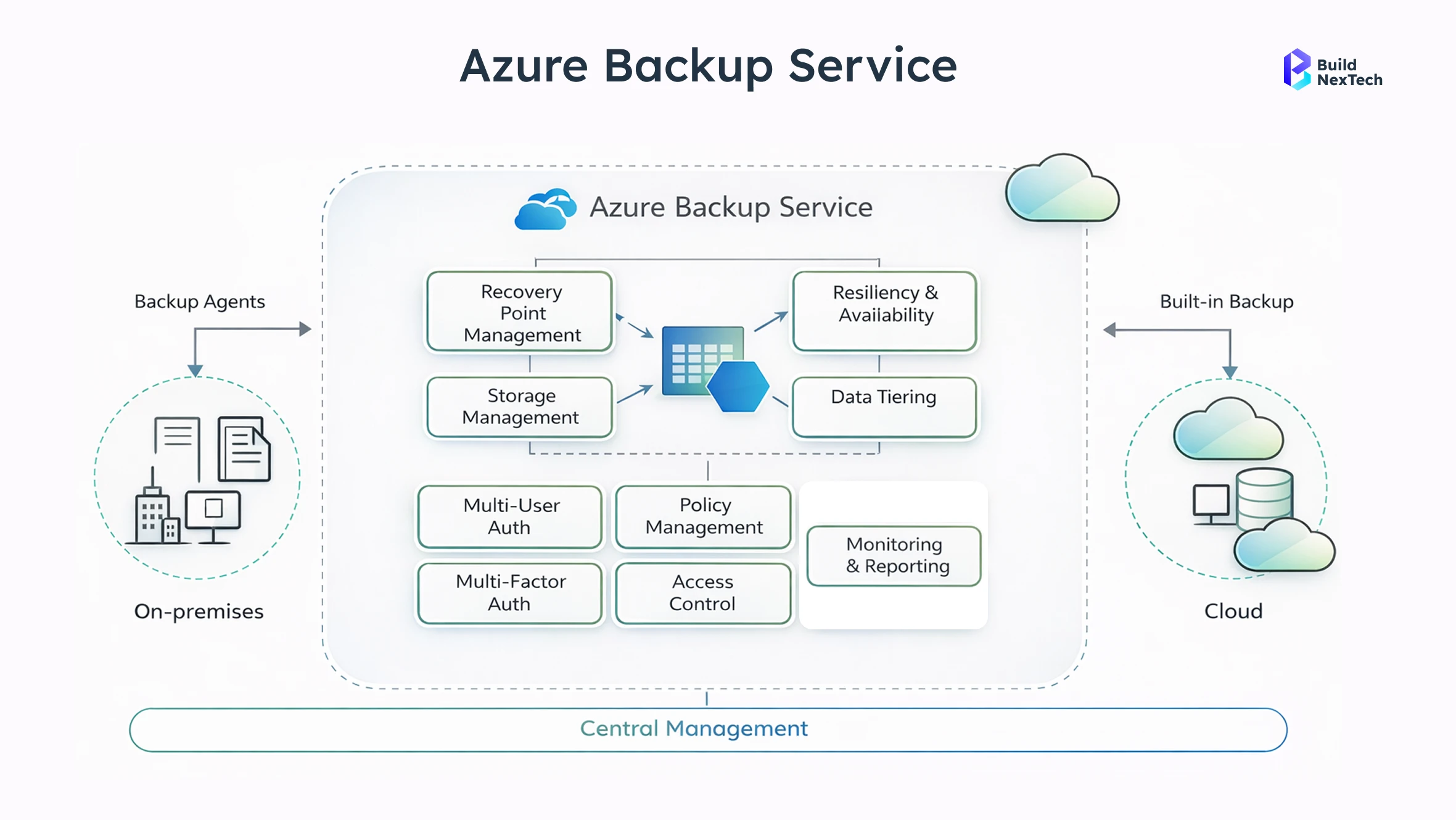
AWS Disaster Recovery
- This thing has tools that help it keep working when something goes wrong. It can make copies of itself, so if one part stops working, the other part can take over. This means that the system will not be down for a time when there are problems. The tools are really good at reducing downtime when bad things happen to the system.
- Supports a wide range of workloads, enabling flexible recovery strategies and aligning with modern cloud migration strategies.
Best Practices for Cloud Backup and Disaster Recovery
By incorporating best practices, you can ensure that your disaster recovery strategy remains effective over time. Whether it’s security or multi-cloud, best practices can help mitigate risks and improve reliability. It’s essential to optimize and stay resilient.
Implementing a Multi-Cloud Strategy
- Reduce Provider Dependency: This makes sure that the system does not rely on one provider. If something goes wrong with that provider, everything will not be affected. This means that the system will keep working even if one provider has a problem. Reducing Provider Dependency is important because it helps to avoid a point of failure.
- Optimise Costs: To save money organizations can pick services that do not cost a lot from companies that offer them. This helps organisations save money by choosing the services that cost the least from the companies that provide these services.
- Increase Flexibility: Increased flexibility is really important. It makes it a lot easier to move workloads, and it also improves redundancy. This means that increased flexibility is very useful for workloads.
Ensuring Compliance and Security in Disaster Recovery
- Follow Regulatory Standards: This makes sure the company does what it is supposed to do and keeps the customer information safe. The company has to follow these rules to be in compliance with the law and protect the customer data.
- Conduct Security Audits: Conducting security audits is important because it helps us fix vulnerabilities before they become a serious risk to our security. By doing security audits, we can make sure that our security is strong and that potential vulnerabilities are addressed.
- Enforce Access Controls: This restricts data access to authorised personnel, reducing the risk of breaches.
Continuous Improvement and Adaptation
- Regular Reviews: We need to check our disaster recovery strategies on a regular basis to make sure they still work for our business needs as they change over time. This way, our disaster recovery strategies will always meet the needs of our business.
- Feedback Loops: They help us learn from things that go wrong, like tests that do not work out or big disasters. We can use these lessons to make our strategies better. This means we can try to avoid making the mistakes again and make sure that our strategies are the best they can be. Feedback Loops are about using the things we learn to make positive changes to our strategies.
- Updated Training: This makes sure that the teams are ready for changes in the tools and the threats. The teams need to be ready for these changes, in the tools and the threats so they can do their job well.
Conclusion
Cloud backup and disaster recovery solutions are essential for maintaining business continuity in today’s digital landscape. Organizations that invest in structured planning and modern recovery technologies can significantly reduce downtime while safeguarding critical data assets. Continuous evaluation and optimization further strengthen long-term resilience and operational stability.
Now is the right time to assess your current recovery strategy and identify areas for improvement—because proactive preparation today can prevent costly disruptions tomorrow.
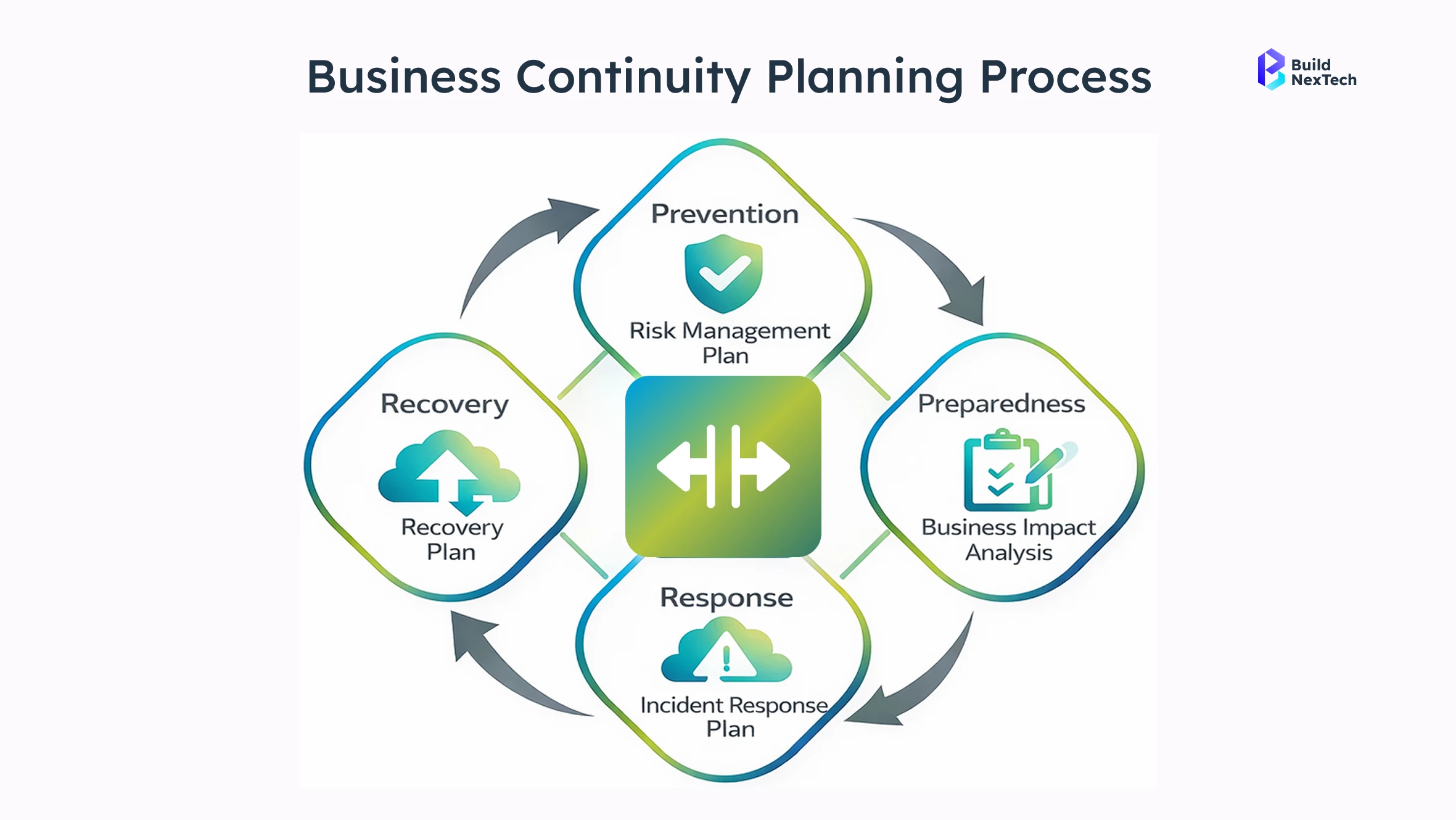
Key Takeaways from Cloud Backup and Disaster Recovery
- Cloud DR strengthens resilience: Cloud Disaster Recovery is important for businesses because it makes them stronger and more able to handle disruptions. Cloud Disaster Recovery is about helping businesses recover from disruptions quickly.
- Tailored plans improve recovery: The organization's operational requirements are taken into account when making these plans. This means that the plans are designed to work with the way the organization operates. Tailored plans are important for the organization because they improve recovery.
- Multi-cloud increases reliability: Using a cloud system makes things more reliable. This is because the cloud infrastructure is diversified, which means it helps to minimise the chances of downtime when using the multi-cloud. The multi-cloud is really good at keeping things running smoothly.
The Future of Cloud Disaster Recovery
Cloud disaster recovery solutions are going to get even better with automation and security. This means cloud disaster recovery solutions will have AI to look at things and strong security to keep everything. So cloud disaster recovery solutions will help us before something bad happens, not after, strengthening Proactive risk management capabilities.
Actionable Steps for Implementation
- Assess infrastructure: There may be gaps in the existing capabilities for cloud backup and disaster recovery.
- Develop a DR plan: This plan has to be put in a way that makes sense for our company and how it works every day. We have to think about what our company needs to keep running and make sure the plan covers all of that. A good Disaster Recovery plan is very important for our company.
- Train teams: Employees must be trained on their responsibilities during disaster recovery situations.
People Also Ask

1. What is the difference between backup and disaster recovery?
Backup is simply a copy of your data stored safely so it can be restored if lost. Disaster recovery is the full plan and process to restore systems, applications, and operations after a major disruption.
2. How often should a disaster recovery plan be tested?
A DR plan should ideally be tested at least once or twice a year, or whenever major system changes happen. Regular testing ensures the plan works and teams are prepared.
3. What are the costs associated with cloud disaster recovery solutions?
Costs typically include storage, compute during failover, data transfer, and management tools. Overall, cloud DR is usually more cost-effective than maintaining a physical secondary site.
4. How can small businesses implement an effective disaster recovery plan?
Small businesses can start by identifying critical data, using automated cloud backups, and defining clear recovery steps. Managed DR services make implementation easier without heavy IT resources.
5. What role does automation play in disaster recovery?
Automation speeds up recovery by triggering failovers, restoring systems in order, and reducing manual errors. It helps minimize downtime and ensures consistent recovery processes.


.webp)
.webp)
.webp)

.webp)
.webp)



