

Choosing between traditional automation and hyperautomation comes down to four factors: process complexity, data type, scale, and integration needs. Simple, predictable processes with structured data and minimal dependencies are best suited for traditional automation. In contrast, complex, exception-heavy workflows involving unstructured data and multiple systems require hyperautomation for scalability and resilience.
I spent six months watching a client's operations team manually copy data between three systems every single day. They had a "script" for it a Python file someone wrote in 2019 that nobody fully understood anymore. It broke every time the source system updated its UI. So every three months, someone would patch it, or worse, they'd go back to doing it by hand.
That's traditional automation in practice. Not always elegant. Often fragile. But sometimes, exactly what you need. The real question is: when do you stop patching that Python script and rethink the entire approach? That’s exactly what this guide answers.
What is Traditional Automation in Business Processes?
How It Works, Limitations, and Best-Fit Use Cases
Choosing between traditional automation and hyperautomation comes down to four factors: process complexity, data type, scale, and integration needs. Simple, predictable processes with structured data and limited system dependencies are best suited for traditional automation, while complex workflows with unstructured data and multiple integrations require hyperautomation. As scale increases and processes become more dynamic, hyperautomation offers better flexibility and long-term value.
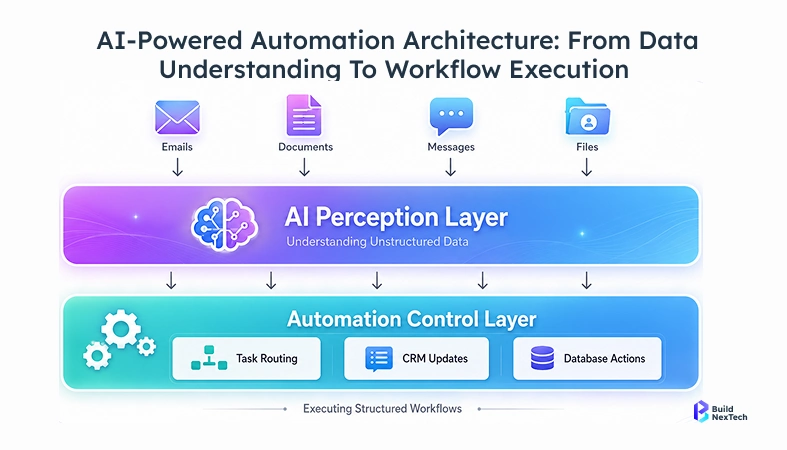
Hyperautomation delivers impact not just by accelerating tasks, but by handling variability. It combines AI, workflow orchestration, and system integrations to manage exceptions, interpret unstructured data, and coordinate decisions across tools. This is where traditional automation typically breaks down-when inputs are inconsistent, rules are insufficient, and processes span multiple systems.
What is Hyperautomation and Why It Matters Today
Key Technologies and Business Impact
Hyperautomation isn't a product. It's an approach-specifically, the idea that you should automate not just individual tasks but entire end-to-end business processes, using a combination of technologies that can also learn and improve over time.
Gartner coined the term around 2019. The underlying stack includes: RPA for UI-based task execution, machine learning solutions for pattern recognition and decision support, natural language processing services for handling unstructured text, process mining for discovering what's actually happening (vs. what you think is happening), and workflow orchestration to connect everything.
When these work together, something interesting happens. Instead of automating the step "read invoice, enter amount," you can automate "receive any invoice in any format, extract the relevant fields using optical character recognition and NLP, validate against the PO, flag anomalies, and route for approval without human intervention."
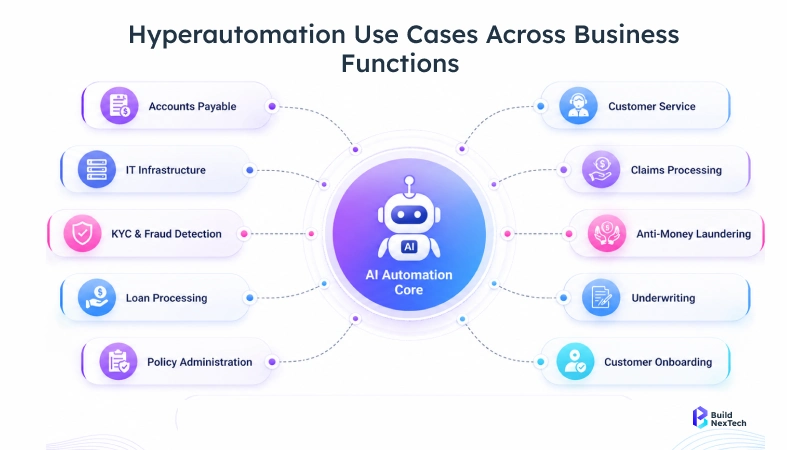
The business impact is measurable. In a BNXT.ai engagement with a mid-size financial services firm processing ~2,000 invoices per month, cycle time reduced from 2–3 days to under 4 hours over an 8-week implementation period, while error rates dropped from ~4% to under 0.5% after NLP-based extraction replaced manual entry and validation workflows were automated.
Machine learning development services make this possible in two ways. Supervised machine learning handles classification (is this invoice from a known vendor? does this amount match the PO?). Natural language processing solutions handle the messy text reading unstructured emails, extracting intent, and summarizing documents.
In BNXT.ai's automation engagements, manual time reduction for high-volume processes typically falls in the 60–80% range.
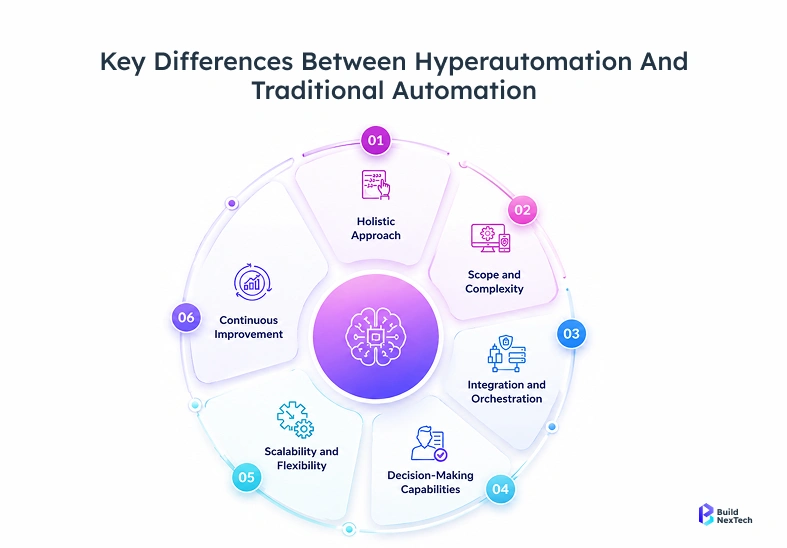
Hyperautomation vs Traditional Automation: Core Differences
Scope, Technology, and Intelligence
The intelligence gap is the one that matters most in practice. Traditional automation is a pipe. Water flows through it in one direction. Hyperautomation is closer to a nervous system inputs trigger decisions, and those decisions adapt based on what's happened before.
A simple workflow diagram makes this concrete:
Traditional: Invoice received → OCR extracts data → Data entered into ERP → Done
Hyperautomation: Invoice received → NLP identifies vendor, invoice type, and language → ML cross-checks against contract database → Anomaly detection flags amount deviation → Agentic workflow routes to approver with context → Approval triggers payment and updates CRM → Process mining logs the entire event for future optimization
Integration, Scalability, and ROI
Traditional automation usually means point-to-point API integration or UI-level scripting. You connect system A to system B. That's it.
Hyperautomation operates at a different layer. Integration platform as a service (iPaaS) tools like MuleSoft, Boomi, or n8n workflow handle data integration across dozens of systems simultaneously. Horizontal integration across departments becomes feasible. Vertical integration connecting operational data all the way up to executive dashboards becomes standard.
On ROI: traditional automation shows payback in 3-6 months for a single process. Hyperautomation takes longer to implement but scales without proportional cost increases. One automation architecture handles 50 processes or 500. The incremental cost per process drops significantly after the first dozen.
Decision Framework: How to Choose the Right Approach
Key Factors: Complexity, Data, Scale, and Integration Needs
I use a simple scoring model when a client asks, “should we go traditional or hyperautomation?”
Use this four-question scoring model to determine which automation approach fits your project:
- How complex is the process?
Linear, well-defined steps with no exceptions → Traditional
Multiple decision branches, exceptions common → Hyperautomation - What does the data look like?
Structured, consistent format (CSV, database fields) → Traditional
PDFs, emails, scanned documents, freeform text → Hyperautomation - What’s the expected scale?
Stable, predictable volume → Traditional
Rapid growth or seasonal spikes → Hyperautomation - How many systems are involved?
1–2 systems with stable APIs → Traditional
Multiple systems with cross-functional workflows → Hyperautomation
Real-World Use Cases: Traditional vs Hyperautomation
Where Traditional Automation Works vs Where Hyperautomation Wins
Traditional automation works well for:
Order processing in e-commerce. A basic workflow automation tool like Zapier or Make watches for new orders, sends confirmation emails, updates inventory in the warehouse system, and creates a shipping label. Stable inputs, predictable steps. No ML needed.
Report generation. A scheduled Python script pulls data from a database, formats it into a spreadsheet, and emails it to 10 people every Monday at 7am. These workflows can run unchanged for years.
Data entry automation. Screen scraping a competitor's website to update internal price lists. UiPath handles this reliably through UI-based automation
Customer service at scale. In BNXT.ai hyperautomation engagements with mid-size telecom companies (~3,000–10,000 employees), support teams handle ~15,000 emails per day. Natural language processing classifies intent (billing, technical issues, cancellations), extracts key data, pulls CRM history, and either resolves automatically or routes with full context-reducing resolution time from ~48 hours to under 6 hours. (Confirm both figures reflect actual engagement data before publishing.)
Supply chain exception handling. In manufacturing implementations involving companies managing 200–500 suppliers, AI-driven workflows monitor delays in real time. When disruptions occur, the system cross-references inventory, identifies at-risk production orders, suggests alternative sourcing, and alerts procurement often before human teams detect the issue. In BNXT.ai engagements, this level of orchestration is typically achieved within 8–12 weeks of implementation, depending on system complexity.
Financial document processing. Across BNXT.ai work with financial institutions handling multi-document loan applications (20+ document types), traditional OCR pipelines fail on 30%+ of cases. A hyperautomation approach using ML, NLP, and image recognition reduces failure rates to under 5%, significantly improving processing speed and accuracy.
Benefits of Hyperautomation Over Traditional Automation
Efficiency, Visibility, and Scalability Gains
The efficiency gains from hyperautomation are real, but the source is often mischaracterized. The time savings come not from the automated steps themselves, but from eliminating recovery work when traditional automation fails.
In practice, teams spend significant time fixing broken bots, re-entering data, and auditing outputs. By reducing failure rates, hyperautomation removes this recovery overhead, which is where most of the efficiency gains actually come from.
Visibility is underrated. Process mining gives you a live view of where work is sitting, where exceptions cluster, and where the actual bottleneck is (rarely where you thought). This feeds back into process improvement.
Cost reductions come from three places: direct labor reduction, operational cost reduction from fewer errors and rework, and indirect savings from faster cycle times (faster invoice processing = better cash flow; faster customer service resolution = lower churn).
Scalability is where hyperautomation genuinely has no comparison. A traditional RPA deployment scales linearly more volume means more bots, more maintenance. Hyperautomation's agentic workflow architecture scales horizontally with minimal added overhead.
Hyperautomation Architecture: What the Stack Looks Like
Core Components: RPA, AI, Orchestration, and Integration Layers
Here's the stack I've seen work in production:
┌─────────────────────────────────────────────────────┐
│              Business Process Layer                 │
│   (Process Mining, Workflow Diagram, Monitoring)    │
├─────────────────────────────────────────────────────┤
│            Orchestration Layer                      │
│   (n8n Workflow / Camunda / Apache Airflow)         │
├─────────────────────────────────────────────────────┤
│           AI / Intelligence Layer                   │
│   (ML Models, NLP API, AI Agents, GenAI)            │
├─────────────────────────────────────────────────────┤
│              Automation Layer                       │
│   (RPA - UiPath / Automation Anywhere / Power       │
│    Automate, plus custom scripts)                   │
├─────────────────────────────────────────────────────┤
│           Integration Layer                         │
│   (iPaaS - MuleSoft / Boomi / n8n,                  │
│    API Integration, CRM Integration,                │
│    Data Integration)                                │
├─────────────────────────────────────────────────────┤
│              Data Sources                           │
│   (ERPs, CRMs, Databases, Files, Emails, APIs)      │
└─────────────────────────────────────────────────────┘
Each layer has a job:
Integration layer is the plumbing. Every system that needs to participate connects here. CRM integration, database connectors, API integration for third-party services this is what makes software integration possible at scale.
Automation layer is where work happens. Robotic process automation services handle UI-level tasks. Custom scripts handle API-level tasks.
AI/Intelligence layer is what makes hyperautomation different from traditional automation. This is where natural language processing APIs process text, where supervised machine learning classifies and predicts, where AI agents make decisions.
Orchestration layer is the conductor. Workflow orchestration tools like n8n workflow or Apache Airflow determine what runs when, handle failures, manage retries, and keep everything coordinated.
Business Process layer is where you watch what's happening and feed insights back into improvement cycles.
A practical n8n workflow snippet for a document classification pipeline:
{
  "nodes": [
    {
      "name": "Email Trigger",
      "type": "n8n-nodes-base.emailReadImap",
      "parameters": { "mailbox": "invoices@company.com" }
    },
    {
      "name": "Extract Attachment",
      "type": "n8n-nodes-base.extractFromFile",
      "parameters": { "operation": "pdf" }
    },
    {
      "name": "NLP Classification",
      "type": "n8n-nodes-base.httpRequest",
      "parameters": {
        "url": "https://your-nlp-api/classify",
        "method": "POST",
        "body": "={{ $json.text }}"
      }
    },
    {
      "name": "Route by Document Type",
      "type": "n8n-nodes-base.switch",
      "parameters": {
        "value": "={{ $json.classification }}"
      }
    }
  ]
}
This is a simplified skeleton, but it shows how workflow automation tools connect triggers, AI processing, and routing logic in one pipeline.
Challenges and Limitations of Both Approaches
Trade-offs: Cost, Complexity, and Adoption Barriers
Traditional automation has real limitations that accumulate over time:
- Breaks when the UI or API changes (and it will)
- Scales poorly every new process requires a new build
- No intelligence means no visibility into why something failed
- Technical debt builds quickly when logic isn’t documented
Hyperautomation has its own trade-offs:
- Higher upfront cost you’re building infrastructure, not just deploying software
- Requires ML and data engineering skills many ops teams lack
- Integration complexity connecting multiple systems demands careful architecture
- Business process discipline is essential; undocumented processes lead to faster chaos
The biggest adoption barrier isn’t technology, it's organizational. Teams resist systems they don’t understand, which makes change management and clear communication as important as the technical stack.
Cost is another practical constraint. A full hyperautomation stack RPA platform, iPaaS, ML infrastructure, and workflow orchestration can run into six figures annually before automating a single process. That investment makes sense for a 500-person company processing 10,000 transactions daily, but not for a 20-person team handling 50.
When Should Businesses Shift to Hyperautomation?
Key Triggers and Readiness Indicators
I watch for specific signals that tell me a client has outgrown traditional automation.
Trigger 1: Automation failure rate exceeds 10% When more than 1 in 10 automated tasks needs human intervention to complete, you're spending more on maintenance than you're saving on automation. That's the moment to rethink the architecture.
Trigger 2: Process exceptions are the new normal If your team spends more time handling exceptions than running the standard process, rules-based automation isn't the right fit. You need a system that can handle variation.
Trigger 3: Integration points multiply faster than you can manage Three new systems this quarter, two more next quarter and each one needs its own integration. This is when integration platform as a service becomes not just helpful but necessary.
Trigger 4: Data is getting messier New channels, new vendors, new formats. When your automation pipeline starts receiving emails, PDFs, and voice transcripts alongside structured database records, natural language processing solutions become essential.
Readiness indicators:
- You have (or can hire) a machine learning engineer.
- Your core processes are documented, not just implied.
- Leadership understands that this is an 18-24 month transformation, not a 6-week implementation.
- You have data quality standards in place poor data makes ML worse, not better.
If you're not sure where your organization sits on this curve, BNXT.ai works specifically on AI-driven product engineering and can help you map your current automation maturity against where you need to go.
Future Trends: From Automation to Autonomous Enterprises
AI-Driven, Event-Based, and Self-Optimizing Systems
Agentic workflow systems. AI agents don’t just execute tasks they plan, adapt, and coordinate. In customer service, an agent can analyze a complaint, retrieve account data, draft a response, validate it against company policy, and decide whether to send or escalate leaving humans to handle only edge cases.
Event-based orchestration. Instead of scheduled workflows, systems react in real time. For example, when a shipment delay is detected, an event triggers a workflow that updates inventory forecasts, alerts procurement, and notifies customers automatically without waiting for a daily batch job.
Generative AI integration. Generative AI is transforming document-heavy processes. In operations, incoming vendor emails can be automatically summarized, key details extracted, and responses drafted reducing manual handling time from minutes to seconds per interaction.
Self-optimizing processes. Automation systems are starting to improve themselves. For instance, process mining tools can detect that invoice approvals consistently slow down at a specific step, suggest workflow changes, and in some cases automatically reroute approvals to reduce delays.
Conclusion: Choosing the Right Automation Strategy
Start with the process, not the technology. Map exactly what you’re trying to automate, identify exceptions, document data formats, and estimate task volume. This analysis will quickly reveal whether a simple workflow automation tool is enough or if a full hyperautomation stack is justified. For stable, structured, high-volume processes, traditional automation still delivers strong ROI without unnecessary complexity.
Don’t underestimate the importance of integration and capability readiness. In most cases, the real bottleneck isn’t automation it’s data flow between systems like CRMs, APIs, and databases. Getting the integration layer right should come before scaling automation. At the same time, building ML capability should be deliberate, not rushed. You don’t need a full data science team from day one, but you do need the ability to evaluate model performance and understand when automation decisions are reliable.
Finally, measure what actually impacts the business. Automation ROI goes beyond time saved it includes reduced error rates, faster cycle times, and lower operational costs. Establish these baselines early so improvements are measurable. The decision between traditional automation and hyperautomation ultimately depends on your process complexity and organizational readiness. Focus on what you can realistically execute, rather than what appears most advanced on paper, and scale your approach as your systems and capabilities mature.
People Also Ask

1. How does hyperautomation impact long-term operational costs compared to traditional automation?
Hyperautomation has higher upfront costs but reduces long-term expenses through fewer errors, less rework, and better scalability. Over time, cost per process drops as the same system supports multiple workflows.
2. Can small and mid-sized businesses adopt hyperautomation, or is it only for enterprises?
SMBs can adopt hyperautomation by starting with focused use cases and using low-code tools. This allows gradual scaling based on ROI without heavy upfront investment.
3. What role does data quality play in the success of hyperautomation initiatives?
Data quality is critical because machine learning models rely on accurate inputs for reliable decisions. Poor data leads to errors and reduces trust in automation systems.
4. How does hyperautomation support compliance and audit requirements in regulated industries?
Hyperautomation creates audit trails, improves process visibility, and embeds compliance checks into workflows. This ensures consistency and simplifies regulatory reporting.
5. What skills or team capabilities are required to implement hyperautomation successfully?
Teams need automation, integration, and basic machine learning knowledge to build and manage workflows. Strong process mapping and change management skills are also essential for adoption.


.webp)
.webp)
.webp)

.webp)
.webp)



