


GitLab is an unbeatable, comprehensive platform for DevOps that enables teams to develop software faster by using a single app for planning, building, securing, and deploying, all at once. While today's development workflows are intricate, GitLab is the choice of a large number of organizations worldwide for automating CI/CD pipelines and facilitating collaboration between development and operations teams, resulting in high-quality software being delivered at the scale of the company.
No matter if you are a novice acquiring the knowledge of DevOps, a QA engineer confirming the CI pipelines, or a corporate group executing the CI/CD practices on a large scale, this guide will provide you with information about GitLab's fundamental features, real-life applications, and industry best practices. You will not only have a clear picture regarding GitLab's facilitation of quicker release cycles, better code quality, and smoother team collaboration, but also the reason why it is the favored DevOps platform for both startups and large companies.
📌 Key Topics Covered in This Blog
1. Introduction to GitLab and Modern DevOps Workflows
2. Source Code Management & GitLab Repository Structure
3. CI/CD Pipelines in GitLab (Builds, Jobs & Continuous Deployment)
4. GitLab vs GitHub, Jenkins & Other DevOps Ecosystem Tools
5. How DevOps Engineers Use GitLab + Jira & Ticketing Tool Integrations
Introduction to GitLab and Modern DevOps Workflows
Modern DevOps workflows allow for the automation of the entire collaboration process and the rapid delivery of software, with GitLab as the primary driver of this transformation. GitLab’s approach of combining source code management, continuous integration, and deployment, as well as DevOps automation, into a single platform not only reduces the difficulties coming from using various tools but also streamlines the entire software development lifecycle.
For companies aiming at speed and efficiency in their software development processes—whether it is application creation, testing, or updating—GitLab has turned out to be a key player in the realization of large-scale successful DevOps transformation.
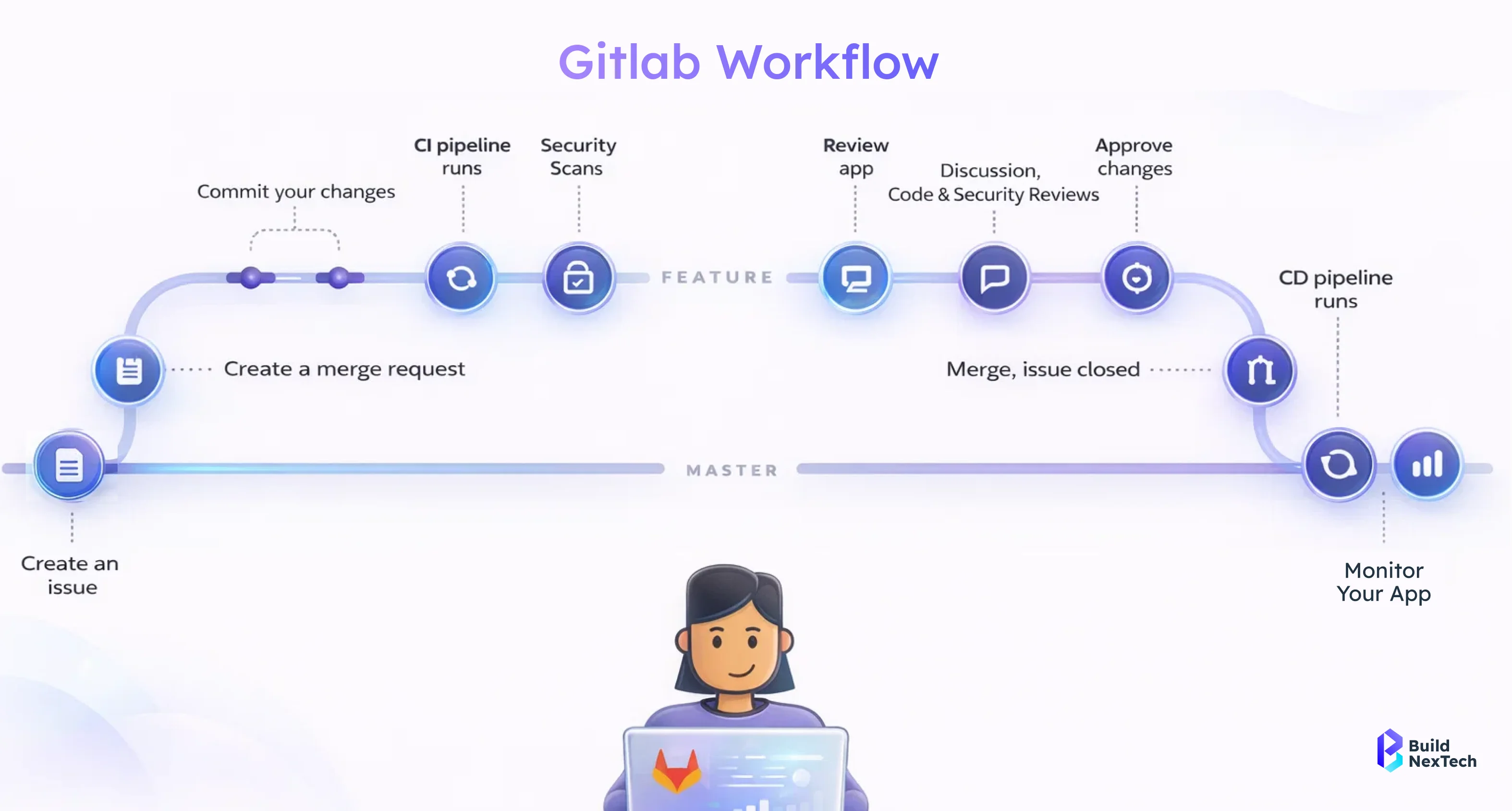
Understanding What GitLab Is and What It Is Used For
GitLab is a platform for DevOps that is entirely web-based, and it provides powerful tools for managing the source code, automatically creating builds, testing, and releasing applications. GitLab is viewed as a complete software development solution that not only controls versions but also serves all the stages of the software development cycle by giving a single platform for planning, coding, testing, securing, and deploying.
What GitLab is used for includes:
- Managing source code using Git-based repositories
- Automating CI/CD pipelines using gitlab jobs
- Tracking issues, merge requests, and releases
- Enabling collaboration across development, QA, and operations teams
A GitLab tutorial typically starts with repositories and pipelines, but GitLab can also support complex DevOps practices such as monitoring, security scanning, and infrastructure automation.
What Is GitLab and How It Helps Development Teams
GitLab supports the efficient collaboration of development teams by bringing together code, pipelines, and project management tools in one place. Teams can handle everything from a GitLab repository to automated deployments in one interface instead of moving around different platforms.
How GitLab helps development teams:
- Faster development cycles using automated gitlab jobs
- Improved collaboration through merge requests and code reviews
- Reduced errors with built-in CI/CD validation
- Clear visibility into pipelines, commits, and releases
For teams following a gitlab, these features simplify onboarding and ensure consistent development practices across projects.
GitLab as Version Control Software for Source Code Management
GitLab is a powerful source code management (SCM) platform based on Git as its core, which also serves as a version control system. A GitLab repo is a place where code changes are kept, the history is tracked, and the collaboration of the team is in a safe manner, which means no one will overwrite the other's work.
Key capabilities of GitLab for version control include:
- Centralized gitlab repository management for source code
- Branching and merging to support parallel development
- Access control and permissions for secure collaboration
- Integration with CI/CD pipelines triggered by code changes
With the merging of version control and automated GitLab jobs along with pipelines, GitLab has ensured that each and every code change goes through the testing and validation process, thus making it a central part of the modern DevOps workflow.
How CI/CD Pipelines Work Inside GitLab
GitLab's CI/CD pipelines are responsible for the automation of the application building, testing, and delivery process, which enables the teams to release the software quickly and in a more reliable manner. GitLab guarantees that every modification to the code is subjected to a structured validation through the pipeline before it is sent to production.
GitLab's integrated CI/CD functionalities enable the teams to specify pipelines in code, observe their execution immediately, and control the releases through one interface. This method decreases the amount of manual work, increases consistency, and fosters cooperation among the DevOps teams.
What Is CI/CD Pipeline and Why It Matters
A CI/CD pipeline is a series of automated processes that check code modifications through the execution of builds, tests, and deployments. The term CI/CD pipeline refers to an automation process when developers inquire about it that guarantees code quality and fast delivery throughout the software lifecycle.
Why CI/CD pipelines matter:
- Early detection of bugs through automated testing
- Faster feedback for developers
- Consistent and repeatable release processes
- Reduced risk during production deployments
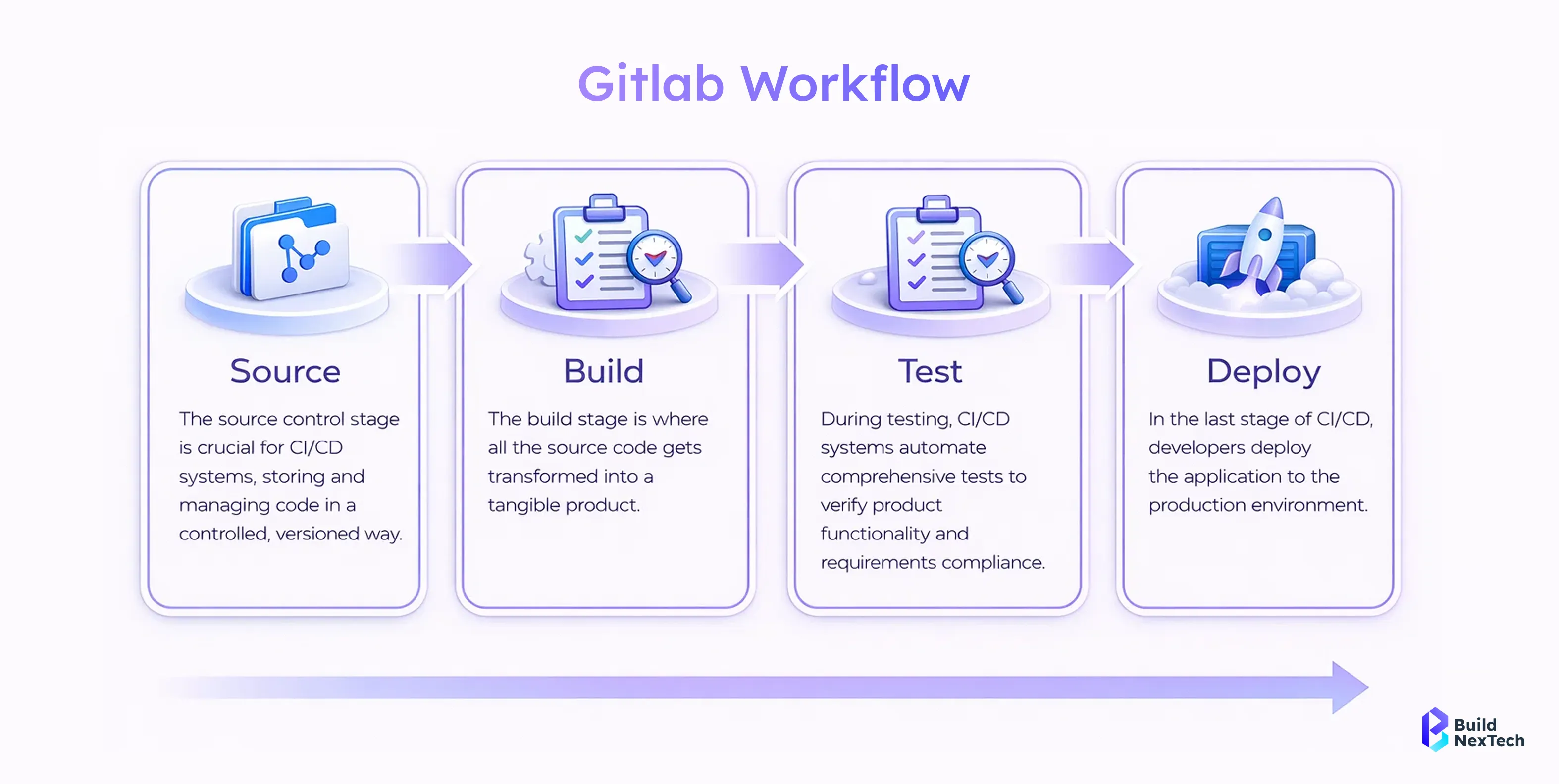
A carefully planned build pipeline allows the team to make regular adjustments to the application without risking its stability.
Continuous Deployment and Build Pipeline Automation
Continuous deployment is a method where code modifications are automatically released to the production environment after passing all the pipeline stages. Pipelines in GitLab complete all processes from compiling to deploying automatically, thus eliminating the necessity for human intervention and lowering the chances of mistakes made by humans.
Key aspects of build pipeline automation:
- Automated builds triggered by every commit
- Test execution across multiple environments
- Deployment workflows managed through pipelines
- Faster release cycles using continuous deployment practices
Through the automation of the build pipeline, groups experience regular releases and higher operational efficiency.
Popular CI/CD Tools Used With GitLab and Jenkins
GitLab works perfectly with many different CI/CD tools, which helps the teams to create dynamic DevOps ecosystems. Even though GitLab provides its own CI/CD features, a lot of companies still add third-party tools along with GitLab, depending on the project's needs.
Common CI/CD tools used with GitLab include:
- jenkins ci/cd for custom and extensible pipeline automation
- Docker and Kubernetes for containerized deployments
- Cloud platforms for scalable infrastructure
- Monitoring and security tools for pipeline validation
- AI code review and test generation tools for automated merge request checks
When GitLab is combined with CI/CD tools like Jenkins, the teams can create CI/CD workflows that are not only robust but also scalable and efficient in light of modern software development requirements.
Managing Source Code and Repositories in GitLab
Handling source code in a competent way is one of the main elements in modern DevOps practices, and GitLab gives a common platform to treat repositories, cooperation, and automation. With the integration of version control and the use of built-in DevOps tools, GitLab aids teams in the process of having clean, secure, and scalable codebases.
GitLab takes the complexity out of source code management from little projects to big enterprise applications by allowing teams to monitor changes, work together on new functionalities, and keep environments in sync. This gives the development team more power over the complete application's development life cycle.
Different Source Code Types Used in Applications
Modern software applications consist of diverse source code depending on the technology used and the purpose. GitLab, being compatible with different programming languages and frameworks, is perfect for handling the application source code.
Common source code types include:
- Frontend code such as HTML, CSS, and JavaScript
- Backend code written in Java, Python, Node.js, or .NET
- Configuration and infrastructure code
- Scripts and automation files used in CI/CD pipelines
The interaction of the teams will be boosted when the source code of all applications is centralized on one platform, and furthermore, the issue of fragmentation will be minimized substantially.
GitLab Repository Structure and Source Code Management
The GitLab repository is a well-organized place for keeping, ordering, and looking after the code. GitLab, with its powerful source code management, offers the possibility for the cooperating groups to work efficiently with all the operations that deal with branching, merging, and versioning.
Key aspects of GitLab source code management include:
- Organized repository structure for scalable projects
- Branching strategies to support parallel development
- Merge requests for controlled code integration
- Access controls to protect sensitive code
Due to these characteristics, the application source code is protected, tracked, and kept maintenance-friendly at all times.
Source Code Download, Review, and Version Tracking
GitLab facilitates source code download, giving users the opportunity to comment on and track the versions three times over releases. Using regular Git workflows, developers can at once clone the repositories on their local machines, check the changes made by others, and provide their own changes.
Core capabilities include:
- Secure source code download using Git protocols
- Collaborative source code review through merge requests
- Detailed commit history for version tracking
- Change comparison and audit trails
By means of organized code inspection and versioning, GitLab supports the groups to keep the coding standards impressive and to be open about the development process as well.
GitLab vs Other Version Control and DevOps Tools
GitLab is compared with numerous tools of version control because it unites source code management, CI/CD automation, and DevOps workflows all in one single platform. Though many tools just deal with code hosting, GitLab goes beyond the limits of conventional version control software by implementing planning, testing, security, and deployment features as well.
Getting the version control definition and the various tools that realize it will assist the teams in making the right choice of the platform. This comparison shows how GitLab is distinct from other solutions and the reason it is often chosen for complete DevOps workflows.
GitHub Version Control Compared With GitLab
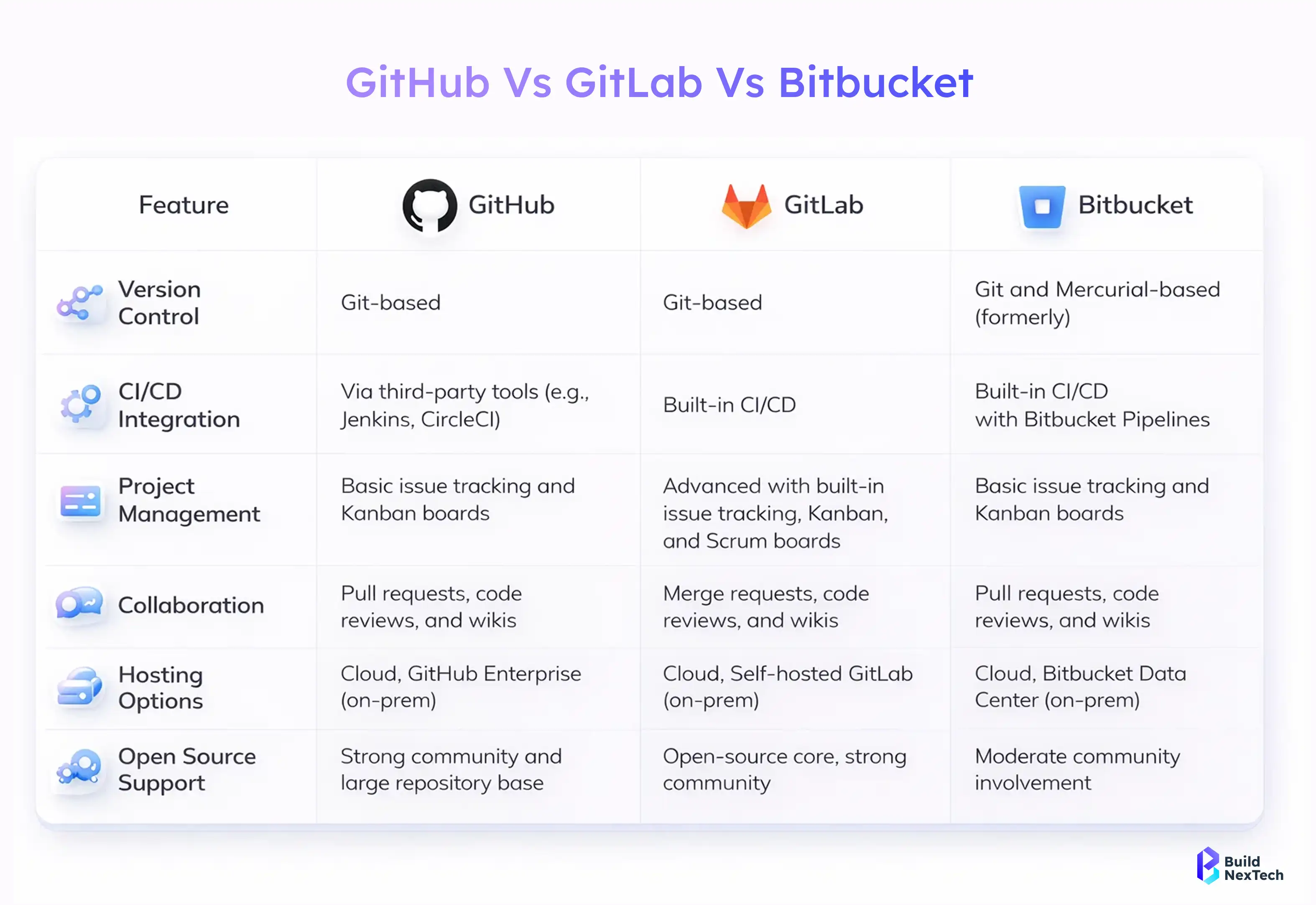
GitHub is among the top platforms for version control, along with Git, primarily directing its attention to the hosting of Git repositories and making it easy for developers to work together through pull requests. On the contrary, GitLab gives a more extensive DevOps experience with its built-in CI/CD, security scanning, and deployment automation features.
Key differences between GitHub and GitLab:
- GitHub emphasizes github version control and third-party integrations
- GitLab offers integrated CI/CD without external plugins
- GitLab provides stronger out-of-the-box DevOps automation
- Both platforms are reliable version control software options
Knowing the reasons why version control is important makes it easier for the teams to realize the benefits of these features: tracking changes, safe collaboration, and retaining code history—all of which are supported by both platforms, with GitLab going deeper into DevOps.
Using GitLab With Jira and Other Ticketing Tools
GitLab effortlessly blends with Jira and all other ticketing systems and thereby enables teams to tie up their code alterations with tasks, defects, and new feature requests. This combination of integration connects version control tools with project management systems.
Benefits of integrating GitLab with ticketing tools:
- Link commits and merge requests to Jira issues
- Improve traceability across version control software and task tracking
- Enhance collaboration between developers and QA teams
- Maintain a clear audit trail from issue creation to deployment
When teams use GitLab besides Jira, they reinforce their workflows and comprehend the reason for version control more clearly in the case of complex project management and fast software delivery.
Why Version Control Tools Are Important for Teams
Version control tools are essential for modern software development since they enable teams to work together on code changes in a more efficient and collaborative manner. In order to grasp the significance of version control, it is crucial to examine the collaboration of teams working on codebases that are shared, that are located in different environments, and that are of different times.
Why version control tools are important for teams:
- Enable multiple developers to work on the same codebase simultaneously
- Prevent code conflicts and accidental overwrites
- Maintain a full history of changes with accountability
- Support rollback and recovery in case of issues
- Improve collaboration using reliable version control software
Structured version control tools such as GitLab and GitHub provide teams with better visibility, stability, and control over their development workflows, effectively making version control a foundational pillar of DevOps practices.
GitLab for DevOps Engineers and Career Growth
GitLab is a crucial tool for a DevOps engineer, giving them the power to automate, collaborate, and deliver software reliably. With a unified environment that supports repositories, CI/CD pipelines, and real-time monitoring, GitLab makes GitLab CI/CD pipeline setup for enterprises efficient and scalable across modern development teams.
As more organizations move toward cloud-native development, automation-first strategies, and agile delivery models, the demand for GitLab skills continues to grow. Companies evaluating tools—whether through a GitLab vs Jenkins CI/CD comparison or platform features—recognize GitLab’s advantage in centralizing workflows and supporting collaboration. Engineers who understand GitLab deeply, including how to manage projects and GitLab integration with Jira for agile workflows, gain a strong competitive edge in roles requiring automation, scalability, and cross-team coordination.
How DevOps Engineers Use GitLab in Real Projects
A DevOps engineer, in real-world projects, utilizes GitLab for the automation of builds, testing execution, deployment management, and application health monitoring. GitLab functions as a primary point of contact for developers and operations staff to work without any friction.
How DevOps engineers use GitLab in practice:
- Automating CI/CD pipelines for faster releases
- Managing infrastructure and configuration as code
- Coordinating development and deployment workflows
- Integrating GitLab with other DevOps tools
With the help of GitLab in production, DevOps engineers can maintain the same level of quality and reliability while also speeding up the process of getting the product to market.
DevOps Tools and Operational Collaboration Explained
DevOps relies on close cooperation between the development and operations teams. It is necessary to clarify the meaning of what are ops in order to understand this operations teams are the ones who deploy the system, keep the infrastructure stable, monitor the system, and make it reliable.
Key aspects of operational collaboration include:
- Shared responsibility between developers and ops teams
- Automated workflows using devops tools
- Issue tracking and incident management through ticketing tools
- Seamless handoff between build, release, and operations
Gaps between development and operations are bridged by tools such as GitLab and Jira (via Jira login), which provide all the teams with transparency and accountability.
GitLab Jobs and Industry Demand for Skills
GitLab jobs are AI-automated tasks that work within CI/CD pipelines and express the realistic abilities the companies want from the DevOps people. GitLab pipeline and automation mastery have a very positive effect on the employability of a candidate for a DevOps role.
Why GitLab skills are in high demand:
- Strong alignment with modern devops tools and practices
- Hands-on experience relevant to enterprise environments
- Integration with ticketing tools and monitoring systems
- Practical exposure valuable for every devops engineer role
The more companies' DevOps adoption grows, the more they want to hire professionals with skills in GitLab automation, pipelines, and collaboration tools, and at the same time, such people are continuously getting career growth opportunities.
Conclusion: Why GitLab Is a Complete DevOps Platform
GitLab, a one-stop shop for source code management, CI/CD automation, security, and collaboration, is considered a complete DevOps platform. It not only reduces the number of tools used but also streamlines daily workflows, making End-to-end DevOps automation with GitLab achievable from a single interface. Organizations comparing tools often look at GitLab DevOps platform pricing and features because it simplifies adoption while maintaining quality and consistency throughout the software delivery lifecycle.
GitLab is a daily help for developers, QA testers, and DevOps experts, empowering them to manage large and complex projects with confidence. Its ability to integrate planning, development, operations, and monitoring makes GitLab one of the best version control software for DevOps teams, supporting transparency, collaboration, and long-term scalability in modern development environments.
People Also Ask

1. What Is the Difference Between GitLab and GitHub?
GitLab provides an all-in-one DevOps platform with built-in CI/CD, while GitHub focuses mainly on repository hosting and integrations.
2. How Does GitLab Support Team Collaboration in DevOps?
GitLab enables collaboration through repositories, merge requests, issue tracking, and automated pipelines in a single platform.
3. Why Is Version Control Important in Software Development?
Version control tracks code changes, enables team collaboration, and allows quick rollback in case of issues.
4. Is GitLab Free to Use?
Yes, GitLab offers a free tier with essential DevOps features, along with paid plans for advanced enterprise needs.
5. Can GitLab Replace Jenkins for CI/CD?
GitLab can replace Jenkins for most CI/CD use cases, though Jenkins is still preferred for highly customized pipelines.


.webp)
.webp)
.webp)

.webp)
.webp)



